Welcome to our community

Be a part of something great, join today!

  • Hey all, just changed over the backend after 15 years I figured time to give it a bit of an update, its probably gonna be a bit weird for most of you and i am sure there is a few bugs to work out but it should kinda work the same as before... hopefully :)

FCP X - using it yet?

Anyone have experience sharing projects with FCPX?

I've tried several workflows trying to find a system that works, and the best solution I've found is to swap drives, ensuring that everything is contained on the same drive. It's a PITA to back things up, and requires physically handing drives around, but every other system we tried didn't work well at all.

I know it's super basic, but that's the best we could come up with.
 
Been using it since 10.0.2. I have cut two full seasons of television shows for NBC (currently cutting a 3rd) and also a feature length doc, in it, that was a 4K/1080p mix with 5000+assets. (http://www.youtube.com/watch?v=aSVjYBSrL68) I have run it on everything from an 8-core traditional setup to a MBP/Thunderbolt>Pegasus>Flanders setup with success and generally, it's an enjoyable and convenient editing experience that's getting better all the time.. best of luck!
 
once you go X you cant go back because everything else is clunky 1990s garbage
 
I've switched to it from FCP6 with a great deal of trepidation. I love a lot of things about it, but hate several others.

Love:
- Speed. You can rough in edits and move things around faster than anything else out there, this is delightful.
- Visual file management - being able to scroll through clips in an instant saves so much time it isn't even funny.
- Magnetic timeline, it gives you unholy speed on certain types of edits, for anything narrative and relatively straightforward, it's an absolute delight
- Multi-cam. Wow, just wow.

Loathe:
- Slow downs. With just one or two large edits up, FCPX can slow down horrendously at times. I've had it hang and crash far more often than FCP6 ever did (though thankfully the perpetual saving makes this a minor issue)
- Perpetual saving, it can be frustrating having to duplicate projects just to try alternate edits of certain sections (without overriding your previous work)
- Death to Montage. Montage, in FCPX, is hell. The magnetic timeline makes working with large numbers of tracks an utter nightmare. You make a small cut and your track shoots down to the timeline and you then have no idea which track is which in the broader context of your edit. For edits with complex montages like music videos, or edits where you don't have a clear idea of the finished edit right from the start - this is an absolute nightmare. I REALLY, really wish they'd provide the option of a non-magnetic timeline for those times when you need to compose a montage - it would erase my primary concern with FCPX, as it stands I'm building myself up to tackle learning Premier purely for montage purposes.
 
Not an all-time user yet, but you can switch off the magnetic timeline, and you can very well "try alternate edits of certain sections" (auditions).
 
How do you switch off the magnetic timeline?

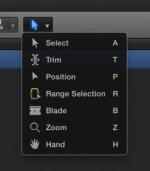
My understanding is that you can't and frankly you shouldn't be able to, there is however always the position command.

- Death to Montage. Montage, in FCPX, is hell. The magnetic timeline makes working with large numbers of tracks an utter nightmare. You make a small cut and your track shoots down to the timeline and you then have no idea which track is which in the broader context of your edit. For edits with complex montages like music videos, or edits where you don't have a clear idea of the finished edit right from the start - this is an absolute nightmare. I REALLY, really wish they'd provide the option of a non-magnetic timeline for those times when you need to compose a montage - it would erase my primary concern with FCPX, as it stands I'm building myself up to tackle learning Premier purely for montage purposes.

Why do you need multiple tracks to cut a montage? I've never needed multiple tracks to cut a montage.
 

Attachments

  • Screen Shot 2013-08-16 at 4.12.31 PM.jpg
    Screen Shot 2013-08-16 at 4.12.31 PM.jpg
    8.2 KB · Views: 0
My understanding is that you can't and frankly you shouldn't be able to, there is however always the position command.

Unfortunately the position tool does nothing to stop the vertical magnetism of the timeline, so cut clips still drop down from the position you had them in. A track-based timeline provides a clear and simple way to know where you're various clips are, and which sections of them you're using. The magnetic timeline makes it practically impossible to structure a complex edit with the same level of clarity (for the simple reason that you can't keep track of things as easily).

Why do you need multiple tracks to cut a montage? I've never needed multiple tracks to cut a montage.

Then you must have a vastly different process for positioning and arranging your clips than I do. Especially when you're dealing with a montage with 30+ clips, that's being entirely constructed in the edit, rather than through prior planning of a specific sequence.
 
Unfortunately the position tool does nothing to stop the vertical magnetism of the timeline, so cut clips still drop down from the position you had them in. A track-based timeline provides a clear and simple way to know where you're various clips are, and which sections of them you're using. The magnetic timeline makes it practically impossible to structure a complex edit with the same level of clarity (for the simple reason that you can't keep track of things as easily).


Then you must have a vastly different process for positioning and arranging your clips than I do. Especially when you're dealing with a montage with 30+ clips, that's being entirely constructed in the edit, rather than through prior planning of a specific sequence.

Mark, I had a similar problem in a TVC that was one big montage and it was a pain, before I started to use "story lines". By Creating Storylines I could work similar to a track based workflow. Try it.
 
I've cut 3 short pieces on FCPX, moving over from FCP7 and Premiere. Both of those apps feel ancient in comparison. Working at 4K is a reality for me now, mainly with proxies then rendering from the r3ds.

Media management is fantastic, I feel like I can cut through large amounts of footage very quickly. It definitely requires you to take a bit of a step back and re-approach, but it was time well spent imo.
 
I've switched to it from FCP6 with a great deal of trepidation. I love a lot of things about it, but hate several others.

Love:
- Speed. You can rough in edits and move things around faster than anything else out there, this is delightful.
- Visual file management - being able to scroll through clips in an instant saves so much time it isn't even funny.
- Magnetic timeline, it gives you unholy speed on certain types of edits, for anything narrative and relatively straightforward, it's an absolute delight
- Multi-cam. Wow, just wow.

Loathe:
- Slow downs. With just one or two large edits up, FCPX can slow down horrendously at times. I've had it hang and crash far more often than FCP6 ever did (though thankfully the perpetual saving makes this a minor issue)
- Perpetual saving, it can be frustrating having to duplicate projects just to try alternate edits of certain sections (without overriding your previous work)
- Death to Montage. Montage, in FCPX, is hell. The magnetic timeline makes working with large numbers of tracks an utter nightmare. You make a small cut and your track shoots down to the timeline and you then have no idea which track is which in the broader context of your edit. For edits with complex montages like music videos, or edits where you don't have a clear idea of the finished edit right from the start - this is an absolute nightmare. I REALLY, really wish they'd provide the option of a non-magnetic timeline for those times when you need to compose a montage - it would erase my primary concern with FCPX, as it stands I'm building myself up to tackle learning Premier purely for montage purposes.

The only decent way I've found to mimic a track based timeline in FCPX is to just disable clips so that are below so things don't slide down... of course this method doesn't work when you don't have clips that aren't the entire length of the song (music video specifically).

I wish that there was a choice for track based editing... would make music videos much easier to deal with.. or anything that you could potentially need 20+ layers of video..
 
Thinking of them as audio and video tracks is what is holding you back. Don't approach projects like that anymore. Think of the "primary storyline" as just that; it is the core (the spine) of what you are doing and everything else grows off of that. In the case of a music video, the music literally comes first. Put that in the primary slot. "It is NOT video track #1, it is my primary storyline." Say it like a mantra. Live it and everything should all into place. :-)

The main reason learning FCPX is so trying is that we are required to completely alter our methods of thinking. The more you can do that... The more deeply you embrace it, the more liberating the experience becomes.

This is my experience, though I too am still learning to breathe it in deeply. Expect your mileage to vary.
Sorry for mixing metaphors, it is a standard part of the now boring disclaimer. ;-)

The only decent way I've found to mimic a track based timeline in FCPX is to just disable clips so that are below so things don't slide down... of course this method doesn't work when you don't have clips that aren't the entire length of the song (music video specifically).

I wish that there was a choice for track based editing... would make music videos much easier to deal with.. or anything that you could potentially need 20+ layers of video..
 
Last edited:
Thinking of them as audio and video tracks is what is holding you back. Don't approach projects like that anymore. Think of the "primary storyline" as just that; it is the core (the spine) of what you are doing and everything else grows off of that. In the case of a music video, the music literally comes first. Put that in the primary slot. "It is NOT video track #1, it is my primary storyline." Say it like a mantra. Live it and everything should all into place. :-)

The main reason learning FCPX is so trying is that we are required to completely alter our methods of thinking. The more you can do that... The more deeply you embrace it, the more liberating the experience becomes.

This is my experience, though I too am still learning to breathe it in deeply. Expect your mileage to vary.
Sorry for mixing metaphors, it is a standard part of the now boring disclaimer. ;-)

I'm quite adept at FCPX at this point.. been using it since version 10.0.1 ... and it sucks for editing music videos where you have a ton of overlapping performance footage. Has nothing to do with my thinking or the way I use the program. It is an inherent limitation of the magnetic timeline. Stackable clips that don't drop down to fill space would be a huge boon but as it stands it's a huge annoyance when you want things to stay in one spot. The position tool is only useful for things on the primary storyline. I love the magnetic timeline for 90% of the work I do.. but it's super annoying for cutting something where layered tracks work flawlessly.

At this point I doubt apple will ever put the 'option' for a traditional track based timeline given how integral the new paradigm is to the program. And really, it is so good in so many other ways it's just a minor annoyance..
 
If your audio is on the Primary, and you attach the video in secondary storylines they don't drop down. They don't move anything else and they only move relative to the primary storyline. Am I missing something you are saying?

I'm quite adept at FCPX at this point.. been using it since version 10.0.1 ... and it sucks for editing music videos where you have a ton of overlapping performance footage. Has nothing to do with my thinking or the way I use the program. It is an inherent limitation of the magnetic timeline. Stackable clips that don't drop down to fill space would be a huge boon but as it stands it's a huge annoyance when you want things to stay in one spot. The position tool is only useful for things on the primary storyline. I love the magnetic timeline for 90% of the work I do.. but it's super annoying for cutting something where layered tracks work flawlessly.

At this point I doubt apple will ever put the 'option' for a traditional track based timeline given how integral the new paradigm is to the program. And really, it is so good in so many other ways it's just a minor annoyance..
 
Back
Top