Welcome to our community

Be a part of something great, join today!

  • Hey all, just changed over the backend after 15 years I figured time to give it a bit of an update, its probably gonna be a bit weird for most of you and i am sure there is a few bugs to work out but it should kinda work the same as before... hopefully :)

FCP X not updating RMD from RED CINE-X

Ben Garvey

Well-known member
Joined
Nov 12, 2007
Messages
105
Reaction score
0
Points
0
Location
Portland, Or
Website
www.hidefcinematography.com
I posted this in the recon FCP X update thread, but no response. I am having an issue of FCP X not updating the saved changes to the RMD file in CINE-X. Is anyone else having this issue? And what import settings are people using for FCP X? Should I just have it import the R3D file as optimized?

The steps I have done are

1. Open R3D in CINE-X
2. Select and save RMD of all clips in CINE-X that will be imported in FCP X
3. Import clips in FCP X
4. Adjust clip color/settings in CINE-X
5. Save RMD in CINE-X
6. Go back to FCP X... and nothing changed.

I was working on another project where I had 'optimized media' selected for the import option in FCP X and seem to have better luck in the RMD being updated, but I had to fiddle around the 'Modify RED RAW Settings' in FCP X to make it update, and it didn't work all the time.

But it seems to me, working with the R3D natively in FCP, and not creating optimized or proxy media will be the best route for FCP X to recognize the updates to the RMD, but this is not the case. Am I doing something wrong or missed a step?
 
I don't believe FCP X reads the RMD. You set the clip metadata right inside FCP X's inspector from the native .r3d file, not in RCXP. You can highlight a group of clips in the event browser and set all to the same values using the HUD panel.

- Oliver
 
That is incorrect, FCP should be reading up updating the RMD from Cine-x, that is what the video above illustrated. And is what I am having problems with. I want to have more control over the color controls than what is available in the setting plug-in inside FCP X.
 
That is incorrect, FCP should be reading up updating the RMD from Cine-x, that is what the video above illustrated. And is what I am having problems with. I want to have more control over the color controls than what is available in the setting plug-in inside FCP X.

You are correct. I misspoke.

- Oliver
 
...But I appreciate the help Oliver. I guess my basic question is what import setting are people using for R3D into FCP X. Native, optimized and/or Proxy? What works best for making FCP update from the RMD?

I've only done testing with RED in X so far, but I have found that if you are staying in a 4K timeline, using optimized media is extremely taxing. Remember that with RED, optimized means 4K ProRes4444 files at full debayer. You are best off working with proxy for the basic editing and then switch to native in your preferences for finishing and output.

One other thing about FCP X, which may be your issue depending on settings, is that when you swap out or update media (always a bit tricky with X), the thumbnails are not automatically updated. You might check to see if that's your issue. I noticed this on a test using image sequence files from the BMCC. The image was only updated (after I'd changed color externally) while I was playing the file or skimming through it. The event's filmstrip view was the old color, unless I manually deleted the thumbnail media in the Finder.

- Oliver
 
I'm sure you are missing something. I am not having a problem. In fact, not only are my RAW settings made in RCX Pro 16 represented in FCPX and vice versa, even quick look previews in the finder reflect the changes. Are you sure that you don't have more than one copy of the media on your drive? Did you copy the media into FCPX when you imported it?


I posted this in the recon FCP X update thread, but no response. I am having an issue of FCP X not updating the saved changes to the RMD file in CINE-X. Is anyone else having this issue? And what import settings are people using for FCP X? Should I just have it import the R3D file as optimized?

The steps I have done are

1. Open R3D in CINE-X
2. Select and save RMD of all clips in CINE-X that will be imported in FCP X
3. Import clips in FCP X
4. Adjust clip color/settings in CINE-X
5. Save RMD in CINE-X
6. Go back to FCP X... and nothing changed.

I was working on another project where I had 'optimized media' selected for the import option in FCP X and seem to have better luck in the RMD being updated, but I had to fiddle around the 'Modify RED RAW Settings' in FCP X to make it update, and it didn't work all the time.

But it seems to me, working with the R3D natively in FCP, and not creating optimized or proxy media will be the best route for FCP X to recognize the updates to the RMD, but this is not the case. Am I doing something wrong or missed a step?
 
After much trial and error, I think I found out what is causing the problem, ...the program Real Player of all things. The .RMD extension that is associated with my R3D files in the finder was being referenced to Real Player, so I think that caused FCP to not load it. I deleted Real Player app from my system and all is working as it should. I also learned that if you create 'Optimized Media' with the R3D you have to reset that media by clicking on 'Modify RED RAW Settings' to have changes to the RMD load from CINE-X to FCP X.


Did you copy the media into FCPX when you imported it?
No I don't select the option to copy files into the media events folder if that is what you are referring to, do you?
 
After much trial and error, I think I found out what is causing the problem, ...the program Real Player of all things. The .RMD extension that is associated with my R3D files in the finder was being referenced to Real Player, so I think that caused FCP to not load it. I deleted Real Player app from my system and all is working as it should. I also learned that if you create 'Optimized Media' with the R3D you have to reset that media by clicking on 'Modify RED RAW Settings' to have changes to the RMD load from CINE-X to FCP X.


No I don't select the option to copy files into the media events folder if that is what you are referring to, do you?

Damned Real Player! I haven't let that shit on my machines since 1997. ;-)

I am surprised to hear your optimized media report. I would expect FCPX to auto detect that the RMD was changed and alert you in the info pane that the optimized media should be re-rendered. Maybe that is expecting too much or maybe that too is related to the fact that RealPlayer waylaid your files.

I have never imported media into FCPX via copy for a plethora of reasons. I was just suggesting it as one of the most common reasons for a problem like the one you were having. I'm glad to hear that you found the culprit quickly and could right the situation without too much effort.
 
Damned Real Player! I haven't let that shit on my machines since 1997. ;-). .


Ha! and I haven't used it since 1997 either. Who does anymore?
I am surprised to hear your optimized media report. I would expect FCPX to auto detect that the RMD was changed and alert you in the info pane that the optimized media should be re-rendered. Maybe that is expecting too much or maybe that too is related to the fact that RealPlayer waylaid your.

Well it did ask me, but I think I turned that option off.

Thanks for everyone's help. Getting RED Cine-X RMD updates to work in FCP X was the determing factor in deciding to stick with learning and using FCP X, I really like it so far, besides some of these quirks.
 
Trying to import a batch of clips in fcpx. Flipped clips in redcine (shot upside down, steadycam "quick" low mode). Also trimmed with new ins e outs. And modified white balance/tint.
FCPX project sees correctly new white values and corrected orientaton, but does not want to show me new in's and out's. Current redcine (37).
Is this a bug?
Thanks
 
Might be better to set your ins and outs in FCP X and take advantage of keywords and metadata as well. I don't think the ins and outs will come over and RCX isn't the greatest with XML.

maybe try setting one lights in RCX and use FCP for the trimming. Which you can do prior to import.

David
 
Thanks David.
I badly explained myself.

I shot and gave a copy of the material to the editor (that edit in Première).
I wanted to do one light in RCX and send him the project to help preserve my photography decisions. Before sending it, I opened a new FCPX library to test, and see if the newer metadata (originated within RCX) were applied to the R3D folders.
In FCPX, I see metadata are effectively updated, but trimming is not. And that's a shame
 
unable to sync

unable to sync

As of 28 July 2016, running Final Cut Pro X 10.2.3 and RedCine-X Pro 40, I am unable to make any automatic synchronization work.

I followed the procedure outlined previously of making sure an RMD file exists for every set of R3Ds before bringing them into FCP X. Most of the time I am doing color correction in RedCine-X Pro anyway so I have RMD files because of that. When I bring the files into FCP X I make sure that I choose both create proxy and create optimized media.

If during the editing process I realize that I need a different look that is not achievable or desirable to achieve via FCP X alone I have to go into RedCine-X Pro, make the change, then go into the FCP X project and delete the proxy and optimized files. I use the Terminal application to do this.

For example, let's say I have a R3D that is A032_C015_42FG and I have a FCP Library named "My Super Movie" and my clips are in an event called 7-19-16

I would bring up Terminal.

cd "~/Documents/My Super Movie"
cd "7-19-16"
cd "Transcoded Media"
find . | grep A032_C015

That would give me the list of proxy files I need to delete.

Once deleted, FCP X is smart enough to recreate them. There is no need to exit FCP X during any of this. I can edit in FCP X, decide to make a color correct, bring up RedCine-X Pro, do the color correct, bring up the Terminal delete the files, click back to FCP X and then within seconds FCP X will start recreating the Proxy and Optimized Media with the new RMD settings.
 
Hi all,

I re-open this thread because I am experiencing the same kind of issues, I am using FCP X 10.4 and RED CINE X 50.2, on SCARLET-W footage.

1) I open the R3D file in RED CINE X, make some primary changes, then apply a LUT, to get the look I want for the footage. I made sure that in RED CINE X 'Automatically Save RMD Files' was checked in the preferences.

2) I create a new FCP X Library and Event, and I import (option 'keep file in place' checked) the R3D footage that I previously edited.

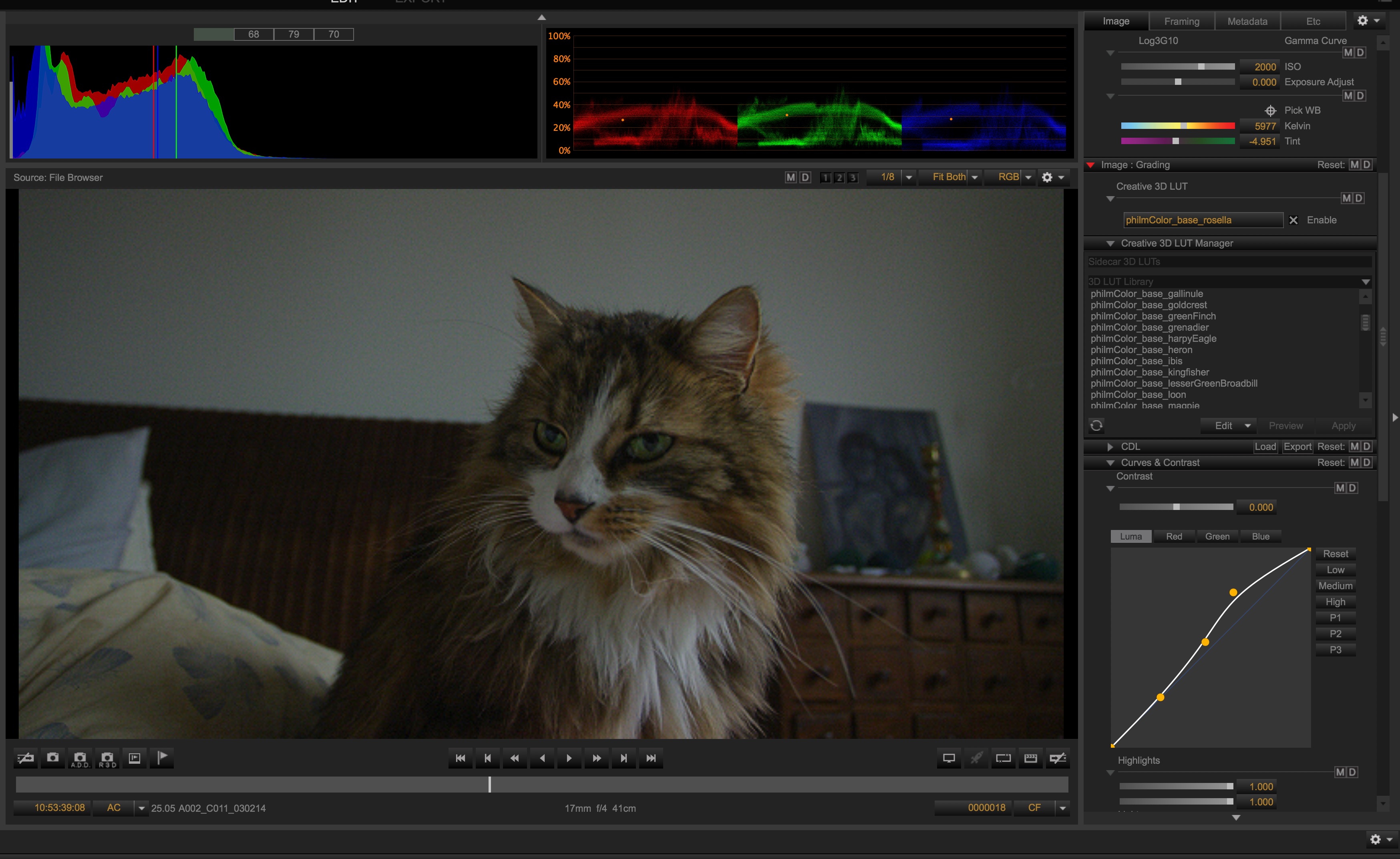
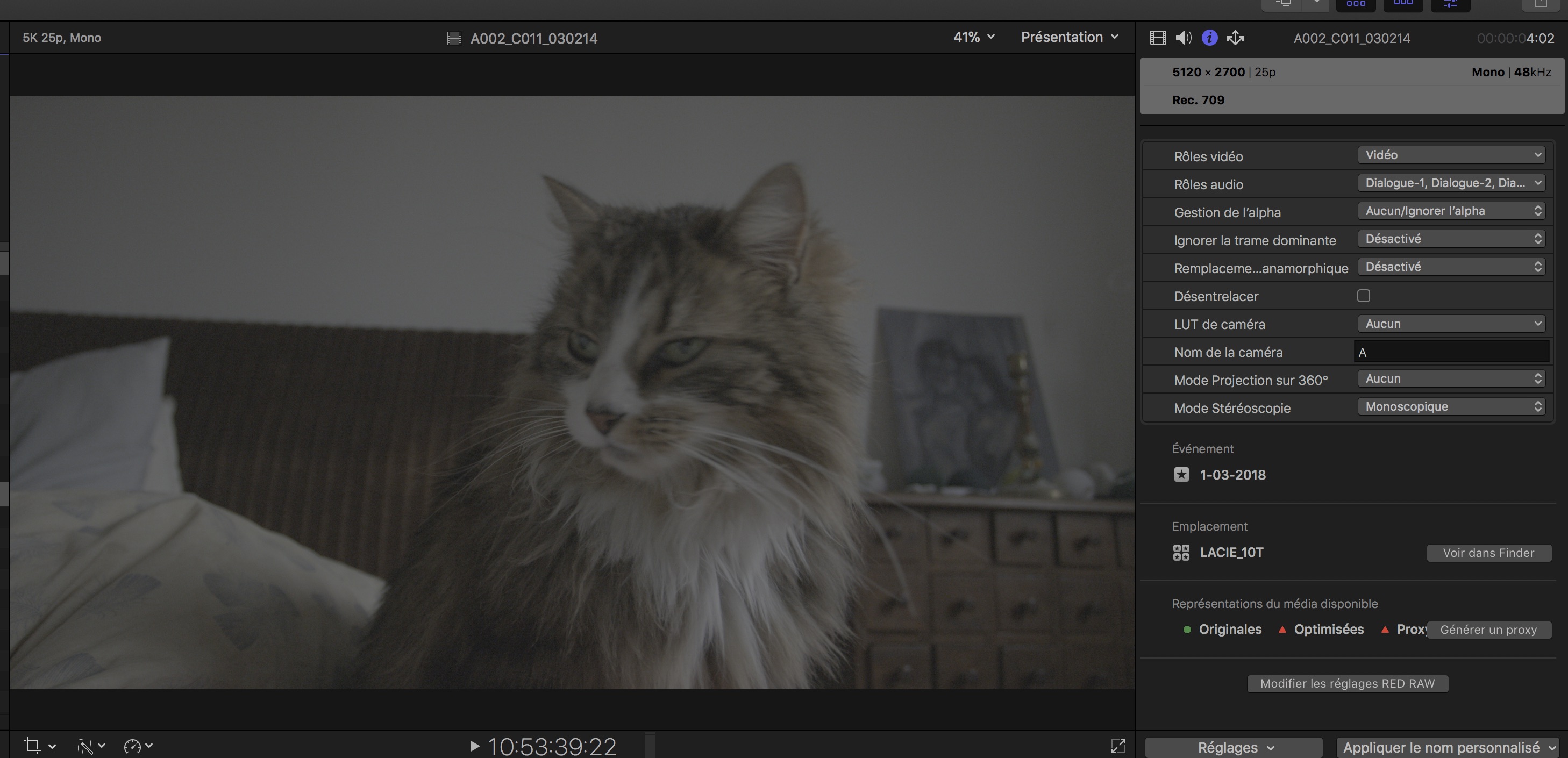
And NONE of the changes I made in RED CINE X are visible on FCP X, the footage is totally ungraded (flat IPP2)....but for instance if I open the R3D file with RED PLAYER, then what I see is the graded shot.

Any idea??

(the fix mentioned by Blair below is irrelevant in my case, FCP X didn't create its own RMD file).

UPDATE: What is REALLY weird is that I don't have that kind of problem with sample footage downloaded on the RED website. On those files, when I change something on the R3D, the change is immediately visible on FCP X...

Thanks!
 
Last edited:
UPDATE: What is REALLY weird is that I don't have that kind of problem with sample footage downloaded on the RED website. On those files, when I change something on the R3D, the change is immediately visible on FCP X...

Hi Emmanuel,

Can you file a support ticket and include a trimmed R3D and RMD that reproduces the issue you are having so we can investigate?
 
Hi Emmanuel,

Can you file a support ticket and include a trimmed R3D and RMD that reproduces the issue you are having so we can investigate?

Hello Stacey, sure, could you just point to the URL where I can file a support ticket? haven't found it on the support page.

UPDATE :
More than happy to file a ticket when I'll have the URL but meanwhile, to save time, I uploaded an R3D file here: https://we.tl/cwchGNYHTx

Below what I see in RCX and what I see in FCP X.
rcx.jpg

fcpx.jpg
 
Last edited:
Back
Top