Carl Dieker
Well-known member
will fcp-x do a full debayer when exporting a 5k project to prores?

Follow along with the video below to see how to install our site as a web app on your home screen.

Note: this_feature_currently_requires_accessing_site_using_safari


Yes it's vague. I would assume playback setting are for playback only and that it would render full res on output?
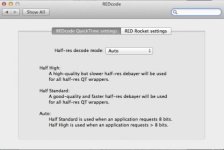
I've looked around trying to find WHERE one can find settings for full or half debayer, but can't find anything. I only find within REDcode QT settings half debayer--it does not say that those settings are for playback....it only says Half-res decode mode---not exactly sure what that means. But i took it to mean just that--half res-debayer....But please do post if you find actual literature on settings. I would be surprised if FCPX did anything BUT half debayer just by looking at the settings i've seen already.

I've looked around trying to find WHERE one can find settings for full or half debayer, but can't find anything. I only find within REDcode QT settings half debayer--it does not say that those settings are for playback....it only says Half-res decode mode---not exactly sure what that means. But i took it to mean just that--half res-debayer....But please do post if you find actual literature on settings. I would be surprised if FCPX did anything BUT half debayer just by looking at the settings i've seen already.
It is done in the Playback settings. Better performance=1/4 debayer playback without RR card and 1/2 debater with RR card while Better quality is 1/2 and full debayer respectively. That is in the vimeo, as for where I read that the output is always full debayer I'm going to have to think on it more.
Scott, that would be fine if we know for sure...but seems to be well hidden about this in FCPX documentation. I would expect that if they had full debayer they would make it easy to access and choose. Maybe i am wrong here, but none of those settings in FCP prefs or system prefs makes this easy to figure out. In fact it's so vague that i have no idea if it's 1/4, or 1/2 in FCP prefs....One would think that we should have control over transcoding via 1/4; 1/2 or full. but users are left with no answers. Please do post on it if you find some documentation.

I've looked around trying to find WHERE one can find settings for full or half debayer, but can't find anything. I only find within REDcode QT settings half debayer--it does not say that those settings are for playback....it only says Half-res decode mode---not exactly sure what that means. But i took it to mean just that--half res-debayer....But please do post if you find actual literature on settings. I would be surprised if FCPX did anything BUT half debayer just by looking at the settings i've seen already.
Johnny,
cket you are always getting a Full debayer (highest quality). Now in FCPX speak, if you have the performance setting set to High Quality, you get a full resolution frame. If you have the performance setting set to Better Performance you get a Quarter resolution frame (scaled via the Rocket).
Johnny,
That tab on the REDcode System Prefs dialog only controls the REDcode QuickTime settings. ie., what you get when you playback with QuickTime player via wrappers for example. This has nothing to do with FCPX.
If you have a Rocket you are always getting a Full debayer (highest quality). Now in FCPX speak, if you have the performance setting set to High Quality, you get a full resolution frame. If you have the performance setting set to Better Performance you get a Quarter resolution frame (scaled via the Rocket).
Does that clear things up?
Thanks,
David
Now in FCPX speak, if you have the performance setting set to High Quality, you get a full resolution frame.
Johnny,
That tab on the REDcode System Prefs dialog only controls the REDcode QuickTime settings. ie., what you get when you playback with QuickTime player via wrappers for example. This has nothing to do with FCPX.
If you have a Rocket you are always getting a Full debayer (highest quality). Now in FCPX speak, if you have the performance setting set to High Quality, you get a full resolution frame. If you have the performance setting set to Better Performance you get a Quarter resolution frame (scaled via the Rocket).
Does that clear things up?
Thanks,
David
Full debayer and full resolution is that the same? because both terms are used in Davids post...
Also what I love about RedcineX is the ability to use different downscaling algorithms, which have a huge impact on the final image
- but in Resolve and other programs I have yet to find such precise choices... only better,best, fast, fastest... etc...