Henk van den Doel
Well-known member
- Joined
- Jan 18, 2007
- Messages
- 280
- Reaction score
- 0
- Points
- 0
Hi all
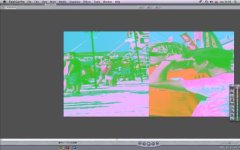
We just installed the FCP3 upgrade a few days ago, but today all of a sudden things work problematic. Every now and then (there is no logic to be found in this), the canvas turns pink and green and cuts the picture in half. See the attached picture to see what I mean.
We've done a bit of research, but the suggestions we found were of little help unfortunately: it cannot be a broken hard drive, throwing out render files does not solve the problem either.
The only thing that seems to solve it for now, is by toggling on the 'show excess luma'. But that seems like a weird solution to an even weirder problem and could very well be a short term solution for a bigger underlying problem. Does anyone have any clue what might be the problem and how to solve it?
Thanks in advance!
We just installed the FCP3 upgrade a few days ago, but today all of a sudden things work problematic. Every now and then (there is no logic to be found in this), the canvas turns pink and green and cuts the picture in half. See the attached picture to see what I mean.
We've done a bit of research, but the suggestions we found were of little help unfortunately: it cannot be a broken hard drive, throwing out render files does not solve the problem either.
The only thing that seems to solve it for now, is by toggling on the 'show excess luma'. But that seems like a weird solution to an even weirder problem and could very well be a short term solution for a bigger underlying problem. Does anyone have any clue what might be the problem and how to solve it?
Thanks in advance!