Welcome to our community

Be a part of something great, join today!

  • Hey all, just changed over the backend after 15 years I figured time to give it a bit of an update, its probably gonna be a bit weird for most of you and i am sure there is a few bugs to work out but it should kinda work the same as before... hopefully :)

FCP 7 and L&T or red rush problems

Joined
Oct 21, 2009
Messages
5
Reaction score
0
Points
0
Hi all,

I really don't know if I'm being stupid here but everytime I try and use L&T or redrush to transcode to prores 4444 or 422 HQ and then bring into FCP all I can see is a pure white screen. I've made sure to follow the sequence settings quide in the white paper but am still getting nothing.

However, if I export the clip from redcine or Nuke to the same codecs and bring that into FCP the footage comes in fine allbeit a little washed out.

Could anyone shed a little light on what I'm doing wrong here.

Ben
 
mentioned this in another post too for a different problem, try trashing ur fcp preferences and doing it again. the washed out look might be you setting it to a gamma space that's different from what it was shot in. what gamma space was it shot in and what are you exporting it as? something might have gone haywire in the redline code too, might wanna reinstall RR, and redcode, and also dumping l&t plugin and reinstalling that too...
 
I'm using "as shot" for the import settings and my gamma settings in fcp user settings is set to source.

Is there a guide to uninstalling and reinstalling, don't wanna miss anything if that is the problem
 
just run a google search for trashing FCP preferances, it will give you a step by step. it's important to know what the gamma settings in camera were shot as. there is camera source and then actual ouput for gamma. if everything was shot in red space and you set it to output as rec709 which is your HD gamma space, everything is gonna look washed out, etc. etc. open it up in red alert and set all ur gamma space settings around until the picture looks right, that's where ur gonna see what is was shot in, if it was shot correctly it should have been shot for end delivery. if it's HD delivery, ie bd, broadcast or web, it should have been done in 709. otherwise u might have to recorrect in post for the gamma shifts. and u can google search uninstalling a lot of the other stuff, search in the forum too for uninstalling red l&t plugin, it's in a special folder that i can't remember off the top of my head. same with uninstalling redcode.
 
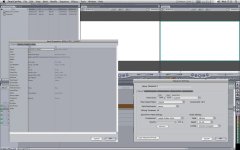
ok, reset fcp and reinstalled all plugins and am still having the same problem. attached is a screenshot of fcp with an imported clip with all the settings showing.

as you can see the viewport is totally white. no image to be seen. if I open the quickview windows I can see the video playing and in the videoscopes, nothing seems out of the ordinary.
 

Attachments

  • problem.jpg
    problem.jpg
    93.8 KB · Views: 0
if u export 3 seconds of it out of the timeline is it still white? when u double click the file in ur capture scratch does it look right in ur qt player? if it does play right, did u try dragging and dropping from the folder itself into the timeline? and you said red rushes is giving you the same problem?
 
I've had the same problems on my MBP. I think it has something to do with the display card. So I basically reset FCP by rebooting in power save mode which makes the MBP switch to its other graphics card and also trash FCP preferences and it comes back. Not sure what to do if you have a tower.
 
i'm thinking it's a hardware issue too. however does this do it with other hd footage is what i'm wondering. the fact that it's unique to redcode is kind of mind boggling. have u tried making a 1080p render?
 
then the real test should be with other footage. if that's the case then it's a FCP/hardware issue. and if that really is the case might have to try to swap out video cards...
 
Hey guys, a bit of info about my machine, 8-core intel mac dual graphics cards, ATI radeon 4870 and a radeon 2600XT. I'm running 3 screens, a 30-inch apple cinema display and a sony bravia running at 1080p on the 4870 and a 19 inch flat running on the 2600XT.

I don't seem to have any problems with the footage if I export it from redcine as a qt prores 422HQ mov and bring that into fcp. Only when using rushes or L&T.

Have reset fcp pref's numerous times but will get my fcp expert to see if it's fcp today. I don't think it is though because of being able to export via redcine
 
Ok, Just an update. This morning I came in and I re-installed the plugin and the quicktime codec after that and now it is working perfectly. Seems that the order in which you do it makes a difference as yesterday I tried doing the qt codec first and the fcp plugin after that and it didn't work.

So yay, seems that my issue is solved.

btw, It worked with using L&T, I have not tried doing it the rush way but I think that we are going to be using L&T to import the footage anyway.

Thanks to all that replied and hopefully this thread helps anyone else with this problem as well.

Ben
 
Back
Top