Welcome to our community

Be a part of something great, join today!

  • Hey all, just changed over the backend after 15 years I figured time to give it a bit of an update, its probably gonna be a bit weird for most of you and i am sure there is a few bugs to work out but it should kinda work the same as before... hopefully :)

Fastest Thunderbolt DIT solution

No! No! No!
Raid-0 is not the way to do this.

It will have almost the opposite result you are looking to achieve.

Raid-0 in this configuration will give you ONE COPY of your data split across your three drives.


I'm just thinking, but I think I have a perfect way of doing it.
- 3 ssd drives in raid 0. So you have the backup on 3 disks. This will be very fast, lightweight AND less sensitive to vibrations and impacts than magnetical disks. Shouldn't be too expensive either.
/Andreas
 
Sorry Todd, ehm, typing misstake. Of course Raid 1 is the way to do it, will edit my original post to avoid confusion.
/Andreas
 
our fast DIT solution

our fast DIT solution

in my opinion, you need 3 connections to your drives :
1 = RED mag , could be esata or USB3, both have the same tranferspeeds, USB3 is now preferred with newer macbookpro's, as doesnt need external powersupply and an esata adaptercard.
2+3 = copies : i dont recommend using RAID1 mirroring. if the disks are seperated, you cannot put them back together. also when seperated, the system gives a error, which is not a good sign for a customer receiving the disks. And if you would use are hardware RAID1 box, you need to make sure that the postproduction will use the same boxes. In multiday productions you will separate the copies each evening - in the event one disk is lost, transport, and/or you want to check the files in the evening/night, but you cannot bring a RAID1 back together. it is much better to use independant copies.
so the other choices for the 2 independant copies could be a 2 RAID disks or 2 single disks. Most productions will not want the spend the money necessary for RAID disks for rushes. You want RAID disks if you really need to copy fast, but even then there are limits on the read-speed of the RED mag. you will gain some time during the verification read of the copies with RAID's- you do that of course ? (R3Dmanager, DoubleData, Shotput pro)
but beside the budget, another problem with RAID boxes is that they are big, make noise, and not always easy to use on set, and you really need a battery backup system for RAID boxes if power fails.
So i would recommend using 2 single drives for most productions. You could use thunderbolt disks, Lacie has some nice ones, but check with postproduction if they can handle thunderbolt disks: if they work with Macpro's, the lacie thunderbolt d2 single drives are nice as they have thunderbolt and usb3 on them, so for the macpro, just add a usb3 card ( Caldigit or Highpoint ). The single drive thunderbolt D2 of lacie doenst have a thunderbolt loop, which is a limitation - especially if you would use an thunderbolt SxS cardreader in Alexa environment.
There is also the nice thunderbolt-only '2big' lacie box with 2 disk trays that can work in JBOD ( Just a Bunch Of Disks), which is very fast, and the trays can be used in their bigger 5big JBOD box - only no usb3 connections that can work for a MacPro... the newer 2big usb3 boxes dont accept the JBOD trays, so this 2big/5big solution is only best if postproduction uses iMac's... or unscrew the disks from the trays to use them in a macpro solution. This solution is still nice because on set there is only one 2big box with 1 powersupply + 1 thunderboltbolt cable, with loop option and the usb3 connected RED reader.
Single 3,5" drives will give you copy speeds of 120-150MB/s when not too full, which is nice and economical.
if your macbook has no 2 thunderbolt connections free, or you want to use cheaper disks, 2 solutions :
use a usb3 hub and usb3 drives for the 2 copies, or use a lacie thunderbolt to esata adapter and 2 esata disks. The usb3 or esata interface will be as fast as the copy disks will allow, and wont give any problem in postproduction to connect with macpro or pc's.
The usb3 hub need to be tested before, some will only give 1 real usb3 connection and the other connections will fall back to usb2,
but the correct ones will give you all the necessary bandwith for up to 4 fast connections.

You could also use 2,5" drives, but keep in mind that the price/TB is double of the 3,5" drives, and they are not so fast : approx 90MB/s over usb3/thunderbolt- you could use a SSD disk, which are very fast, but price is even much higher. Dependant of budgets, needed capacity and carry-on weight, available powersupply and how much rushes, the 2,5" drives can be a good option, but 3,5" single drives will give you the most bang-for-buck ratio.

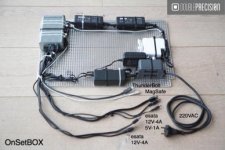
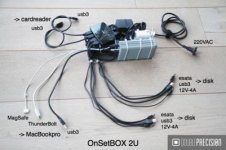
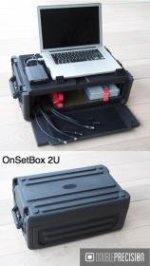
one of the problems of the 3,5" drives is that they need external powersupply, so we've developped for our customers a pre-cabled 'grid' with powersupplies for macbook, 2 drives, thunderbolt-esata, usb3 hub - see the photo's. it avoids the cable mess that you would have normally.
 

Attachments

  • OnSetBOX.jpg
    OnSetBOX.jpg
    20.1 KB · Views: 0
  • OnSetBOX 2U content.jpg
    OnSetBOX 2U content.jpg
    20 KB · Views: 0
  • OnSetBox 2U exterior.jpg
    OnSetBox 2U exterior.jpg
    8.7 KB · Views: 0
Funny you should ask...

Funny you should ask...

(snip)
- I'm beginning to think that Red should build a DIT station themselves where you can connect with USB3 and thunderbold harddrives and red drives and just copy directly from there. This would be faster and easier to manage.
Best
/Andreas

I don't often see them around, but RED does offer a very elegant solution with the 2.5" Red Station drive bay. Using bare 2.5" drives (SSD or spinning), one can shuffle the 1.8" RedMags and 2.5" storage drives in a clever little RedStation stack with eSATA connectivity. I haven't benchmarked it personally, but it should give you at least 90% of the max read speed off the RedMags.

Cheers - #19
 
The fastest way will be a TB PCIe expander box with an Atto H680, with a SAS/eSATA fanout cable going to the card reader and drives

But you'll never get more than 12 GB's a minute, because that's as fast as the RedMags will go - and you need to be going to eSATA G-Raids, or some other drive config involving at least 2 discs raided together and accessed with eSATA ports, to get to 12 GB's a minute on the other end (unless you use SSD's, which isn't cost effective right now compared to HDD's).
 
Mirroring is good unless your file gets corrupt in the transfer (then you'll just have two copies of the corruption.) SO, use CRC or copy independently... In either case your transfer times are doubled.
 
i dont recommend using RAID1 mirroring. if the disks are seperated, you cannot put them back together

You can separate RAID-1 volumes and bring them back together without any issues - as long as you do not modify the data on the volumes.

also when seperated, the system gives a error, which is not a good sign for a customer receiving the disks

Client receives the drives at the end of the DIT job (or when they are full and new set is used to continue) - at which point you delete the RAID-1 using the Disk Utility. There is no error message what so ever when you then deliver these drives to the client.

And if you would use are hardware RAID1 box, you need to make sure that the postproduction will use the same boxes

I have warned against using HW RAID-1 above. You need to use the Disk Utility to both create and destroy the RAID-1.

In multiday productions you will separate the copies each evening - in the event one disk is lost, transport, and/or you want to check the files in the evening/night, but you cannot bring a RAID1 back together

You can do all the above, bring the drives together in the morning and continue your work for as long as you do not modify the data on the individual volumes.

it is much better to use independant copies

The purpose of this thread is the "speed" of DIT workflow. Independent copying is certainly not the answer (nor I actually recommend it). Not only you are multiplying the time needed to offload the data with each independent copy - and therefore block the REDMAG from use - but you further multiply the task of verifying the integrity of the data, as you would need to check each independent copy. Another reason is that the DIT process involves many tasks beyond copying of the data. For example it is common to review all shots and set certain look with the DoP and director, which are then saved on the volume. We also create a detailed shot list with thumbnails and notes. With the RAID-1 all of the extra work is automatically synchronized on all volumes immediately as you work. With independent copies this adds another headache...

I am against speeding things up if it compromises data safety in any way. But the RAID-1 (using Disk Utility) not only speed things up dramatically - but it also improves the safety as compared with independent copies... WIN-WIN

:sifone: Peter
 
Double Data sounds interesting if it works. One problem with these programs is that they do a lot of verification checks that can take a lot of extra time. Not so much point to copy to 2 drives at the same time if it's doing it at half speed. Of course only way to find out is to test. Would be great if it works.
/Andreas
 
Mirroring is good unless your file gets corrupt in the transfer (then you'll just have two copies of the corruption.) SO, use CRC or copy independently... In either case your transfer times are doubled.


Mike is spot on. Beware of relying on straight mirroring without md5 verification. The old saying garbage in garbage out comes to mind. Quick question: how are you doubling transfer speeds by relying on software raid? If your building the RAID using Disk utility than the raid controller is essentially the operating system. Meaning the data has to be written twice by the computer itself. I can imagine a slight speed boost but a doubling? Seems unlikely.
 
Mike is spot on. Beware of relying on straight mirroring without md5 verification. The old saying garbage in garbage out comes to mind. Quick question: how are you doubling transfer speeds by relying on software raid? If your building the RAID using Disk utility than the raid controller is essentially the operating system. Meaning the data has to be written twice by the computer itself. I can imagine a slight speed boost but a doubling? Seems unlikely.

That is an interesting point. Does this happen often that the files get corrupted while copying. I have never heard of files not being copied correctly before and the operating system saying that its "ok", but this is a real problem?

This is how Raid 1 would work for SSD disk
- Red SSD. 200MB/s
- SSD. 300-400MB/s

Alternative 1, using 2 separate disks
- Save to disk A in 200MB/s. Since the Red disk is the slowest in the chain 200MB/s is the maximum. A 128GB would take about 11 minutes.
- Save to disk B in 200MB/s. 11 minutes
In total doing a backup of 128GB would be 22 minutes

Alternative 2, using a Raid 1 setup with 2 (or 3 ssd)
- Raid 1 makes the external harddrives behave like 1 disk from the computers point of view. When you write to one disk it will save to all disks. It will write a bit slower, maybe 10% slower because of the extra overhead to write to 3 disks at the same time. However the external ssds are so fast so this doesn't matter. For example 300MB/sec *0.9 is still 270MB/s which means that the lower speed of Red SSD will still be the bottleneck.
- Total write speed is 200MB/s and only needs to be done once.
Total time 11minutes

Hope that explains a bit. Interesting point with doing CRC for verifying. What are the best programs for doing such checks?

It's worth pointing out what the purpose of the DIT is also. Are these disks means to be the final disks? Or is it only to free up the Red SSDs. Myself one of my main concerns is freeing up the RED SSDs, I wouldn't mind to copy to other drives straight after I have moved from Red media. I guess if you have a high budget you can have 3 ssd drives for every day but that will be very costly. Myself I would use the SSDs as a first point and then set it to backup to multiple spinning drives straight away freeing up the DIT station.


/Andreas
 
Mike is spot on. Beware of relying on straight mirroring without md5 verification. The old saying garbage in garbage out comes to mind. Quick question: how are you doubling transfer speeds by relying on software raid? If your building the RAID using Disk utility than the raid controller is essentially the operating system. Meaning the data has to be written twice by the computer itself. I can imagine a slight speed boost but a doubling? Seems unlikely.

Have you actually ever tried it? I have used this workflow on 50+ projects without a single issue and the difference in speed between writing to the RAID-1 and the individual drive in less then 1% (negligent for all given purpose). And you are not doubling the speed - you are halving the time it would take you to run two independent copies...

And do not get me started on "verification" SW/HW. I am yet to see a single SW that I could rely on 100%. You can MD666 all you want.
The only footage I trust is the one I can see - which is why we actually watch all clips to make sure they are not corrupted - MD5 or not...
The point is that what ever checking method you use (taking your chances with any such SW, watching the footage - or a combination of both) - having everything on RAID-1 means I only need to check it once. With individual copies you need to check and verify each and every copy - which the takes that much longer...

In any case - use what you want. I use my workflow that I know it saves me s*** load of time and I can rely on it 100%...

:sifone: Peter
 
I think that is a valid Point Peter. One should always check the footage, it doesn't have to take very long.
This is the procedure I use so far (not perfect but works pretty well)
- Copy it to my 2 GTech Drives
- Double check the folder size on the ssd and the Gtech drive that it's the same size. I also check that there are the same amount of files in the folder
- Open up Redcine and check (only one drive so far) that the files exist. If some files are offline I will check on the original ssd to see what it looks like there.

If get quite a few offline files when I shoot. Do you guys know why this happens? It doesn't seem to be files that I miss, but often I get a few and they are only a few kb big.

/Andreas
 
I am yet to get any offline files or corrupted data (touch wood).
On the other hand - i have seen 4 times over the last 4 years the dredged frame artifacts:

This is the sunrise we could have had beautiful timelapse of:

PicoDeOrizaba_Sunrise_RedOne_1K.jpg


... if it wasn't for codec errors like these:

A001_C002_083042_00007.jpg


A001_C002_083042_00018.jpg


As soon as we have switched over to the Red Drive it was all fine, but the sunrise was long gone. Maybe next time... :)

I thought codec errors were the thing of the B15 and the past. Did anyone experienced this type of errors on the release B16? BTW - our cards are the RED 8GB CF cards, so branding is not the problem here...

Any clues?

The irony is that such an error (which is the only type of corruption I have ever seen in any RED camera since 2008) can not be picked up by the MD5 or what not safety SW, since the corruption is in the original files to begin with. This is why the ONLY way to 100% verify your footage is to actually watch it. Don't waste time on useless SW...

When I have the time to review each clip on RCXP - I do so (90% of the time). If I do not have the time - I use Storm. One of the perks of having initiated its development and working closely with The Foundry through-out the entire R&D stage - I got to keep a permanent version of the SW. It allows (amongst other super useful things) for amazing preview mode where you can drag all clips in the viewer and play back while being able to speed-up / slow-down (etc) - so I use it to review all clips at 2x or 3x the speed looking for any issues...

It's a shame RCXP killed Storm. There is still not a single SW out there that does what Storm did. RCXP does 3/4 - minus all the really useful things like metadata / tag management and asset cataloging, secondary CC, advanced playback / comparison of clips, simultaneous output of RED ROCKET to both the external display and the UI, resolution independent scopes, etc, etc... :reddevil:

:sifone: Peter
 
Most dropped frame or corrupted frames I've seen in the last couple years have been due to an over zealous P.A. or A.C. pulling the red card prematurely or without ejecting the card first, or from a faulty batter plate and inconsistant power to the camera.
 
There was mention of only being able to copy to one destination at a time in OS X earlier in this thread. This is only true in the Finder. The terminal application rsync, or any application that acts as a front end for it, can be prompted to make multiple copies to multiple destinations simultaneously. This is useful because I use my RAID 5 as the master copy and it has the bandwidth to write out to several externals at the same time. I actually have been using Carbon Copy Cloner lately with scheduled jobs to make additional dupes. It is fast and can do incremental backups with a GUI. This is especially important for RMD files which you'd only be creating on one drive and then mirroring to the backups. It will even copy over colored folder information and any other information in .DS_Store files.
 
Rsync seems powerful and useful. Do you know what commands you use to copy to 2 disks at the same time. Haven't found a clear answer on the net yet.
/Andreas
 
Peter,

Which individual HDD drives would you recommend?

And how about using a two slot icy box with 3,5" HDD's?
Would it work with your method of creating/crushing Raid 1 or does it count as one HW Raid anyway?
Would I risk loosing data?

Thx a lot for your input!!
 
Peter,

Which individual HDD drives would you recommend?

And how about using a two slot icy box with 3,5" HDD's?
Would it work with your method of creating/crushing Raid 1 or does it count as one HW Raid anyway?
Would I risk loosing data?

Thx a lot for your input!!

Hi Sebastian,

The actual brand/model of the HDD is not important and subject to personal preferences - as long as the drives are identical.
For my work I either use Lacie Rugged drives when I need portable solution powered by the laptop, or bare Seagate Barracudas for when working in studio environment with AC power.
I have a CENTURY dual bay 3.5" eSATA enclosure (very similar to the ice box) that I use with the bare Barracudas.
Using such an enclosure is fine for as long as you set it to JBOD (Just a Bunch Of Disks) mode - so that the OS-X sees the individual drives. Do not use the HW RAID options on the box itself...

Creating - and more importantly DELETING - the RAID-1 with disk utility might seem nerve-wrecking when you do it for the first time.
So if you need to give yourself (and/or the client) a peace of mind do the following:

- at the start of the project create a RAID-1 set called TEMP using the drives you are planing to use
- copy some files to the drives
- delete the RAID-1 using the disk utility and take note of (or show to the client) the prompt you get that specifies that doing so will result in individual volumes with identical set of data
- proceed with the deletion of the RAID
- check that you now have the individual drives and that each contains the same exact set of data
- once you and/or the client is satisfied how this works proceed to creating the actual RAID set that you will use for the project

I find it really helpful to do the above when I need to work with someone who has never done this or has any concerns about this procedure. Seeing is believing...

:sifone: Peter

PS: It helps to rename the individual drives after you have destroyed the RAID-1 at the end of your project (or when they are full), as the individual drives will also be named in an identical fashion. My standard procedure is to name the RAID with the name of the project and then, once I delete the RAID, rename the individual drives by adding the names of the departments to whom the drives will go. For example:

RAID-1: ORANGE

after deleting RAID-1:
ORANGE_POST
ORANGE_CLIENT
ORANGE_BACKUP

This helps with keeping the track of the drives. Of course add physical labels on the drives as well...
 
Speed is important, but quality over quantity when you're talking about your footage. Nothing beats a Raid-5 for price-performance ratio. A 6 drive Raid-5 is RAID-0 over 5 drives plus a parity drive, which is blistering fast (from a spinning disk standpoint, anyways).

When it comes to Drobo vs. Pegasus, it really is a 'you get what you pay for' type of situation. I have a Drobo 5D and the thing drives me crazy even over USB 3.0. It does lots of "thinking" which makes it dreadfully slow (I regret purchasing it slow). My Pegasus during a rebuild is far faster, which is sad since they are supposed to be essentially the same type of device.

I always offload with checksum verification, and Silverstack 3.3 uses a new, faster MHL verification technology that speeds up verified transfers. Still, it's a trade-off because you still take a significant performance hit when using verified offloads. But, it's not worth it to me to have a corrupt transfer, because it's saved me several times when the media I'm copying to starts getting bad blocks. It won't verify and will fail. But otherwise you'll be happy-go-lucky until you try to read the files back in and realize even though they copied 'correctly', the destination was NG and you're now in deep doodoo. Multiple copies helps, but multiple verified copies are the golden standard. I try and do 3 copies plus a transport copy. PLUS hold the media until it gets QC'd (where I'm able to anyways). Some call me paranoid, but I dread the show where I only have two mags. I think I'd be sick... however I know people work like that every day. :)

PS. Sorry for dragging up an old thread.
 
Back
Top