Welcome to our community

Be a part of something great, join today!

  • Hey all, just changed over the backend after 15 years I figured time to give it a bit of an update, its probably gonna be a bit weird for most of you and i am sure there is a few bugs to work out but it should kinda work the same as before... hopefully :)

Faking overcast in studio

kalari Jack

Well-known member
Joined
Mar 17, 2009
Messages
70
Reaction score
0
Points
0
Location
UK
Website
www.twitter.com
Hey,

I'm working on a short at the moment, most of which is going to be shot in a green screen studio. There is a scene thats set during an overcast day and I'm trying to emulate it in the studio. I'm thinking instead of having a fully soft scene I could have a key light thats got a little diffuse but bright enough to add a little back lighting to the character. The setup I was thinking was.

1x 1.2k HMI for the key with two heavily diffused keno's to add the overall soft element.

Some examples I could find online are:

The-Thin-Red-Line.jpg


2553976187_b81e6cfe1b_o.jpg


I myself am not an experienced DOP and shooting in a studio trying to fake this effect is not ideal but I was hoping someone who has tried to do this before would be kind enough to share some advice/tips.

Thanks in advance,
K
 
HMIS are rather hard, but if you shot it through a softbox or 8'x8', maybe? A lot of this will be dictated by what the green screen is lit by (more specifically, if it's 5600K or tungsten).

If the cyc you're shooting on is lit by spacelights I would just augment that with as soft a light as possible (a bright, tungsten balanced book light?) from one side to get a directional overcast look and then use fill/negative fill as necessary. Honestly, just leave it to your DP. Every time the director gets involved in lighting beyond the abstract it's a bad sign, even if you know what you're doing, it diverts your attention.
 
Last edited:
Sleepy Hollow was more or less space lights. It's a cheap way to get coverage. I would recommend maybe even consider to have them shooting through silks. Just make sure you, as written by Matt, use soft key light directions and negative fill to sculpture your actors a little.
 
HMIS are rather hard, but if you shot it through a softbox or 8'x8', maybe? A lot of this will be dictated by what the green screen is lit by (more specifically, if it's 5600K or tungsten).

If the cyc you're shooting on is lit by spacelights I would just augment that with as soft a light as possible (a bright, tungsten balanced book light?) from one side to get a directional overcast look and then use fill/negative fill as necessary. Honestly, just leave it to your DP. Every time the director gets involved in lighting beyond the abstract it's a bad sign, even if you know what you're doing, it diverts your attention.

Thanks Matt, This is helpful. The studio is lit with space lights and the technique you mention seems good. There is a soft box attachment to the HMI so we will be experimenting with this. Unfortunately I am a first time DoP for this project so trying to get as much right as possible. Only if experience was something you could buy off the shelf!
 
Thanks Matt, This is helpful. The studio is lit with space lights and the technique you mention seems good. There is a soft box attachment to the HMI so we will be experimenting with this. Unfortunately I am a first time DoP for this project so trying to get as much right as possible. Only if experience was something you could buy off the shelf!

You've done well just by going to reduser! It's pretty amazing to have instant access to the minds of top talent...
 
I don't get the question -- first you say you have one 1.2K HMI and next you say you have a ceiling full of tungsten space lights? Which is it?

An overcast sky is a HUGE soft source over an actor so you have to think in similar terms to recreate that effect. If you start using smaller lights and backlights and fill in a more conventional 3-point manner it's not going to look very natural.
 
Here's what I would do:
-Hang a 20x20 1/4 grid (like silk) under the spacelights (bigger depending on studio size) to make the spacelights one unified soft overhead source like an overcast sky
-Abandon your HMI's and instead match the tungsten color of the spacelights and use something like a Maxibrute through a 12x12 frame of 1/2grid for a soft key
-Maybe a mickey through a chimera right over camera for fill/eyelight (probably not necessary if you're going for as contrasty a look as your references)
-Use a 12x12 solid just on the camera opposite side of the key edge of your frame for negative fill as needed
-Put an 80D or C filter on your camera to correct color temperature closer to the sensor native ~5000K
 
I don't get the question -- first you say you have one 1.2K HMI and next you say you have a ceiling full of tungsten space lights? Which is it?

An overcast sky is a HUGE soft source over an actor so you have to think in similar terms to recreate that effect. If you start using smaller lights and backlights and fill in a more conventional 3-point manner it's not going to look very natural.

Sorry David, I have the option for both.

Using one huge spot does sound ideal, but the budget might not allow for anything larger than the 1.2k that I have. Reading the posts, could it work if I use the space lights (possibly with the silk sheet) and then just use a kinoflo for the extra exposure to add depth(I am working with a limited kit so might not be able to get hold of a Maxibrute here)?

Thanks again guys, apologies for my lack of knowledge, learning as we speak!
 
Although a bit more complex than you'll need, Florian's set up makes good sense. Space lights (and then maybe a 1/4 stop silk under the talent to diffuse them further) is a good way to imitate an overcast day in studio. I would skip the color correction filter and just be careful not to underexpose. You may need the extra stop to stop down and get depth of field similar to what you might normally use on a day exterior.

If you're shooting with tungsten lights, skip the kino flos and hmis, imo. You can gel an hmi (full cto) or use 3200K kino flo bulbs and then maybe put muslin and a 1/4 cto on that to mix in with the studio lighting, but the color rendition won't be quite the same as tungsten. Rent a big tungsten unit--cheaper than hmis or fluorescent lights and the color will match. Use a book light close to the talent or whatever you can rig up, or shoot something (maxibrute or big fresnel) through the same net you have diffusing the ambient light and adjust the angle of the net and negative fill to suit your needs. I've never had the space or budget for a set up like this, and all my work has been on-location thus far, but I've seen them used on shoots like this and the result is great and it's pretty elegant. Also bring along some flags to mitigate spill off the green screen. Keep in mind that, once keyed, the footage will look much higher contrast than you expect and there will be, invariably, more green spill than you expect.

Again, I've never done a shoot like this, but the in-studio day exteriors I've seen have generally been very simple, mostly lit by space lights, or kino flos on the ceiling or whatever and then subtly augmented with soft lights and the like. I think David has done some day exteriors that have looked really good on stages and he knows his stuff better than anyone else here, so take whatever advice he gives, this is just what I've picked up from having seen a few ads shot on stages.
 
Last edited:
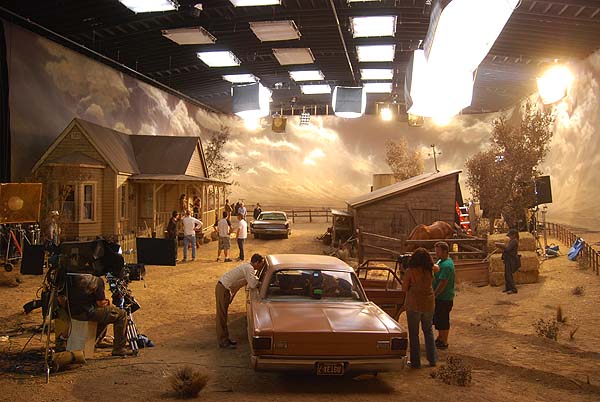
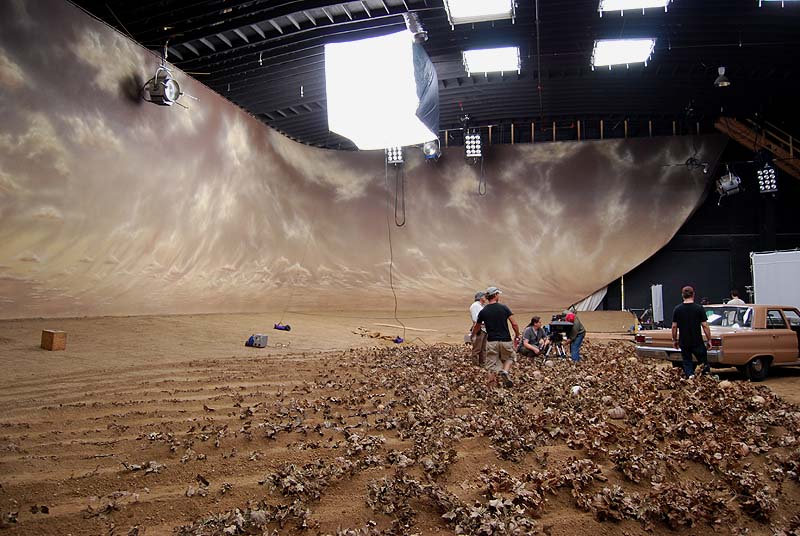
On "Manure" we used daylight Kino Blanket lights in the ceiling combined with HMI lighting balloons for a soft overhead source that was daylight-balanced. But we could have use a bunch of space lights instead if we wanted a 3200K balance.

Some shots of the sets:

manure%20set1.jpg


balloonHMI.jpg


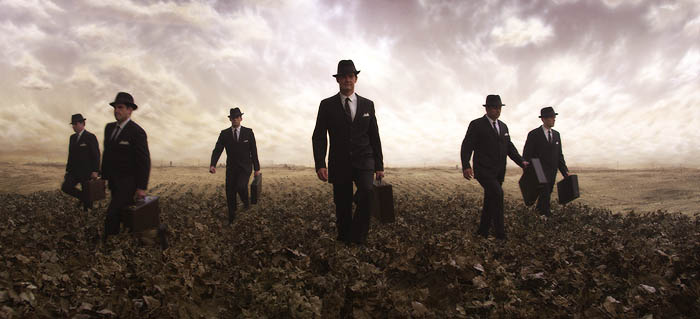
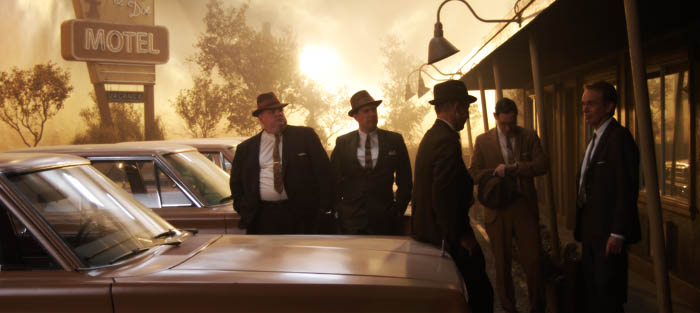
Shots from the movie:

700manure156.jpg


700manure93.jpg


You can see the fluorescent banks reflected in the car and windshield.
 
On "Manure" we used daylight Kino Blanket lights in the ceiling combined with HMI lighting balloons for a soft overhead source that was daylight-balanced. But we could have use a bunch of space lights instead if we wanted a 3200K balance.

Some shots of the sets:

manure%20set1.jpg


balloonHMI.jpg


Shots from the movie:

700manure156.jpg


700manure93.jpg


You can see the fluorescent banks reflected in the car and windshield.

As an aside I would love to be able to see Manure in the cinema, or as a second choice on Blu-Ray - any news on when it might be released?
 
My 2¢...

Shoot it outside. Use a big overhead silk or similar. You need LOTS of guns to get up that ambience level indoors, its easy outside. I'd even shoot next to a building (in the shadow) and then you don't even need the overheads. Use your HMI and bounces to fill as needed.
 
Back
Top