Welcome to our community

Be a part of something great, join today!

  • Hey all, just changed over the backend after 15 years I figured time to give it a bit of an update, its probably gonna be a bit weird for most of you and i am sure there is a few bugs to work out but it should kinda work the same as before... hopefully :)

Extremely blue footage when using motion mount

Dominik Bauch

Well-known member
Joined
Jul 20, 2015
Messages
131
Reaction score
0
Points
0
Location
Los Angeles
Just installed a motion mount today on my red epic dragon. When I dial up the ND amount the image turned seriously blue.
I did a test where I dropped in a 1.5 ND to approximate my high motion mount ND settings just to make sure I wasn't crazy and it looked fine, dark but fine.


I called tech support and followed all the steps they suggested but nothing has helped so far.
I'm using a standard OLPF, the support guy suggested that maybe the Standard OLPF is the issue but surely other people are running the motion mount with the standard olpf and this would be a known issue?

Anyone else had similar problems or know of a work around?

Thanks,

Dom
 
It may be the standard OLPF. I'd try lowlight or skintone. The motion mount was created a year or two ago, and may not have been calibrated (via firmware) for Standard OLPF.

We've used Motion Mount (on MX) and never saw it get blue...
 
Damn... I had hoped that it wouldn't be a hardware issue...
Were you running an epic dragon with standard olpf?
 
I was on a job and a op had the skin tone in but selected low light on camera which resulted in a blue image. So just asking if you have the right Olpf selected in camera software.
 
The blue tint decreases with lower nd settings. When compared to a matte box with a 1.8 irnd, the motion mount is far more blue. The regular nd filter looks good to go, tiny bit green but easily pulled out.
Motion mount is seriously blue at higher nd's. I'd say unusable past nd 5 or just higher but again the effect increases incrementally with higher nd settings.
 
how much % of ND ar you using? i wouldn't go above 3.40 on the ND, Ive experienced the same problems when going to high on ND, i believe RED has a disclaimer about being above 3.8 or something
 
post an R3D the scene you are pointing it at and the type of lighting might be affecting it.
 
When I had the motion mount, I could go from 1.6 to 8.0 and never have a blue image. I found it to be the most neutral ND I had used to date. I assume your color temp is set to some default value? What happens when you put a color chart in the image and use the white balance tool?

Would be nice if they could make a 2nd gen motion mount that supports 8k and has less loss. Just not sure if the mount sold enough to justify another version. One can hope. :)
 
how much % of ND ar you using? i wouldn't go above 3.40 on the ND, Ive experienced the same problems when going to high on ND, i believe RED has a disclaimer about being above 3.8 or something

I've seen they had disclaimers about bokeh getting seriously messed up with high nd, but nothing about color issues. I remember seeing Phil Hollands great posts about the motion mount while he was testing and I'm pretty sure he was psyched about the color neutrality of high ND modes.

to be honest if this thing tops out at 3.8 then it's not as great as I had hoped.
i have a support ticket out so hopefully I'll get more info.
 
When I had the motion mount, I could go from 1.6 to 8.0 and never have a blue image. I found it to be the most neutral ND I had used to date. I assume your color temp is set to some default value? What happens when you put a color chart in the image and use the white balance tool?

Would be nice if they could make a 2nd gen motion mount that supports 8k and has less loss. Just not sure if the mount sold enough to justify another version. One can hope. :)

did you use yours with an mx or dragon and which olpf?
 
OLPF does not matter. I used with both MX and Dragon. Both LLO and STH. The OLPF is not your problem. Could be a bug in the FW or a bad unit. Open a support ticket. Of course maybe you should post an example of how blue it is.

and how does it look after you white balance it in redcine x?
 
I'll post a snapshot over the next couple of days. Thanks for your experiences with it, already opened a ticket.
i pulled one crappy clip into resolve and was able to offset out most of the blue but doing so amplifies the red and green channels so it was by no means an ideal workaround.
 
I have a moition mount and am experiencing extremely blue images as well. I have a flicker that sometimes goes rainbow and my motion mount does not change anything when i change nds. I have contacted red and they have no idea what could be the problem. I am sending mine back for repair. You might want to do the same. It seems like there is some issues with the mount!
 
I had this once, I'd call it a cyan cast more than blue. It required severe correction in Redline X. Only happened on one day's shooting. I can't remember what cured the problem. Probably a firmware re-install on the camera. Wasn't a hardware issue.

MP
 
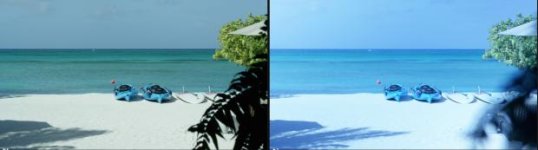
Below is a screen grab to show the motion mount issues I'm having.

I've been testing it a lot over the past week and if it worked properly for me it would be pretty sweet. The irregular bokeh issue was a concern but it really didn't come up much with me, although due to the intense blue cast that the really high ND settings caused, I really didn't go above 5.5 ND most of the time. For exterior stuff it's so much easier and lighter than using a matte box. For interior stuff, unless brightly lit, the 1.6 ND hit really makes the motion mount pretty useless indoors. Old news but worth mentioning from my experiences?

Attached is a screen grab out of resolve.
iso 800, 5600K, 180 shutter.
(Settings below are roughly right, I didn't have a pen handy and my memory stinks)

Screen Right image: Motion mount set to ND 6.5, T5.6

Screen Left image: Motion mount ND mode only, set to lowest setting: 1.6 ND. I closed down the aperture to roughly bring into a similar world as screen right image.

As is clear to see the screen left image is seriously blue. As I mentioned this effect increases as the ND settings get higher. Ok-ish to offset out but definitely ruined a bunch of my footage.

Dom
 

Attachments

  • mmount_comp.jpg
    mmount_comp.jpg
    15.1 KB · Views: 1
Back
Top