

Navigation
Install the app
How to install the app on iOS
Follow along with the video below to see how to install our site as a web app on your home screen.

Note: this_feature_currently_requires_accessing_site_using_safari
More options
Welcome to our community
Be a part of something great, join today!
You are using an out of date browser. It may not display this or other websites correctly.
You should upgrade or use an alternative browser.
You should upgrade or use an alternative browser.
Extra Noisy MX Footage
- Thread starter Daniel Soderberg
- Start date
- Thread starter
- #2
Daniel Soderberg
Well-known member
What's the best way to show a higher res image?

Andrew Gentle
Well-known member
- Joined
- Jul 24, 2008
- Messages
- 605
- Reaction score
- 0
- Points
- 0
- Location
- Brisbane, Australia
- Website
- productions.andrewgentle.com
What's the best way to show a higher res image?
Upload it to a web host or Dropbox or similar and then embed it using

D Fuller
Well-known member
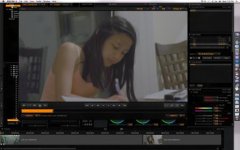
Is this normal to pull a clip from the Red MX (Build 30) into Red Cine X, select Red Log Film, and see so much noise? The noise even has some baby blue spots in it in the shadows...
It is hard to tell from the image, but from your description, it sounds like a black shade may be overdue.
- Thread starter
- #5
Daniel Soderberg
Well-known member
I just got the camera back from Red, they did an MX upgrade so I figured they would black shade it too...?
Here's a link to the image: https://rcpt.yousendit.com/1112870055/cee418440f6099746c5312374fefb2c8
Here's a link to the image: https://rcpt.yousendit.com/1112870055/cee418440f6099746c5312374fefb2c8

Jake Bastian
Well-known member
I would never assume someone else black shaded the camera for you. Always best to make sure.
Also imgur.com works awesome as a free host for images, and they'll show right up inside your post without a download. Like so:

Also imgur.com works awesome as a free host for images, and they'll show right up inside your post without a download. Like so:
- Thread starter
- #7
Daniel Soderberg
Well-known member
It's still a bit higher res if you get it from yousendit.com though.
Jake Bastian
Well-known member
Depends on your monitor size. If you right click and save image it's the same as the .png you posted, in .jpg format. It really not too important though, I was just offering up more options.
Even better would be an exported frame at full rez via yousendit rather than a screen grab, or even go 100% on the image so that we can see the settings you're working with and get a little closer to the noise in the dark areas. It does look like a black shading issue though.
Even better would be an exported frame at full rez via yousendit rather than a screen grab, or even go 100% on the image so that we can see the settings you're working with and get a little closer to the noise in the dark areas. It does look like a black shading issue though.
- Thread starter
- #9
Daniel Soderberg
Well-known member
Well Red said they did a black shade before they shipped my camera back (3 days ago)... Any other ideas?
Sam Winzar
Well-known member
- Joined
- Jan 28, 2007
- Messages
- 269
- Reaction score
- 0
- Points
- 0
- Age
- 42
From the image you posted it looks like the colour temperature is set to 2600. That means the blue channel is underexposed and could be one reason why you are seeing the blue noise.
Jake Bastian
Well-known member
You've got some major tint going on there too, what kind of lighting conditions was this shot under?
D Fuller
Well-known member
Daniel, I think there are a couple of things going on here. One is that because RedLogFilm presents such a flat picture, it exposes all the detail—including noise—that usually disappears into the shadows. Are you accustomed to looking at RLF? If you are not, it might help to look at the image in a more familiar gamma space for a reality check. The second thing is that there probably is more noise than usual in the blacks because the light is so warm and green. If it's some kind of flo or CFL, it's probably a discontinuous spectrum as well. That would mean that the blue channel is really starving for light, so even in an MX its going to begin to show noise.
What happens when you begin to grade? Does bringing the blacks down mitigate the noise?
What happens when you begin to grade? Does bringing the blacks down mitigate the noise?
- Thread starter
- #13
Daniel Soderberg
Well-known member
David,
Bringing the blacks down after switching to RedLogFilm oddly makes the noise even more visible. If I bring the blacks down to about where RedGamma2 starts the blacks out at, RedGamma2 has virtually no noise, while RedLogFilm has A LOT... I find this so odd... RedLogFilm just appears so unusable to me because of the excessive noise, yet I hear people using it to start with a nice flat image for grading...
Am I doing something wrong..?
Bringing the blacks down after switching to RedLogFilm oddly makes the noise even more visible. If I bring the blacks down to about where RedGamma2 starts the blacks out at, RedGamma2 has virtually no noise, while RedLogFilm has A LOT... I find this so odd... RedLogFilm just appears so unusable to me because of the excessive noise, yet I hear people using it to start with a nice flat image for grading...
Am I doing something wrong..?