Welcome to our community

Be a part of something great, join today!

  • Hey all, just changed over the backend after 15 years I figured time to give it a bit of an update, its probably gonna be a bit weird for most of you and i am sure there is a few bugs to work out but it should kinda work the same as before... hopefully :)

Exposure 101...

I like to use the IRE meter!

Keep the Whites @100-105 & Black at Zero......

Dave
 
I like to use the IRE meter!

Keep the Whites @100-105 & Black at Zero......

Dave

On camera?

I set it lower than 90 at all times and alter according to the situation. I also live and shoot in Hawai'i though... Light is constantly changing in drastic ways all day. Sun light is more prevalent here as well as we really don't have air pollution as found in most major cities.

In any case, it seems limiting to me to just leave set to 100 - I like having room for adjustments later and usually find I like my results better this way.

My .02
 
Apologies to our color challenged cohorts but I think this is the holy grail. I actually printed out the page from the manual with the color key for false color, laminated it and keep it at camera. Not only would I love to see false color based on RAW but also charted to IRE values or Ansel Adams Zones.
... what a novel idea... I really like the ansel adams zone system as it is something i understand without needing to read a ton on reduser. no that that would stop me from reading a ton on reduser. The biggest confusion for me deals with the eight thousand different ways people describe to use these meters. Everytime i start to think i understand the camera, another person describes their method. Personally i am in the all meters in RAW crowd. i think the best idea given has been the histogram with a line for veiw mode peaking, but measured for raw.
 
HI Jannard

We are planning to shoot a longlenth movie with the red. But I didnt have any ezperience with the red, what would you recommen to me,Which one is good 2k or 4k, where we should eddit, with fin. cut or avi. What format you rcomment for final print its goint to be film print, or any tips for this camera its goint to be so helpfull. I usually work 35mm 16mm, thats why I have so many unknown things for me.
Thanks

Also , wellcome to any one who have experience with red one.
 
HI Jannard

We are planning to shoot a longlenth movie with the red. But I didnt have any ezperience with the red, what would you recommen to me,Which one is good 2k or 4k, where we should eddit, with fin. cut or avi. What format you rcomment for final print its goint to be film print, or any tips for this camera its goint to be so helpfull. I usually work 35mm 16mm, thats why I have so many unknown things for me.
Thanks

Also , wellcome to any one who have experience with red one.

BEST POST OF THE YEAR!

:beer:
 
No, just because an area is dark doesn't mean it has to be noisy. Obviously an image will normally contain tones below 18% grey value -- it would look pretty boring if it didn't!

Basically at the extreme bottom end of exposure, there is information being captured... but it lies in the noise floor, so if you can live without seeing that faint detail in the murk, you are better off letting it go to black in the final color-correction and thus hiding the noise there.

As for noise in general shadow areas above black, it all depends on the overall level and your color-correcting decisions -- if you have enough exposure in the shadows to push them "down" a little in brightness, then they will look fairly clean, but if you don't have enough exposure and have to lift them "up" at all, then noise will also appear. So you can light for mood all you want as long as you don't change your mind and attempt to bright up low-level detail in the final color-correction, and if you want even cleaner, less noisy shadows, add some weak fill to them and basically crush the bottom end down a little to darken it.

Thanks, David.
 
Red Team:

Would it be a good idea and/or possible to have multiple simultaneous monitoring meters? .. like having traffic lights, histogram, waveform monitor, spot meter all the same time? The menu would be more crowded, but the info for exposure would be more complete.

Perhaps a quick home video (on you tube) of Jim J's suggestion on various monitoring options would be much appreciated.

many thanks,

Oli
 
Wouldn't it work to load up the screen with as many meters as you can jam into the thing - even covering up portions of the recordable image area? Then you could use a User Defined button to clear away everything but the important stuff when you're ready to roll. Sort of similar to what the #5 button on the RED monitor does now, but I think it currently just pushes that info off screen. Maybe a new design could remove that info instead.
 
How about an app that runs on a laptop allowing you to control the menus from a "Virtual Menu" screen.

This would allow the user to configure custom "Layouts" of whatever menus and monitor options they want.

For example, you could choose to open a waveform monitor, traffic lights, large RGB Histogram, etc. all on the same screen and also remotely control the RED via USB.
 
Thanks David,

When you shot Manure did you rate the camera 320 asa?

- Did you light as close to the final look as possible in terms of contrast? - or did you add more fill to the shadows to avoid noise, knowing you would later pull down the blacks in post?

Im prepping a feature starting next week (1st AD),

I had a conversation with the DOP today about the contrast ratio, because the post house says the shadows are a bit noisy (we shot a test). SO he asked me if he should light it more flat

- one of the main characters face is often in shadow with the "sun" only hitting his body, so the face is like a couple of stops under and are supposed to stay like that.

So should he light it contrasty, close to the final look he wants or should he add more general fill to the shadows and pull it down in post? (noise wise)...

any one feel free to help with this one:)

best,

Sidney
 
It's pretty simple: if he's getting too much noise in the shadows, he needs to give them more level. He can do it two ways: he can add a little more fill light and try increasing the contrast/gamma of the shadows in post to darken them back down, or he leaves the shadows as dark as he likes and he gives the overall image more exposure so he can bring it all down together and reduce noise (at the risk of more clipping in the brightest highlights).

The other cause of noise is shooting in 3200K light and correcting this to neutral, in which case he can use a blue filter to improve the color balance in the channels.

As far as monitoring goes, it may be as simple as crushing the blacks on your set monitor a little so that you'll compensate by adding more fill. Or you can lower the blacks in the RED's metadata I believe.

I shot "Manure" on Build 15 at 320 ASA using Rec 709 monitoring. My only regret is that in some darker interior scenes that I didn't give the shadows a little more light because the contrast ended up higher in the final D.I. once I got the black levels nice and rich. This was because I was looking at the image on set using a midrange LCD monitor, and you never get good blacks on many LCD's, and you have to look at the image dead-on, not off-axis. With our set monitor, if you looked at the image from the side, it was brighter and washed-out more, so you tended to compensate by exposing darker and adding more contrast to the lighting. After I realized this was happening, I had to make sure my chair was dead-center in front of the monitor.

What helped a lot in "Manure" in terms of noise was that I tried to light with daylight sources whenever possible and keep the camera at 5600K rating, and the look was muted, so I wasn't trying to boost the saturation of the color channels in post.

It's always easier to add contrast in post than it is to take it away, so using a bit more fill light on set and then increasing the contrast in post may be the best way to go as long as you don't overdo it. Afterall, if you want a black shadow, or a pure silhouette, then you don't add light to it -- but you want to make sure your overall exposure is enough that your noise level will be low.
 
wow quick response!:)

Excellent answer - really appreciate it. - just checked your site again and damn you know how to light!:)

really look forward to seeing it.

yeah we have the panasonic 1700 on set - already DP asked why it there was green shadows... I hate LCD.


- EDIT : everything is HMI. the Arri suns have a little bit of CTO to simulate a warm sun.


best,

Sidney
 
David,

One more thing - How do you judge exposure on the RED? meter, histogram, falsecolors... ?

Looking at your stills from "Manure"

They have a high contrast.

I read something about the brightest area taking half the tonal values in the image... so I assume you just let the sky/ sun clip a bit when you shot it. knowing that you would let it go a bit anyways in the colorgrading? - or did you protect the highlights and exposed accordingly?
 
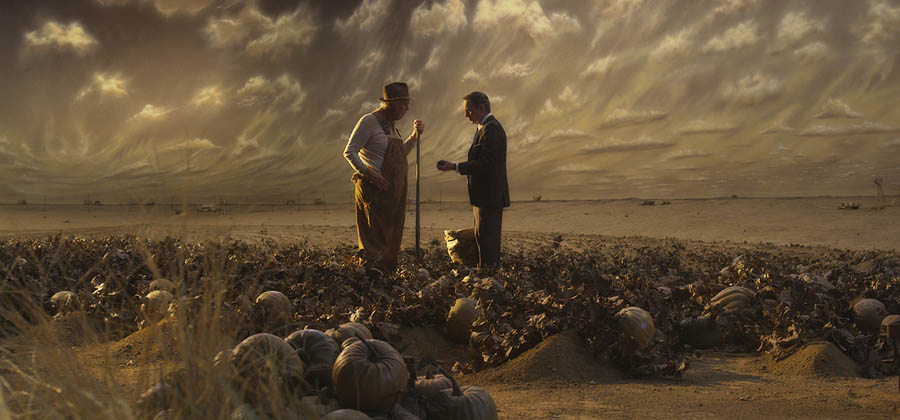
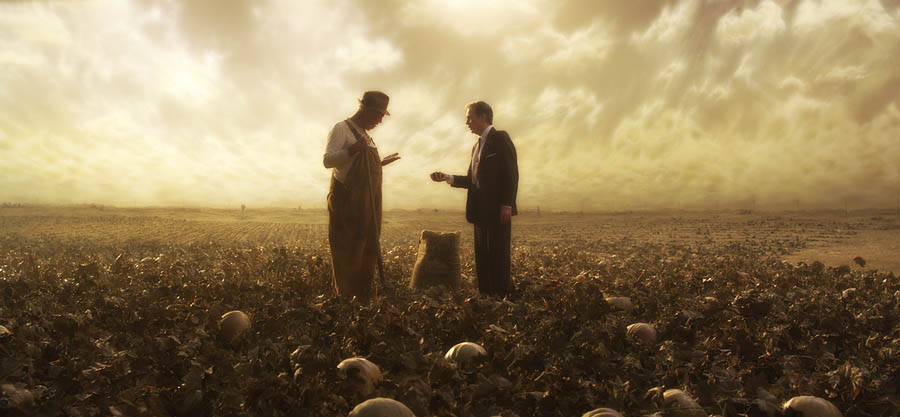
That was all shot on a soundstage and I deliberately clipped parts of the sky backing to make it look more real. It was painted medium brown and I found that it looked more realistic overexposed so I pounded it with light.

This was the only scene we shot twice because it was the first scene shot on Day One and by Day Ten I had learned so much that me and the production designer Clark Hunter asked for a second attempt. Here was the first version where you can see the true brightness of the sky backing:

900manure1.jpg


And here was the reshoot where I overexposed the sky by spotlighting it from the ground:

900manure2.jpg


Yes, there is some clipping in the sky but that would happen in real life which is the point, you don't always want a perfectly balanced image because it can (A) be boring, and (B) not always be realistic.

I mainly used my light meter and the set monitor, occasionally looking at the histogram in the camera, but since I was not operating, it was not easy seeing that. I also looked at TIFF frames every night of each set-up and made adjustments to my exposure technique the next day.

Now if I were really outside shooting into a hot sky, I'd probably use an ND grad or attentuator to control the brightness to something manageable, plus adjust my exposure, but in this case, I could control it with lighting to the level I wanted.

Remember, clipping just means that something has gone white with no detail in it, just white. That's not always a mistake as long as you remember that no detail means no detail, there's nothing there that can be pulled out in post.
 
hehe I know I know, Im a avid reader of the "Manure" thread:)

I totally agree about not being afraid of clipping stuff, question is to let it clip in camera or in post? - and how this affects the Tonal values available to the rest of the image.:)
SO you clipped it in camera and therefore distributed more values to the rest of the image, resulting in a higher "quality" image - expose to the right theory:)

But did you rate the camera as 320? and how low did you let the blacks go compared to your midtones - 2stops? (when shooting).


best,

Sidney
 
I don't really meter my fill light, I set it by eye and then double-check by looking at the monitor (if set-up properly.) You could easily shoot a test though and figure out when things go to black, etc.

There's a difference between contrast ratios, black levels, and noise issues in the shadows -- those are three different areas of concern though related.

Two-stops under would not go to black anyway unless it was a dark grey object.

I mean, in general, you could say that shadows that were four stops under compared to the key would be near black in most situations, whereas shadows that were three stops under would be moody and dark, but with detail. But when things actually go to black depends on their reflectance. Could be five, six, seven stops under depending on the object. Generally if you wanted the shadow side of a face to go pitch-black, you'd just try to make it as dark as you could.

I don't light movies to specific ratios.

Now in the case of faking day exterior indoors on a soundstage, starting out by matching the contrast ratio outdoors is not a bad idea.

The thing about lighting is that you don't want to make it a technical exercise, the goal would be to be able to light by eye as much as possible.

Yes, I rated the camera at 320 ASA but as the shoot went on, I found myself adding more exposure. I probably could have rated it at 250 ASA, that's only a 1/3-stop difference (within a margin of exposure error) but perhaps it would have given me a generally heavier exposure.
 
One thing to keep in mind is that we all have different exposure tendencies. I find myself working with 2nd Unit DP's a number of times and even if I give them the ASA rating and exposure technique, I find their footage comes back at a different density than mine (often more underexposed, but one DP consistently overexposed compared to my footage.)

So you find a method that works for you. We could all use a 320 ASA rating but that doesn't mean we'll all get the same exposures because we all read our meters differently, we all look at different monitors, and we not only interpret histograms differently, but we have different tastes and we are often shooting different subjects.

So if one guy finds he has to set his meter to 200 ASA and another has to set his meter to 400 ASA to get the results he wants, then that's fine - it doesn't necessarily mean that the camera is 200 ASA or 400 ASA though.
 
That was all shot on a soundstage and I deliberately clipped parts of the sky backing to make it look more real. It was painted medium brown and I found that it looked more realistic overexposed so I pounded it with light.

This was the only scene we shot twice because it was the first scene shot on Day One and by Day Ten I had learned so much that me and the production designer Clark Hunter asked for a second attempt. Here was the first version where you can see the true brightness of the sky backing:

900manure1.jpg


And here was the reshoot where I overexposed the sky by spotlighting it from the ground:

900manure2.jpg


Yes, there is some clipping in the sky but that would happen in real life which is the point, you don't always want a perfectly balanced image because it can (A) be boring, and (B) not always be realistic.

I mainly used my light meter and the set monitor, occasionally looking at the histogram in the camera, but since I was not operating, it was not easy seeing that. I also looked at TIFF frames every night of each set-up and made adjustments to my exposure technique the next day.

Now if I were really outside shooting into a hot sky, I'd probably use an ND grad or attentuator to control the brightness to something manageable, plus adjust my exposure, but in this case, I could control it with lighting to the level I wanted.

Remember, clipping just means that something has gone white with no detail in it, just white. That's not always a mistake as long as you remember that no detail means no detail, there's nothing there that can be pulled out in post.

I noticed the background (sky) in the reshoot also looked quite difference which seemed to make big difference in how realistic the end result was.

Was this replaced with a new one or did adding much more light just make that dramatic a change to the appearance of it?

Also, did you use any filters to add a "haze effect" (or perhaps something done in post)? There is something about the second image that feels more authentic as far as scattered light / atmosphere goes.
 
I know 2 stops under is not really that dark, but when you take the shadows down in post you have a higher noise free "starting" point. EDIT - by shadows I meant in a face - the darker areas of the face...

But I get what you mean about using your eyes. Normally I prefer to control the roll off/ fall off, be it to white or shadow, in the color grading, So Im interested in finding out how much people are pushing it...:)

My reference to the technical side was only because I really trying to get my head around this Red/RAW thingy... I would hate if I came home with a beautiful lit high contrast shot only to find out that my shadows are alive...

But I guess youre right, what works for one person might not work for another...

Funny with Americans and operators, we don´t normally use operators over here (steadicam is the exception)- DP operates and If you ask them, normally they cant imagine not controlling the camera themselves...

†he production designer of Manure really knows his craft by the look of your stills. very impressive work.
Why do you think your 2nd units tend to underexpose compared to you?
 
Back
Top