Welcome to our community

Be a part of something great, join today!

  • Hey all, just changed over the backend after 15 years I figured time to give it a bit of an update, its probably gonna be a bit weird for most of you and i am sure there is a few bugs to work out but it should kinda work the same as before... hopefully :)

Exposing for night scene.

dean lee

Well-known member
Joined
Aug 13, 2012
Messages
60
Reaction score
0
Points
0
Location
Toronto
Hey guys

Im trying to figure some stuff out. How do you expose for a night shot. Very dim lit. I've one some tests and the noise is pretty nasty. Iso800 1/50.

Also what is you go to workflow to remove noise?

Also I wanted to know..when you cap you lens and hit magnify..how much noise do you see?

Thanks dean
 
If you can't introduce any light, you need a faster lens. If you are finishing in 1080, you could use an external recorder bypassing the Redcode compression and get a much cleaner image in low light. You can also check out the Neat Image plugin for noise reduction.
 
Thanks Bob. Would you normally shoot this brighter and then crush in post.?
 
If you can shoot brighter, especially at 800, you'll be better off. It's basically the same as exposing for night scenes at ISO 320, which is beneficial for reducing noise but harder to do at night (You will need to light a night scene for a proper exposure at 320).

You can get by shooting wide open at 800 but the noise will stick unless you throw a noise removal tool on in post. You could also try tweaking the curve to clean up the shadows, but then again it depends on how much of your frame is shadows (If your noise goal post on the left of the histogram is full and your talent/working scene is in the shadows, you're very limited in what you can do with curves).
 
Remember that increasing ISO when shooting is more a function of being able to see your exposure. There is no harm in doing this as it's what you will do in post anyway. It's meta data remember. RED cameras do not do any in camera noise reduction or sharpening like others do. But I am surprised in low light how much cleaner images come from the downsampled HDMI/SDI ports in low light. Check out Neat Image (http://www.neatimage.com) if all else fails.
 
Shoot at a lower iso and get more light, probably not more than iso500 if you are sensitive to noise. It is essentially the same as shooting brighter and darkening in post but you get to actually see your results on set.

If you can't get more light (with bigger lights, open aperture, open shutter, etc) then consider playing with your look to hide noise a bit. Depending on where you are seeing noise, a look that compresses (reduces contrast) in the gamma curve in the area where noise is visible may make it less visible. The settings that might do it are contrast and shadow.
 
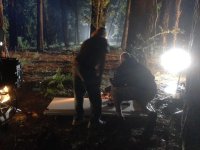
Except that you may not have the benefit of a big backlight, hopefully the rest of the lighting arrangement here might be of some help. I cannot make any claim to the setup. That was done by someone who knows his stuff and made a good living at shooting TVCs when film and production value-adding was still king. In this instance he was using what lighting was available within the power budget, excluding the big 12K which was separately powered at a distance. For practical reasons, it was not lifted higher to a more ideal position. We sometimes have to live within our means.

Off screen to the right about 20 metres and separate by about 10 metres were two 800watt redheads warm, lighting the ground and treetrunks in close background from the right. They also doubled as site worklights.

On left edge, one 650watt tungsten fresnel, close to ground, gelled warmer for left profile and front of subject, flags narrowed right down to a slot. My limited understanding is that the motivation for this light upon the subject on the ground was a nearby dropped torch, which passes through the earlier portion of the tracking shot which moves to the right.

In right, a LED panel gelled even cooler for soft right fill/rim.

The subject prone on the ground in front of the dolly-mounted camera was a small girl lost in the woods. I can't show you the actual vision as it is someone elses and I do not have consent to publish. The object on centre frame edge to left is a mattebox on front of a 7D on a tripod not another light. The fresnel light is below it in the image.

The active camera was a SI2K. The settings were close to ISO 320 tungsten which on the SI2K is 0db gain, which seems to be its happiest setting. I believe for the RED camera family it is ISO 800 but there are better people here than I to advise you on that subject.

3200K whitebalance was selected along with Neutral Low Contrast LUT for previewing and histogram for the exposures. Like the RED camera family, the SI2K does not bake in the whitebalance or LUTs, which we call looks. The peak in the histogram tended towards the left third. Lenses were T1.3 Super16mm and f1.4 Nikon 35mm stills primes and we wanted them at about T2 to stay out of any softness/flare issues with the Nikons.
 

Attachments

  • NIGHT SETUP.jpg
    NIGHT SETUP.jpg
    89.3 KB · Views: 0
Last edited:
what do you guys think about this video for low light test on Epic? It doesn't look 100% clean, but we are watching youtube version..

Donno if neat video was used, check out the shots at 1:15.

http://www.youtube.com/watch?v=aYGkDInYxJk
 
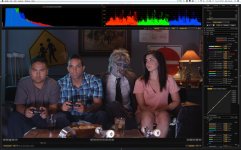
No Noise reduction is needed here because the areas that are visible can easily be captured at a proper exposure. Proper exposure has black in it, but it also has highlights and mid tone. Logic in my example attached would suggest that the image is going to be noisy. Its not at all because even though the histogram indicates that most of the image is in shadow, the exposure on the faces is correct. I don't need to alter the histogram hence leaving any noise in the shadows.


what do you guys think about this video for low light test on Epic? It doesn't look 100% clean, but we are watching youtube version..

Donno if neat video was used, check out the shots at 1:15.

http://www.youtube.com/watch?v=aYGkDInYxJk
 

Attachments

  • playstation.jpg
    playstation.jpg
    95.2 KB · Views: 0
in other words, you provided the sensor 'enough' light to expose well. The sensor wasn't starved for light and hence didn't create noise.. You just select and light the area of the shot that you want to expose, in this case, it was faces. In some other shot it would be a window with silhouetted foreground actor or something... al long as the sensor has enough light to expose whatever you are choosing to in the shot? I recently got an Epic and have been experimenting various ways to expose. My basic strategy has been to check the light meter and then the exposure tool + false colors, haven't been paying too much attention to the histogram. However, I do pay attention to the guide posts..
 
Last edited:
800 ISO can be misleading in low light, or when you have lots of shadows. Whatever the R3D compression is doing, it'll add more noise than what you see on your monitor. Don't let the monitor fool you. Since you have more control of your light in a night scene, you will not need to worry about highlight protection like you would shooting daylight which is when 800 iso seems to be very handy. As Bob mentioned this is why you'll get a cleaner image if you record to an external recorder, it's pre-R3D compression. This is also why it's better to use a lower ISO to shoot in low light, because it forces you to either open up a few stops, or use more light to avoid that noise. Also remember to blackshade.
 
The problem is there is a certain noise level at 800 ASA, let's say, that looks acceptable in normal scenes because the brighter details in the shot are catching your eye more than the noise. But in a dim scene, the same noise level is more obvious. Another issue is that even if the noise level in a dim image is still acceptable, you are now riding the edge in terms of exposure -- in other words, you have no flexibility to brighten the image in post without making the noise more visible. Hence why it is generally a good idea to expose dim scenes more conservatively and then darken them further in post. Or if you really want to make the image look darker on the monitor, either darken the monitor artificially or drop the ASA level to make the image look darker, either way you are still giving the sensor more exposure.

Sometimes in dim scenes I also use more fill light than seems normal because I plan on crushing down the shadow detail in post to improve the blacks and the noise in the shadows.

Here's one common problem with shooting in bright light levels (day exterior) and dim light levels (night work) -- your eyes get used to the levels and so the monitor looks dim in brighter conditions and too bright in dim conditions, so you make the mistake of exposing until it looks right on the monitors. Plus many monitors have a backlight function that lifts the shadows, which can be misleading in dim viewing conditions.
 
Here's one common problem with shooting in bright light levels (day exterior) and dim light levels (night work) -- your eyes get used to the levels and so the monitor looks dim in brighter conditions and too bright in dim conditions, so you make the mistake of exposing until it looks right on the monitors. Plus many monitors have a backlight function that lifts the shadows, which can be misleading in dim viewing conditions.

On a scale of 1 - 10, 5 being the average brightness level for monitor viewing in a day interior viewing condition, what would be your preferred value for day exterior, and night exterior conditions to minimize the effect you mentioned above?
Thanks
 
Has anyone tried iso800 with the lens cap on and hit the magnify button. I am going to assume that this is the noise you will see in the area with no light if you zoom in. After reading the above I have determined that.. you cannot shoot a night scene as you would see it. you would shoot a night seen and expose it brighter and then crush in post.
 
After reading the above I have determined that.. you cannot shoot a night scene as you would see it. you would shoot a night seen and expose it brighter and then crush in post.

"Cannot" is too strong a word, suggests a rule... sure you can, if you can accept a certain amount of noise. There is no rule that night scenes should be as noiseless as possible.
 
Last edited:
You are correct.. "cannot" is a strong word and you are right. You could. But its just not the look i want to get. I'm just curious on how others are lighting there dark/night scenes.. As I dont see any noise at all.. im wondering now if they are exposing and just crushing it in post. i will try to find examples...
 
You are correct.. "cannot" is a strong word and you are right. You could. But its just not the look i want to get. I'm just curious on how others are lighting there dark/night scenes.. As I dont see any noise at all.. im wondering now if they are exposing and just crushing it in post. i will try to find examples...

I think folks are exposing and crushing in post. I have yet to do more tests on my Epic for night with good lighting, but my assumption is its going to be noisy unless you have good lighting and find a nice balance. I won't be looking for absolutely pristine noiseless shots, but the bare minimum noise that won't bother.. The fireworks video I posted earlier in this thread is a good example where the noise isn't bothersome at all and it looks good to my eye. As some folks mentioned earlier, that can be done when you exposed correctly for the fireworks (in that video) and the sensor was able to pick up detail in the shadows.. again two different POVs. Until I do my own tests, it will be hard to favor either school of thought..
 
I recently shot A LOT of night time exteriors... The only way to get "clean" blacks for low light exteriors is to expose at ISO 500 or lower. 500 For me was pushing it, but that got my blacks clean and my images to be "dark". ISO 800 was a joke for the night time EXT I was shooting. It was so noisy it looked horrible.

Expose using the RAW view and you'll be happy. My only thing to tell you is if you don't have enough light... get more lights. There is really no way around it with the current sensor in the Scarlet.

You must overlight to get a dark scene to be noiseless. I was using a Arri D12 HMI (1.2K or "5K" in tungsten strength) and that was still a little dark for some scenes where I wanted the light to be far away but still bright.

Use your FLUT, it is your friend as well.
 
My tip: Keep ISO at 320 add fast lens and then introduce more light if the lens doesen't do the trick.
I always try to keep ISO at 320 in low light and 800 in daylight. Seems weird but that's how I get the cleanest images from my Scarlet. And of course try to keep the red color down on the "goalposts" around the histogram (noise meter and clipping meter).

I also tried using frame averaging to remove noise (in the latest 4.0 build BETA) and the results are promising, very clean image even when I tried to push it in post. It does however mean that you can't shoot 4k as it needs to double the framerate to do averaging. It does will also affect motion blur (easily fixed by setting shutter to 360 degerees).
 
Last edited:
I recently shot A LOT of night time exteriors... The only way to get "clean" blacks for low light exteriors is to expose at ISO 500 or lower. 500 For me was pushing it, but that got my blacks clean and my images to be "dark". ISO 800 was a joke for the night time EXT I was shooting. It was so noisy it looked horrible.

Expose using the RAW view and you'll be happy. My only thing to tell you is if you don't have enough light... get more lights. There is really no way around it with the current sensor in the Scarlet.

You must overlight to get a dark scene to be noiseless. I was using a Arri D12 HMI (1.2K or "5K" in tungsten strength) and that was still a little dark for some scenes where I wanted the light to be far away but still bright.

Use your FLUT, it is your friend as well.

I agree with using enough lights to expose and keep it minimal in noise. The key here would be to still maintain the contrast ratios so that in post you have options to pull back on some areas and push others.
 
Back
Top