Welcome to our community

Be a part of something great, join today!

  • Hey all, just changed over the backend after 15 years I figured time to give it a bit of an update, its probably gonna be a bit weird for most of you and i am sure there is a few bugs to work out but it should kinda work the same as before... hopefully :)

Exports with Cropping trouble

Dave Weber

Well-known member
Joined
May 17, 2007
Messages
907
Reaction score
0
Points
16
Location
Orange County, CA
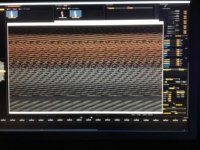
Is anyone experiencing any trouble exporting with a crop? I have a client that was doing some exports and every time he cropped he would get a messed up QT file. I tried with the same result. I tried to do a search looking for this same trouble but can't find a thread with this in it.

Here is a still shot of what the QT screen looks like.
 

Attachments

  • image.jpg
    image.jpg
    20.1 KB · Views: 0
I was having the same issue. The bug I found is only if you export using the 1/2 debayer settings. The FULL and 1/4 debayer work OK. I'm not sure what I did to get it finally working. I would reinstall Redcine-X

Good luck!
 
Is anyone experiencing any trouble exporting with a crop? I have a client that was doing some exports and every time he cropped he would get a messed up QT file. I tried with the same result. I tried to do a search looking for this same trouble but can't find a thread with this in it.

Here is a still shot of what the QT screen looks like.

I need some more information about this particular issue to troubleshoot it.

Can you enable verbose logging (preferences dialog), recreate this corrupt output and then save a report (help->save report) and send it to redcinex at red dot com along with a copy of your export preset (right click on preset and choose save)?
 
I was having the same issue. The bug I found is only if you export using the 1/2 debayer settings. The FULL and 1/4 debayer work OK. I'm not sure what I did to get it finally working. I would reinstall Redcine-X

Good luck!

Bob,

Did the reinstall with same results. thanks for the tips I'm going to try the other debayer settings and check it out.
 
Back
Top