
Navigation
Install the app
How to install the app on iOS
Follow along with the video below to see how to install our site as a web app on your home screen.

Note: this_feature_currently_requires_accessing_site_using_safari
More options
Welcome to our community
Be a part of something great, join today!
You are using an out of date browser. It may not display this or other websites correctly.
You should upgrade or use an alternative browser.
You should upgrade or use an alternative browser.
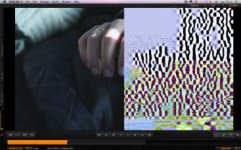
Ever seen this?
- Thread starter José L. Martínez
- Start date

Gunleik Groven
REDuser Sponsor
Looks like a faulty and unverified copy.
Happens more often with cards than with disks, it seems.
Do you still have the original media?
Happens more often with cards than with disks, it seems.
Do you still have the original media?
- Thread starter
- #3
José L. Martínez
Well-known member
Gunliek, I should pay you a salary!.
I don't know. Production provided its own (inexpensive) DIT, I'm just the problem solver... Tomorrow I'll spent a full day with him, trying to see wether is card problem or a faulty operation.
Cheers,
Jose
I don't know. Production provided its own (inexpensive) DIT, I'm just the problem solver... Tomorrow I'll spent a full day with him, trying to see wether is card problem or a faulty operation.
Cheers,
Jose

Sean R.
RED Bomb Squad
- Joined
- Aug 16, 2007
- Messages
- 481
- Reaction score
- 0
- Points
- 0
Yeah, as Mr. Groven offered- it is likely the external card reader that is being used to copy the files over, which you can investigate if you have the original media or if you have multiple copies that were taken from the original media. I have also seen the cable and computer's bus cause this type of data transfer corruption, but those scenarios are not as likely as the card reader itself.
Sean Ruggeri
Sean Ruggeri
- Thread starter
- #5
José L. Martínez
Well-known member
Thanks!.
I'll keep you informed.
Jose
I'll keep you informed.
Jose
- Thread starter
- #6
José L. Martínez
Well-known member
Hi again,
I've been investigating this both on location and post path.
Production is using 2 of our MX cameras and shoting 4k 169 25p mainly in cf 16gb cards.
Copies are being done on a preunibody macbook pro with leopard to a 4tb graid for on set backup and several lacie rugged disks sent to post were another copy is being made to a raid 5 setup. Then the clips are ama ingested to mc 5, transcoded to dnxhd 36 and edited.
Apart from the corrupt frames, some clips exhibit black frames, sometines one, sometines several, across the clip. Sometines is unappreciable, sometimes it makes redcinex and avid crash. The odd thing is that the corrupt clips are mostly from the a camera, and are not the same clips or frames across the disks, from on set backup and post copies.
I think i've almost isolated the problem to the dit part. Cameras were swapped and even a new body was provided. Cards are used accross both cameras and swapped for new ones. According toncamera crew, no camera has ever provided a drop frame alert. Card readers were swapped. Disks were new, but...
The dit station is using a sonnet 2 port fw800 card (was also swapped for a new one) through the offset bus. From this, the raid and 1 cf card reader are feed. From the fw800 bus in the macbook, the post disk is being feed. The remaining fw400 port is feeding the other card reader through a 400 to 800 cable. The guy is even using the USB port for another disk...
Dit is not copying the profile files or the structure as is. Just dragging the rdm folder to raid and post disk SIMULTANeously... When pointed about the bus torture he answer is that it's his third movie and never has a problem.
Camera crew is young and with six day shooting 14 plus hours, I don't know what to believe... Post guys has not much experience with red.
So, I'll spent another day shooting, and will backup the post disk myself to check, but any opinions will be wellcomed.
Cheers
Jose
Dit is using both Mac formatted (raid) and fat 32 (rugged drives) file systems. Mac disks are being read at post house through Windows 7 machines.
I've been investigating this both on location and post path.
Production is using 2 of our MX cameras and shoting 4k 169 25p mainly in cf 16gb cards.
Copies are being done on a preunibody macbook pro with leopard to a 4tb graid for on set backup and several lacie rugged disks sent to post were another copy is being made to a raid 5 setup. Then the clips are ama ingested to mc 5, transcoded to dnxhd 36 and edited.
Apart from the corrupt frames, some clips exhibit black frames, sometines one, sometines several, across the clip. Sometines is unappreciable, sometimes it makes redcinex and avid crash. The odd thing is that the corrupt clips are mostly from the a camera, and are not the same clips or frames across the disks, from on set backup and post copies.
I think i've almost isolated the problem to the dit part. Cameras were swapped and even a new body was provided. Cards are used accross both cameras and swapped for new ones. According toncamera crew, no camera has ever provided a drop frame alert. Card readers were swapped. Disks were new, but...
The dit station is using a sonnet 2 port fw800 card (was also swapped for a new one) through the offset bus. From this, the raid and 1 cf card reader are feed. From the fw800 bus in the macbook, the post disk is being feed. The remaining fw400 port is feeding the other card reader through a 400 to 800 cable. The guy is even using the USB port for another disk...
Dit is not copying the profile files or the structure as is. Just dragging the rdm folder to raid and post disk SIMULTANeously... When pointed about the bus torture he answer is that it's his third movie and never has a problem.
Camera crew is young and with six day shooting 14 plus hours, I don't know what to believe... Post guys has not much experience with red.
So, I'll spent another day shooting, and will backup the post disk myself to check, but any opinions will be wellcomed.
Cheers
Jose
Dit is using both Mac formatted (raid) and fat 32 (rugged drives) file systems. Mac disks are being read at post house through Windows 7 machines.
Gunleik Groven
REDuser Sponsor
This sounds like the recepy for problems.
No card should be formatted here before a transcode is verified.
And I bet a lot will not be.
I'll come back with a bit more later... -
No card should be formatted here before a transcode is verified.
And I bet a lot will not be.
I'll come back with a bit more later... -
john vikias
Member
- Joined
- Aug 30, 2009
- Messages
- 13
- Reaction score
- 0
- Points
- 0
Good morning from Europe! I have seen this kind of problem with corrupted Hard Drives! they have had Bad Sectors! The Medicine was to use new Hard drives!
Sebastian Gross
Well-known member
- Joined
- Oct 4, 2009
- Messages
- 65
- Reaction score
- 0
- Points
- 0
- Location
- Berlin, Germany
- Website
- www.piratesnparadise.de
had it , too
had it , too
hey guys,
had the same problem recently, also
pointed out here.
i am still not convinced that it's the card reader or the bus, because if you look closely you'll find fractions of the bayer pattern and R/G/B in the images.
we noticed this problem with:
build 30.5.0
4K 16:9
onboard sound
RC36
16GB CF
data was copied with R3D Data Manager (verified the copies) and later on with MuCommander, same result.
and the gear was fresh out of the box.
maybe there's some sort of problem with the data stream in the first place?
had it , too
hey guys,
had the same problem recently, also
pointed out here.
i am still not convinced that it's the card reader or the bus, because if you look closely you'll find fractions of the bayer pattern and R/G/B in the images.
we noticed this problem with:
build 30.5.0
4K 16:9
onboard sound
RC36
16GB CF
data was copied with R3D Data Manager (verified the copies) and later on with MuCommander, same result.
and the gear was fresh out of the box.
maybe there's some sort of problem with the data stream in the first place?
Gunleik Groven
REDuser Sponsor
R3D manager can miss stuff which is picked up in the transcode. I have as a rule of thumb that media is NOT EVER to be reused or formatted at least untill the transcode is verified.
I have yet to see on any of the projects I have been on that the fault has been on the media itself. I know others say they have, and don't doubt it.
Wheteher the media is good or bad can quickly be verified through an in-camera playback.
Cheers
G
I have yet to see on any of the projects I have been on that the fault has been on the media itself. I know others say they have, and don't doubt it.
Wheteher the media is good or bad can quickly be verified through an in-camera playback.
Cheers
G
- Thread starter
- #11
José L. Martínez
Well-known member
The thing is getting nasty. Failures do not appear on cf but just in the disks, randombly between the raid and the rugged. When checked, some errors appears in both disks, but most are in one or the other.
We've changed camera, cards and now computers. A test copy I did on set didn't produce errors, but not simultaneous copy on the computer did. Also redcine is not showing thumbnails of some checked files, just black frame, but they play correctly.
I've seen this dit moving his cart with the raids running, upstairs, and I've been told some reddrives were sent without backup to post and connected without power supply. He's even copying 2 cards to 2 disk simultaneously, and just backing up the rdm, no profile file.
I have evidences, but no proofs.
Opinions?
We've changed camera, cards and now computers. A test copy I did on set didn't produce errors, but not simultaneous copy on the computer did. Also redcine is not showing thumbnails of some checked files, just black frame, but they play correctly.
I've seen this dit moving his cart with the raids running, upstairs, and I've been told some reddrives were sent without backup to post and connected without power supply. He's even copying 2 cards to 2 disk simultaneously, and just backing up the rdm, no profile file.
I have evidences, but no proofs.
Opinions?
- Banned
- #12
conrad gaunt
Banned
- Joined
- May 31, 2007
- Messages
- 946
- Reaction score
- 0
- Points
- 0
Nearly all my data problems of old, such as dropped frames or garbage output, were caused by bad drive cables, but if you're exclusively shooting CF (ie, no raids), this wouldn't be the cause. If not, its an avenue worth exploring. I'll describe the symptoms below even though it doesn't seem likely its the cause of your problems.
EDIT, I MISSED THE POST ABOVE, FAULTY DRIVE CABLES ARE ALWAYS A PRIME SUSPECT! INSIST ON A SPARE WHEN YOU RENT A CAMERA.
IN THIS SITUATION THERE IS NOTHING THE DIT CAN DO UNLESS HE HAS TIME TO INSPECT EVERY CLIP FRAME BY FRAME (IE, NOT HIS FAULT)
Normally when a drive cables goes bad you'll experience "POST hangs" as a clue, where the camera freezes after hitting stop after recording, requiring a power cycle. the files are often ok at first glance, but closer inspection in redcine can reveal dropped frames and/or garbage as above. Dropped frames normally show up on LCD, but not always.
I stopped getting these problems when I stopped using the 6ft drive cables (<cough> they're evil <uncough>), but can affect any size drive cable that gets bashed a bit (ie, during a low shot the cable gets bent as the operator tilts the camera up from the floor, since it sticks straight out the back of camera and is rigid).
other stuff,
make sure your DIT is unplugging disks properly.
never bus power a raid with fw on a macbook, it can erase the disk.
I once had a problem with redrushes "zeroing" R3D files whilst regenerating proxy files, so I avoid it now even if the problem has gone (all data was rescued, and another copy existed, but once you see 7tb of data disappear for no good reason, and you know it cost £300k, you don't take chances anymore. The error caused the files sizes to be misreported under windows XP)
Bus torture isn't a big deal, but unverified copies can be a problem. I'd invest in R3D Data Manager. If you have corrupt footage I'd try and Redundead anything shot to raid immediately as rescued files may not be corrupt (unless a drive cable error). You may find shots from a previous shoot mixed in! R3D Data Manager for Mac version has a nice GUI for Redundead.
hopefully you just need a new card reader.
ps, I don;t want to trade on misfortune, but in the unfortunate situation that you do need to reshoot anything, and assuming you're in the uk.. I have a red body and lenses at way way below commercial rates, and you get a DIT for free if you want 07835915253
good luck and kind regards
EDIT, I MISSED THE POST ABOVE, FAULTY DRIVE CABLES ARE ALWAYS A PRIME SUSPECT! INSIST ON A SPARE WHEN YOU RENT A CAMERA.
IN THIS SITUATION THERE IS NOTHING THE DIT CAN DO UNLESS HE HAS TIME TO INSPECT EVERY CLIP FRAME BY FRAME (IE, NOT HIS FAULT)
Normally when a drive cables goes bad you'll experience "POST hangs" as a clue, where the camera freezes after hitting stop after recording, requiring a power cycle. the files are often ok at first glance, but closer inspection in redcine can reveal dropped frames and/or garbage as above. Dropped frames normally show up on LCD, but not always.
I stopped getting these problems when I stopped using the 6ft drive cables (<cough> they're evil <uncough>), but can affect any size drive cable that gets bashed a bit (ie, during a low shot the cable gets bent as the operator tilts the camera up from the floor, since it sticks straight out the back of camera and is rigid).
other stuff,
make sure your DIT is unplugging disks properly.
never bus power a raid with fw on a macbook, it can erase the disk.
I once had a problem with redrushes "zeroing" R3D files whilst regenerating proxy files, so I avoid it now even if the problem has gone (all data was rescued, and another copy existed, but once you see 7tb of data disappear for no good reason, and you know it cost £300k, you don't take chances anymore. The error caused the files sizes to be misreported under windows XP)
Bus torture isn't a big deal, but unverified copies can be a problem. I'd invest in R3D Data Manager. If you have corrupt footage I'd try and Redundead anything shot to raid immediately as rescued files may not be corrupt (unless a drive cable error). You may find shots from a previous shoot mixed in! R3D Data Manager for Mac version has a nice GUI for Redundead.
hopefully you just need a new card reader.
ps, I don;t want to trade on misfortune, but in the unfortunate situation that you do need to reshoot anything, and assuming you're in the uk.. I have a red body and lenses at way way below commercial rates, and you get a DIT for free if you want
07835915253good luck and kind regards
Last edited:

Steve Sherrick
Well-known member
I hate to say it Jose, but sounds like the DIT does not know much about best practices with data management. Therefore, they need to get informed and if they insist on doing it their way, they need to be politely let go. A Digital Loader's prime responsibility is to get the media backed up to disk with no bad frames, no corruption. That involves using best practices and when problems are discovered, the proper steps are taken to remedy the situation. Source media would not be erased until that solution was found. Budget should have nothing to do with this. Whether it's a $1,000 short film or a major motion picture, file based production is here to stay and those who are put in the position to manage data need to do it properly.The thing is getting nasty. Failures do not appear on cf but just in the disks, randombly between the raid and the rugged. When checked, some errors appears in both disks, but most are in one or the other.
We've changed camera, cards and now computers. A test copy I did on set didn't produce errors, but not simultaneous copy on the computer did. Also redcine is not showing thumbnails of some checked files, just black frame, but they play correctly.
I've seen this dit moving his cart with the raids running, upstairs, and I've been told some reddrives were sent without backup to post and connected without power supply. He's even copying 2 cards to 2 disk simultaneously, and just backing up the rdm, no profile file.
I have evidences, but no proofs.
Opinions?
There's still too many productions that do not get this and producers are burning themselves by underestimating the importance of the job.
- Thread starter
- #14
José L. Martínez
Well-known member
I hate to say it Jose, but sounds like the DIT does not know much about best practices with data management. Therefore, they need to get informed and if they insist on doing it their way, they need to be politely let go. A Digital Loader's prime responsibility is to get the media backed up to disk with no bad frames, no corruption. That involves using best practices and when problems are discovered, the proper steps are taken to remedy the situation. Source media would not be erased until that solution was found. Budget should have nothing to do with this. Whether it's a $1,000 short film or a major motion picture, file based production is here to stay and those who are put in the position to manage data need to do it properly.
There's still too many productions that do not get this and producers are burning themselves by underestimating the importance of the job.
I agree on this word by word, but since I'm an interested part (these are my company' cameras) I'm against this 'dit' trying to save his butt and the production company, trying to hide all the shortcuts taken, since insurance will not pay if the problem is bad operation...
J
Gunleik Groven
REDuser Sponsor
I am with Steve...
This sounds like a the story of a disaster that everyone could foresee happen, and still didn't do anything.
the least thing the DIT should/must/have the responsibility to do is to NOT send disks with unverified results back into circulation untill a good result is found or said media is taken out of circulation.
It might hold the production up, but not much compared to actually not having the shots...
If stuff appears to be "random", the DIT is probably not doing his or her job at all. Stuff is rarely random. Hardware faults happen. But not on this scale across many cameras, cables, computers and harddisks. Sounds like the only thing they haven't thought of swapping is the DIT...
You managed to get good copies, right?
Original media has been good, as far as you have been able to establish, right?
And the conclusion is...
Noone is helped by politeness, if they actually don't have the shots at the end of the day.
THAT is a scandal...
This sounds like a the story of a disaster that everyone could foresee happen, and still didn't do anything.
the least thing the DIT should/must/have the responsibility to do is to NOT send disks with unverified results back into circulation untill a good result is found or said media is taken out of circulation.
It might hold the production up, but not much compared to actually not having the shots...
If stuff appears to be "random", the DIT is probably not doing his or her job at all. Stuff is rarely random. Hardware faults happen. But not on this scale across many cameras, cables, computers and harddisks. Sounds like the only thing they haven't thought of swapping is the DIT...
You managed to get good copies, right?
Original media has been good, as far as you have been able to establish, right?
And the conclusion is...
Noone is helped by politeness, if they actually don't have the shots at the end of the day.
THAT is a scandal...

Stephen Strangways
Well-known member
- Joined
- Nov 10, 2008
- Messages
- 680
- Reaction score
- 0
- Points
- 0
- Location
- Hamilton, ON, Canada
- Website
- www.strangways.com
Earlier in the thread I was thinking the DIT needs to get a copy of R3D Data Manager:
http://www.r3ddata.com
But upon further reading, I think you are probably better off replacing the DIT with a MARVIN:
http://www.marvintech.com/
http://www.r3ddata.com
But upon further reading, I think you are probably better off replacing the DIT with a MARVIN:
http://www.marvintech.com/
The odd thing is that the corrupt clips are mostly from the a camera, and are not the same clips or frames across the disks, from on set backup and post copies.
When checked, some errors appears in both disks, but most are in one or the other.
- If the same frames of the same clips were corrupt, it would be a camera problem.
- If it's different clips and frames depending on which hard drive you are looking at, it's a problem in the transfer from cards, or the hard drives being backed up to.
If you see corruption on one hard drive but not another, it's probably the hard drive.
If the corruption is on different hard drives, it's probably the transfer from the cards, sometimes due to a hardware problem, but this seems to be a pretty clear case of user error.
- Thread starter
- #17
José L. Martínez
Well-known member
Yep. All CF media I checked in the 2 days was ok and camera playable. I also backed up a full day of shoting with my method, expresscard cf reader to macbook to fw800 rugged and everything was ok. Nothing fancy, just finder copy, clipfinder play check and redcinex full debayer scrub. I also did some terminal check sum by sha1.
Everything I backed up was ok. Now he has my system. I hope he won't crush it.
Everything I backed up was ok. Now he has my system. I hope he won't crush it.
Gunleik Groven
REDuser Sponsor
Now he has my system. I hope he won't crush it.
LOL
Good luck!
G
Steve Sherrick
Well-known member
Hopefully you have good insurance. :biggrin:Yep. All CF media I checked in the 2 days was ok and camera playable. I also backed up a full day of shoting with my method, expresscard cf reader to macbook to fw800 rugged and everything was ok. Nothing fancy, just finder copy, clipfinder play check and redcinex full debayer scrub. I also did some terminal check sum by sha1.
Everything I backed up was ok. Now he has my system. I hope he won't crush it.
- Thread starter
- #20
José L. Martínez
Well-known member
He did. 15+ calla from production this morning. The computer is producing an asorted amount of errors and shooting down...
He's connecting everything trough his rack mounted ups and using the same configuration.
He's connecting everything trough his rack mounted ups and using the same configuration.