Craig Melville
Member
- Joined
- Sep 28, 2016
- Messages
- 24
- Reaction score
- 0
- Points
- 1
- Location
- New York
- Website
- www.craigmelville.com
Hi team,
I've been doing some tests with my Epic-W. I've noticed the Color Space and Gamma Curve metadata aren't being recorded correctly when I shoot with RedWideGamutRGB and Log3G10.
I'm using the latest camera firmware and the latest versions of Resolve, Redcine X and Premiere on a Mac with the latest OS.
The problem arises when I shoot a clip with RedWideGamutRGB and Log3G10. When I open the clip in Resolve and select the Camera Raw settings for "Decode using: Camera Metadata" the settings incorrectly show Color Space as 'DRAGONColor2' and Gamma Curve as 'REDGamma4'.
I did a test to see where the problem lies. Spoiler alert: It seems to be the camera.
I opened up the same clip in Premiere and used Premier's tools to change the setting to what I actually shot with - 'RedWideGamutRGB' and 'Log3G10'. I saved the settings to the clip using 'Save to RMD'.
When I opened the corrected clip in Resolve, the RedWideGamutRGB and Log3G10 settings were now embedded in the clip. So Resolve was reading the clips correctly - which indicates the camera isn't recording the metadata correctly.
RedCine X had the same response. Clips from the camera were incorrect when straight out of the camera and were corrected when I fixed the clip's metadata in Premiere.
I think it's important that this is fixed. If files are being supplied to editors and colorists with the wrong color space and gamma setting embedded it could cause a lot of confusion. The clips would appear completely different to what the DP intended.
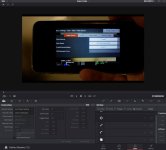
I've supplied a screengrab of the issue. You can see my iPhone showing the setting that were displayed on the camera's menu screen and the incorrect interpretation of these setting in the Resolve interface.
Thanks!
Craig
I've been doing some tests with my Epic-W. I've noticed the Color Space and Gamma Curve metadata aren't being recorded correctly when I shoot with RedWideGamutRGB and Log3G10.
I'm using the latest camera firmware and the latest versions of Resolve, Redcine X and Premiere on a Mac with the latest OS.
The problem arises when I shoot a clip with RedWideGamutRGB and Log3G10. When I open the clip in Resolve and select the Camera Raw settings for "Decode using: Camera Metadata" the settings incorrectly show Color Space as 'DRAGONColor2' and Gamma Curve as 'REDGamma4'.
I did a test to see where the problem lies. Spoiler alert: It seems to be the camera.
I opened up the same clip in Premiere and used Premier's tools to change the setting to what I actually shot with - 'RedWideGamutRGB' and 'Log3G10'. I saved the settings to the clip using 'Save to RMD'.
When I opened the corrected clip in Resolve, the RedWideGamutRGB and Log3G10 settings were now embedded in the clip. So Resolve was reading the clips correctly - which indicates the camera isn't recording the metadata correctly.
RedCine X had the same response. Clips from the camera were incorrect when straight out of the camera and were corrected when I fixed the clip's metadata in Premiere.
I think it's important that this is fixed. If files are being supplied to editors and colorists with the wrong color space and gamma setting embedded it could cause a lot of confusion. The clips would appear completely different to what the DP intended.
I've supplied a screengrab of the issue. You can see my iPhone showing the setting that were displayed on the camera's menu screen and the incorrect interpretation of these setting in the Resolve interface.
Thanks!
Craig