Welcome to our community

Be a part of something great, join today!

  • Hey all, just changed over the backend after 15 years I figured time to give it a bit of an update, its probably gonna be a bit weird for most of you and i am sure there is a few bugs to work out but it should kinda work the same as before... hopefully :)

Epic Users Without a Red Rocket Card?

Andy Nguyen

Well-known member
Joined
Aug 9, 2011
Messages
113
Reaction score
0
Points
0
Location
NYC
Website
www.andynguyenfilms.com
Dear Epic-M Owners,

Do any of you use this camera without a Red Rocket card?

Just got my camera (thanks Red) and shot just a simple 300 fps shot in 2k (13 minute clip).

Brought it into Redcine-X and great, but outputting that to ProRes took 3 hours without a Red Rocket card.

Do any of you use this camera without a Red Rocket card?

Is it essentially suicide to use this camera without a Red Rocket card?

Those of you who don't have a Red Rocket card, how miserable is your post workflow?

Thanks!!!

Andy
 
DaVinci Resolve and a fast computer does the trick - it is very smart about maxing out the cores.

Try the free version of Resolve maybe? Worth a go and I think you'll like it from both a speed and quality standpoint :)

Also, maybe RED hasn't got 2K footage decoding fully up to speed yet? It is a new feature.

Bruce Allen
www.boacinema.com
 
Just built a new computer the other day (PC) i7 970 6 core with a GTX 580 3gb. Today i was editing 4.5k .r3d's right inside Premiere cs5 at half res. The mercury engine is absolutely amazing. I would give that a try before trying to transcode if its possible. I was able to place a rgb curve, digital scale to 180%, crossfade, plus a blending mode on top of another .r3d without having to ram preview. It just played right through it like I didn't do anything to it. I'm just blown away by the power and how well it utilizes the power. While just playing in the timeline my computer was running at 80 - 100% cpu (all 12 threads) and 25 - 35% of my gpu.
 
That's way too slow. decoding from CS 5.5 was very fast without a rocket
 
Using Premier I can open the R3D files directly on a laptop (MacBook pro 15, i7, 8GBram ) and start editing immediately. For all resolutions: 2K, 4K, and 5K
 
Yeah I definitely have to recommend Premiere Pro CS 5.5 and DaVinci Resolve on the Mac.

On Windows there is still Premiere, but Resolve is a pretty big deal, and worth buying a Mac Pro for all on its own. Seriously.

In either case you need a good CUDA card ... although I get great results with Resolve on Epic footage with just a single ATI card on an 8 core. About as fast as outputting 1080p from my G5 in FCP 6 ... actually probably faster.
 
Dear Epic-M Owners,

Do any of you use this camera without a Red Rocket card?

Just got my camera (thanks Red) and shot just a simple 300 fps shot in 2k (13 minute clip).

Brought it into Redcine-X and great, but outputting that to ProRes took 3 hours without a Red Rocket card.

Do any of you use this camera without a Red Rocket card?

Is it essentially suicide to use this camera without a Red Rocket card?

Those of you who don't have a Red Rocket card, how miserable is your post workflow?

Thanks!!!

Andy

Hi Andy,
I transcoded Multiple speeds and resolutions total of 3.1 hours mostly 2k and 5K (7:1) EPIC out of my 2 core mac Laptop at 422HQ (half debayer - Good) PRORES @ 2048x1024 pixels... (setting REDLOGFILM, Camera RGB) ... duration 13 hours.

I came home from shoot, hit the transcode, went out for dinner, came home half tapped... woke up in the morning, files sitting there ready to go.

I usually always have a RED ROCKET with me.. but this time No. So my ritual is that I transcode while I sleep. (you have to sleep)

Nice surprise in the morning. :)

Maybe these transcode settings will help you.

PS.. PRORES 4444 & a Full debayer takes alot longer and not really necessary.
 
Thats a Graeme or Deanan Question... (hopefully they may jump in for you)

What ever it is you cannot visibly see any difference between 1/2 and Full debayer unless you are really keying some crap footage or going past the extreme of grading.. which is hardly ever.

I use 1/2 Debayer for all my transcoding of 5k.
 
Mark,

Thanks for being so open with your workflow. I am set on buying one, but your information is extremely useful for the meantime.

You have no idea how helpful it is!!!

:)

Andy
 
Thats a Graeme or Deanan Question... (hopefully they may jump in for you)

What ever it is you cannot visibly see any difference between 1/2 and Full debayer unless you are really keying some crap footage or going past the extreme of grading.. which is hardly ever.

I use 1/2 Debayer for all my transcoding of 5k.

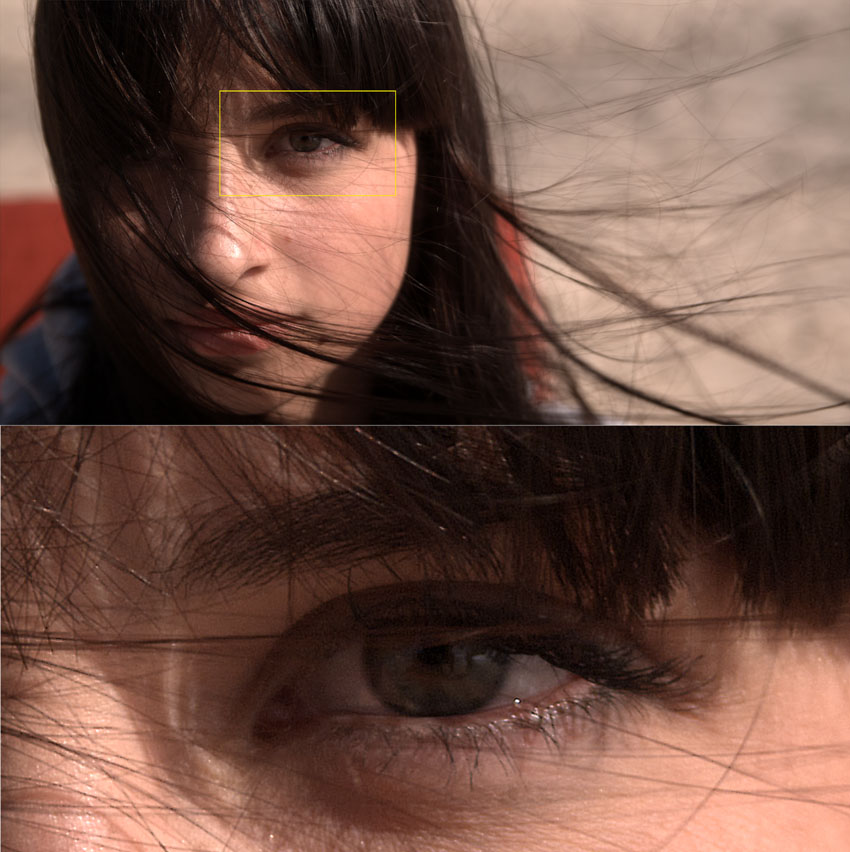
While I hate to disagree with mark who is a very talented guy, Do NOT master in 1/2 debayer... small details like hair or jewelery tends to be very "blocky" and the image is also more noisy.... for offline it is fine... but for online you can run into trouble.
 
You can Disagree with me Sidney. :) All cool... Im no expert.. Just a side by side test aholic :)

I watched a cinema projection before I flew out of the country (1/2 debayer master) and it looked as sharp and as clean as the 200 million dollar feature movie playing behind it. Maybe your doing something different to me. :)

But I will admit that 4444 full debayer is cleaner... but only if you blow it up to 800%+... but who does that? at 100% normal size veiwing, you don't see any difference at all. Well not what Im looking at here right this second I cant.

Just took a screen grab of a 400% blowup of my half debayer HD PRORES... doesn't look blocky to me.

PRO_RES_blowup.jpg
 
We have actually had this discussion before, but at the time we agreed full debayer for online...

But your example looks good - but twice I have run into problems with Half-Good. One was for a major jewlery client, all the jewlery looked like "DV-Cam" and noisy as hell - actor wearing black shirt.

The downscale algorythm might have something to do with it... but in your RCX FCP workflow you dont show which one you use - CatMuL, mitchell...etc?

- Big Jim has also repeatly said full debayer for online - something like you throw away 70% of resolution in half-debayer. - but again your example looks good... but....
 
Mark

It took to me 1 houer get a dailie for 2 minute shot on a macbook pro. Its insane.


Can you tell me The hardware of your lap top and The software, parameter do you y use.
 
i put half debayer. an it take 2.5 less time.

but what happend to the rushes? whats the difference of full or half debayer?
 
Last edited:
Back
Top