Welcome to our community

Be a part of something great, join today!

  • Hey all, just changed over the backend after 15 years I figured time to give it a bit of an update, its probably gonna be a bit weird for most of you and i am sure there is a few bugs to work out but it should kinda work the same as before... hopefully :)

Epic SSD

Gregory Sheffer

Well-known member
Joined
May 4, 2007
Messages
232
Reaction score
0
Points
0
Tried to find something on this but found nothing.

Will SSD take the all recoding options from the EPIC? I.e. 5K High frame rates at the highest REDCODE.
 
Actually none of the above is correct.

1. You can record all 5K frame rates, including 120fps (2.35:1) on the SSD.

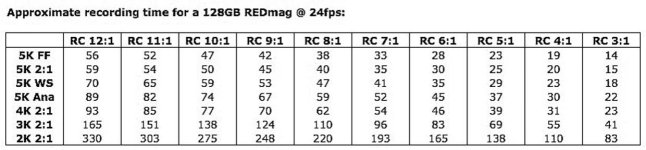
2. You cannot record all frame rates at lower compression REDCODE to the SSD. The higher the frame rate, the lower the REDCODE (more compression). The charts have been posted somewhere.

Jim
 
How about to a flash card? or are these rate only for the SSD.

Also can you see by eye (enlarged) the difference between 12.1 and 3.1 compression. ?

I'm quite sure faster cards will come down the pike and the rules will loosen.

It depends on the scene whether or not you can see a difference between 12:1 and 3:1. Usually, yes you can although it is subtle. That does not mean that 12:1 is not useable.

Jim
 
Can we expect the same sort of ratio as the R1 where in full 4k 16:9 the max framerate was about 28-30 fps to a red drive?

What might the redcode compression need to be set to for 5k 120fps?

David
 
Can we expect the same sort of ratio as the R1 where in full 4k 16:9 the max framerate was about 28-30 fps to a red drive?

What might the redcode compression need to be set to for 5k 120fps?

David

Offhand I think that 5K 2:1 at 96fps and 5K 2.35:1 at 120fps are both REDCODE 12:1. 5K 2:1 at 48fps is REDCODE 6:1, 5K 2:1 at 72fps is REDCODE 9:1. I'll double-check and change if necessary.

All these numbers are for the current 64GB, 128GB and 256GB RED SSDs.

Jim
 
Thanks Jim.

It's very intualtive. Does the EPIC ajust to what you ask for? IE: I want 96FPS and the compression adjusts or do I have to change a couple of menus?

It would be nice if it was automatic and maybe programable to a couple of user keys.

I'll see it soon enough. :) Could really use that HDR in these Florentine Streets I tell ya.

Thanks for the reply.

David
 
Thanks Jim.

It's very intualtive. Does the EPIC ajust to what you ask for? IE: I want 96FPS and the compression adjusts or do I have to change a couple of menus?

It would be nice if it was automatic and maybe programable to a couple of user keys.

I'll see it soon enough. :) Could really use that HDR in these Florentine Streets I tell ya.

Thanks for the reply.

David

Currently it tells you what you need to set REDCODE to if you have selected too low of compression and all you have to do is hit enter or record and it automatically sets that number. In the future, several options will be available that make this process even easier.

Jim
 
Thanks.

Quick presets would be nice. I go in saying I want 5K 24fps at top quality and then say, 48fps and maybe 96fps and then be able to switch in between shots.

even just small changes between 22, 24 and 28 would be nice to have at the press of a button.

But you know all this.

It's late on Friday and you haven't dropped a bit of huge news...

What are you waitng for?


David
 
I'm quite sure faster cards will come down the pike and the rules will loosen.

It depends on the scene whether or not you can see a difference between 12:1 and 3:1. Usually, yes you can although it is subtle. That does not mean that 12:1 is not useable.

Jim
I like the honesty! However, when you say "Usually, yes you can..." Are you referring to a full 5k playback somehow, or maybe if you're seeing a 4k projection with RedRay?

I mean, if someone shoots 5k to make the shot more future safe, but it is really only viewed on 2k in its initial release - Can you still "notice" a difference in 12:1?
 
ok
You always mention current SSD speeds.
so what are the theoretical limits of the Epic
lets say the New SSD can handle it all.
what Speeds / compression can the Epic spit out?
 
ok
You always mention current SSD speeds.
so what are the theoretical limits of the Epic
lets say the New SSD can handle it all.
what Speeds / compression can the Epic spit out?

I'm not sure if this is what you are looking for or not...but it does seem to be a listing of max framerate/compression ratios.

Offhand I think that 5K 2:1 at 96fps and 5K 2.35:1 at 120fps are both REDCODE 12:1. 5K 2:1 at 48fps is REDCODE 6:1, 5K 2:1 at 72fps is REDCODE 9:1. I'll double-check and change if necessary.

All these numbers are for the current 64GB, 128GB and 256GB RED SSDs.

Jim
 
I like the honesty! However, when you say "Usually, yes you can..." Are you referring to a full 5k playback somehow, or maybe if you're seeing a 4k projection with RedRay?

I mean, if someone shoots 5k to make the shot more future safe, but it is really only viewed on 2k in its initial release - Can you still "notice" a difference in 12:1?

What you see is dictated far more by the actual picture content than it is by data compression, particularly in higher resolution images like the ones produced by Red cameras. The primary differences with wavelet compression (which Redcode is) are manifested when there is a lot of high frequency detail, which usually undergoes some softening with higher compression ratios. So if you're looking at something with a lot of flat walls, or large expanses of sky, or anything without a great deal of specific detail, you're not going to see any difference. But if you're looking at a field of blowing grass, or a screen door pattern, or lots of trees, then you might see some minor difference, although in my experience, it's unlikely. Of course, what image processing software sees is a bit different, so if you're doing a lot of visual effects work, you might want to avoid higher compression ratios when it's practical to do so.

At least I ***think*** that's what Jim is alluding to here.. :001_cool:
 
I like the honesty! However, when you say "Usually, yes you can..." Are you referring to a full 5k playback somehow, or maybe if you're seeing a 4k projection with RedRay?

I mean, if someone shoots 5k to make the shot more future safe, but it is really only viewed on 2k in its initial release - Can you still "notice" a difference in 12:1?

For today it is a moot point. If you want to shoot 120fps... you'll shoot 12:1 5K. If you want to stay with the same amount of compression as current REDCODE 36, you'll only shoot to about 72-80fps.

I shoot 5K 2:1 at 96fps and 12:1 all the time and am completely happy with the results. Think... what am I comparing it to? Nothing out there does this except film. And 12:1 has about the same amount of "grain" as film in low light, maybe less.

And Mike is correct... higher compression is more sensitive to high frequency detail. So it does matter what you are shooting. Although lots of high detail was shot at REDCODE 28 (about 10:1) without too much issue.

Jim
 
higher compression is more sensitive to high frequency detail. So it does matter what you are shooting. Although lots of high detail was shot at REDCODE 28 (about 10:1) without too much issue.

Wasn't CHE shot entirely at Redcode 28? And there is a ton of high detail in the jungle. So if 4K 10:1 looks that good, I imagine 5K 12:1 will be awesome in the vast majority of cases.
 
I think this is a case where people should consider looking at what it does rather than what it doesn't do...

Jim
 
I think this is a case where people should consider looking at what it does rather than what it doesn't do...

Jim
I think we're all here because of what your cameras do... I for one didn't mean for my question to come off wrong. Like many others, I'm already sold on the Epic. Unless you just tell me it will no longer turn on, I have no reason what so ever to say I wouldn't buy it over literally any other camera. Just trying to learn more about it too.
 
Back
Top