Welcome to our community

Be a part of something great, join today!

  • Hey all, just changed over the backend after 15 years I figured time to give it a bit of an update, its probably gonna be a bit weird for most of you and i am sure there is a few bugs to work out but it should kinda work the same as before... hopefully :)

Epic SloMo and Twixtor

Hmm, i did some interpolation on flame material shot at 50i. Twixtor and the other high end solutions I tested barley produced any better results than standard retiming in Premiere or Avid. In other words, to get acceptable results you need material that is easy for the software to understand. The final composite with the 50i material slowed down to 100 or so frames looked like shit... I would never do it again. The whole fix it in post mentality and cheap tools will be sufficient, is an annoying phenomenon. Conclusion: Rent a Phantom.

Warped images is not slow motion. It is morphing. Morphing was a cool effect in the 90's.
 
there are situations where you simply don't have the light or budget that you need to rent the proper equipment. if you're software savvy, you may be able to 'get away with it'...

for a 2K/HD finish... i'd try shooting 3k as an in between. your shutter will depend on your subject - you want nice solid, detail - no motion blur (you can add that if you want to hide artifacts - with twixtor/reelsmart). you can also shoot greenscreen on location (shoot a background plate that matches - that will be way easier to interpolate on its own). then you can use particular (or whatever) and/or some 2k 300fps elements you've shot on your own (against black/white/green/blue/etc) and/or some stock fx plates you've found to comp it all together. and you can do full rotoscoping or simple power windows to help certain areas along. even if you can do all that stuff in-house, the real thing is probably going to look better - you can always comp extra stuff in to add texture/detail, which is a lot better than trying really hard just to get something into a 'usable' range.
 
This is exactly wrong; Twixter is interpolating existing frames to make new frames, thus adding information.

Hi Bob, well, you know technically interpolation is not about adding new information. For instance, if you have two frames, a simple example of interpolation is to create a new frame between the existing ones by taking the average. But, in engineering (in the sense of science) this is not understood to add any information. Adding information meant e.g. you took another footage from another camera and combined this with the one you had and so on. Compare, compressing an image or audio signalis not understood to add information although it's a new image or audio track in the sense you employed the word.

When you ask: "How well does Twixtor create the new frames from the existing one" is equivalent to the question, how good is the interpolation. As said, there are data when it works fine, but there is also data when it fails completely. That's the difference to shooting with higher frame rates. That never fails.
 
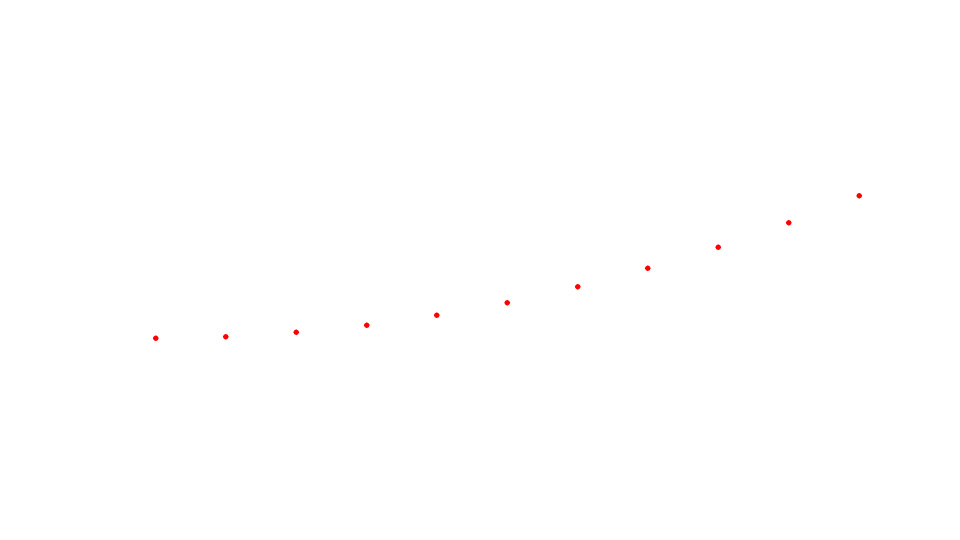
Bob'a comment inspired to create an example revealing, what does "adds no information" mean. I'll exploit a very simple example of a dot moving along a smooth trajectory on white background. Twixtor, or any other corresponding algorithm can't fail in such a simple case, or can it?

Here's 11 frames of a moving red dot put together in one single image.

Interpolation1.jpg


These frames sample the motion of the dot, and one may feel it's obvious that the dot has had to move along a bit curvy trajectory. My guess is, if the frames are inserted to Twixtor to slow down the motion, as a result one will see motion along such a curve. If somebody has Twixtor and wants to try and post such a clip, the frames can be downloaded here

http://www.wildcine.fi/Frames.zip

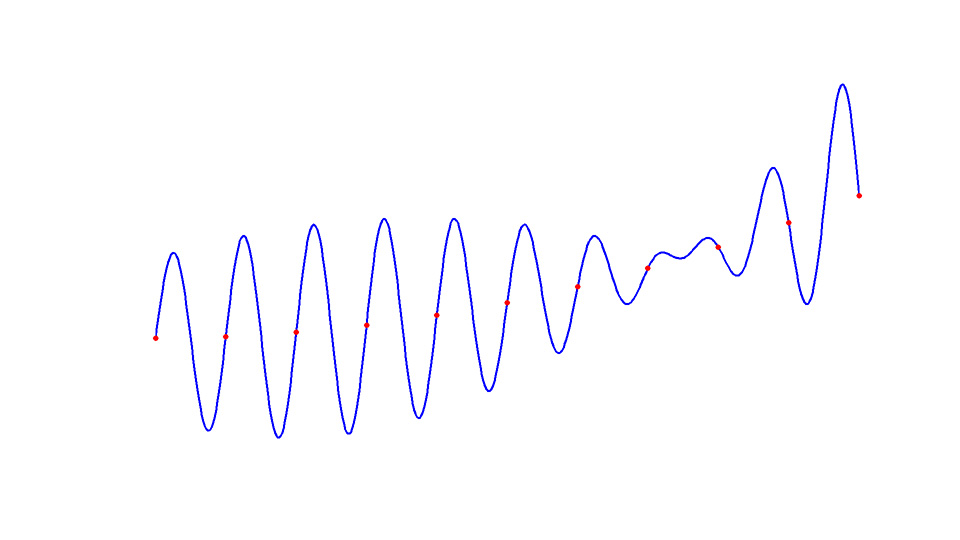
But now, the question is, how do we know what the trajectory of the dot has been at the first place. The answer is, without any external information of the motion, we just do not know anything of how the dot has moved between the sample frames. Whatever algorithm Twixtor employs to interpolate between the frames, it yields no further information of the original motion to us. Instead it provides us with a cultivated guess of the motion. Sometimes the guess is a good one, in some other cases it way off.

In this case the original trajectory is shown here

Interpolation2.jpg


with the blue trajectory.

If one processes bit more on this, it's not that difficult to see that, in fact, there are an infinite amount of possible trajectories that create precisely the same 11 sample frames as in this example. (Just draw any trajectory through the points in proper order and you've generated another possible trajectory.)

This is to say, the software engineers who have developed Twixtor have implemented their cultivated guess or guesses of what the motion between the frames typically is. They must have known that cameras with higher frame rate yield a better starting point for Twixtor. For, thanks to inertia, the objects people typically shoot do not tend to move arbitrarily from one direction to another. Furthermore, the higher the frame rate, typically less happens between the frames, and consequently such data fits better to Twixtor algorithms. As a result there are numerous wonderful examples of Twixtor in the web. But also as people have said in this thread, there are numerous examples when it fails.
 
Good example with the dots. Nature does not move like that in most cases however.
The bigger problem for software slomo is objects being revealed as they move across one and other.
A simple example would be a shot of legs walking over a patterned background. The edges of the legs trailing edges will have problems.
Having said that, lay people don't usually see the artifacts until you replay several times and point it out.
 
Sometimes it works and sometimes it doesn't...when it does, it can add to a piece. Not sure I would call what twixtor(and the others) do "morphing". It is very dependent on the what you are shooting.

I was very happy with how a specific 60p shot interpolated and we went ahead and used it in the edit. I think it added a nice dramatic climax for our subject and the twixtor"ed" shot was amazingly clean of many common artifacts. Sure if you pixel peep it you may find some, but to the majority of the viewers it was a highlight shot of the whole edit.

The Twixtored shot is at 5:10


-dane
 
For Scarlet shooters of liquids, explosions, things of this nature....what would you recommend as far as frame rate vs resolution? I have been doing a lot of in camera 48fps at 3k 60fps at 2k, and 120fps at 1k ws...

Haven't cut/graded/ramped anything yet and am now starting to wonder where my sweet spot might be rez vs fps wise. At what point is it better to shoot lower res at a higher frame rate vs high res at a lower one? I already shoot lowest redcode, always.

Being that I dont have many overcranking options in camera I am just trying to figure out my best way of doing this. I must admit I have mostly favored doing 120fps or 60fps thus far, simply because I was hoping to get what I wanted in camera. But even at 120fps sometimes I am only getting 13 frames of the explosion, depending on subject matter. Thanks for the help in advance!

ps phantom/epic isn't in the budget, its a personal demo reel of sorts. I am a recent phantom miro tech and already understand the better ways of trying to get what I wanted here, but since I am a Scarlet owner and in between freelance gigs I am basically married to my red for the reel at least for the time being
 
you may be better buying a collection or some stock elements for some of that stuff... otherwise you're just going to be fooling with it forever.

test it out if you want... try all 4 k's
 
Back
Top