Welcome to our community

Be a part of something great, join today!

  • Hey all, just changed over the backend after 15 years I figured time to give it a bit of an update, its probably gonna be a bit weird for most of you and i am sure there is a few bugs to work out but it should kinda work the same as before... hopefully :)

Epic in RAW Never Clips? Is this a bug?

Alexander Alexandrov

Well-known member
Joined
Nov 24, 2008
Messages
848
Reaction score
0
Points
0
Age
44
Location
Los Angeles, CA
Website
alexanderalexandrov.com
When I switch to monitor in RAW and point the camera at a highlight, no matter how bright, my histogram never shows any clipping?

only when i go back to "color" monitoring i can see clipping.

tried it on 2 different epics today with .40 firmware.

anyone noticed the same?
 
Peak

Peak

Try setting it to raw display and pointing it at a white wall that has bright light on it.

Then adjust the lens iris, you should see the histogram peak move left and right.

As you get brighter, does the peak disappear before it gets to the side of the histogram, or does it move to the side then overflow past the side of the histogram display?

It may be outside the range of the histogram when its too bright, you only see it at the edge when you have the brightness just right, maybe. (If you display the actual sensor data on a histogram before white balance there are three peaks Green highest, red and blue lower for daylight sources, but to do white balance some "super exposure" data in the red and blue needs to be clipped as you normally want the green pixels clip point to be the end of the histogram range, even though you might get back some luma detail above that using the DRX processing.)

To autoscale the historgams in my programs I ignore values that are close to the top and bottom since those can make the other peaks too small to see, and its the peaks close to mid-tone that are more important, as there are "always" pixels at both ends that don't matter in making exposure for the primary subject in the frame. You can see what my histograms look like in my avatar on the left.

If you can't get the peak to move all the way from left to right, try going outdoors and put the lens out of focus pointed at a white card in full sunshine, then by adjusting the shutter angle and iris you should be able to see the peak go end to end (left to right limits of the histogram display), I would think.
 
i will try again tomorrow. i just point a flashlight at it and it doesnt clip. the bar to the right of the histogram doesn't fill up either. though it's supposed to show red. it is not the case with shadows though - that side works.
 
it is not the case with shadows though - that side works.

Interesting.

For Actual RAW sensor data, when RGB are equal gain, the black level is not set to zero, but to about 4% of full signal, so in a "raw" histogram the peak should never get to the right side (low end), it should stop at the sensor's bias point which is generally set to between 3% and 6% of ADC range.

Check more with an adjustable brightness source, the anti-black-sun circuit in the M-X sensor may be part of the issue at the high end, as may be the white balance clipping, the M sensor it seems had the "black sun" issue, that was fixed (?) in the M-X sensor which is why it can do HDR now, maybe...

Also to get a large peak, the bright source must fill the frame, small hot spots do not make large peaks on the histogram since histograms go by area of the frame total, a small bright spot makes a peak the same size as a small gray spot, but a large gray spot will make a larger peak than a small bright spot etc.
 
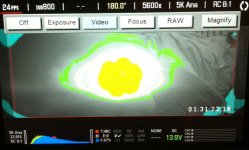
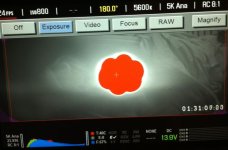
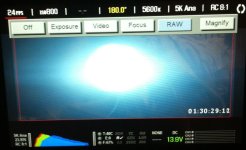
I have tested this a bit more. Now with my own EpicX and seeing the same issues (attaching pics).
This is a simple test, i'm pointing a regular LED flashlight at the lens, which are wide open at T2.5

in "RAW" - histogram shows no clipping? overexposure bars show no clipping? (i'm used to monitoring RAW on red one to see my clipping points, this doesn't seem to work on epic?)
in "EXPOSURE" histogram shows no clipping? overexposure bars show no clipping? but red and blue traffic lights light up? and clipped area is shown in RED on the monitor image
in "VIDEO" histogram shows no clipping? overexposure bars show no clipping? but red and blue traffic lights light up? and clipped area is shown in YELLOW on the monitor image

?
 

Attachments

  • VIDEO.jpg
    VIDEO.jpg
    66.9 KB · Views: 0
  • EXPOSURE.jpg
    EXPOSURE.jpg
    61.3 KB · Views: 0
  • RAW.jpg
    RAW.jpg
    54.5 KB · Views: 0
Sorry to hijack this post, but it is sort of related.

If the camera shoots RAW and when you change the 'looks' settings, why does the histogram and clipping settings change? Surely the camera still sees what it sees regardless of what metadata you change? So for example, I can up my ISO which is metadata and the histogram will change...surely with it just being metadata, it should not affect the histogram? Or am I completely wrong?

Thanks,
Neil
 
Neil,

The traffic lights and histogram on an EPIC are RGB meters and not RAW meters (the manual is wrong about this or at least one of the earlier versions).
I told and showed it to Ted on the Reducation days in London some weeks ago.
If you change the look from RedLogFilm to Redgamma2 the histogram and traffic lights changes too.

Willy Faes
 
Back
Top