- Banned
- #1

Vigen Vartanov
Banned
- Joined
- May 2, 2007
- Messages
- 1,288
- Reaction score
- 0
- Points
- 0
- Age
- 42
- Location
- Tbilisi , Georgia
- Website
- sarke.ge
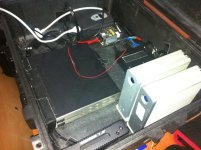
Good day , just got my Glyph Triplicator , and starting my office test with this .
Before i start checking , want to get some feedbacks ? share some details if you are using this system .
I am afraid that test will be ok , and then one day on set i will lose both copies
I have Sonnet E-Sata connected to my MacBook , one e-sata from Sonet to SSD Reader , and Second to Triplicator .
Triplicator is connected to 2 Lacie 1TB Drives . Also want to add 1 FW800 drive , just for back up .
Waiting for your comments .
Before i start checking , want to get some feedbacks ? share some details if you are using this system .
I am afraid that test will be ok , and then one day on set i will lose both copies
I have Sonnet E-Sata connected to my MacBook , one e-sata from Sonet to SSD Reader , and Second to Triplicator .
Triplicator is connected to 2 Lacie 1TB Drives . Also want to add 1 FW800 drive , just for back up .
Waiting for your comments .