Welcome to our community

Be a part of something great, join today!

  • Hey all, just changed over the backend after 15 years I figured time to give it a bit of an update, its probably gonna be a bit weird for most of you and i am sure there is a few bugs to work out but it should kinda work the same as before... hopefully :)

Epic Audio Problems

gregkraus

Well-known member
Joined
Sep 20, 2007
Messages
90
Reaction score
0
Points
0
Epic-X build 3.2.8

I have recently updated my camera's firmware and now I am getting audio that is out of sync by 3-4 seconds (late) from the video. Also on some clips I am getting audio that is stuttering. Has anyone experienced this problem? Is there any way to recover the lost audio?

Greg
 
Not sure what to do but i just got this on my Scarlet when I was going to edit music video footage. Now i have to sync up the video with my eyes and ears! Guess plural eyes can't help me now. Hopefully there is a fix!
 
Sheesh! I hope that bug gets fixed quick!!!! That's a real bastard fault to have.
Send tickets to RED ASAP.. . I'd be very vocal about this bug.
I let a few things slide with RED, but bad audio sync is not exceptable.
Lets hope the guys are into this quickly. I'm sure they are..., but you never know.

This forum seems void of RED staff of late. I'm worried no one is listning any more.... I hope I'm wrong.
 
I just checked some test footage I shot (with audio) using the previous Scarlet beta firmware and it has the same sync problems you describe. I'm using the latest beta build now and haven't tested it yet with audio.
 
Epic-X build 3.2.8

I have recently updated my camera's firmware and now I am getting audio that is out of sync by 3-4 seconds (late) from the video. Also on some clips I am getting audio that is stuttering. Has anyone experienced this problem? Is there any way to recover the lost audio?

Greg

No Problems at all !!! Epic-x 00274 last released build. 30.07
 
well, i seem to have isolated the problem: i installed firmware 3.0.7 and tested again at 24fps (wit a 24fps timebase). same result: a few minutes it runs in sync, then stutters and is out of sync. the stuttering is actually RECORDED, the audio file DAMAGED.
tried recording again, this time at 25 fps (25fps timebase) - everything normal - recorded 7 minutes without a glitch. will try a longer session at 25 fps now. in the meantime, could you please run tests as well? thanks! RED ticket opened, by the way. this is pretty serious.

UPDATE: RECORDED FOR 15 MINUTES AT 25 FPS - OUT OF SYNC AGAIN - SCARLET PRODUCED 14 DIFFERENT FILES FOR ONE UNINTERRUPTED TAKE.
 
Last edited:
Weird that we are the only ones having the problem. I dont have my camera so i can't check which firmware i'm on but i know it's not the newest. Hopefully this gets fixed soon. Thankfully it didn't do it weeks ago when i was doing interviews!
 
Is there a special WAV file that could be recorded, where separate tones for each frame of 23.976 were repeated each second so that it would be easy to look at the first frame and the last and see if there was any drift?

23.976 certainly complicates creating that a bit, but ... just asking as that would be very useful?
 
I usually dismiss audio comments like this as user error or temporary glitches but yesterday I was shooting on my Epic, switched to 3KHD for one shot and the audio was three seconds late. Thought it was an RCX playback glitch so transcoded it with the same results.

Went back to 4KHD and all was fine again. Never seen this before in 4 years of working with RED, I'm sure it will be addressed.

I'll put in a support ticket.
 
This forum seems void of RED staff of late. I'm worried no one is listning any more.... I hope I'm wrong.

We are here 24/7. Like any other issue we'll get this one identified and nailed. Please send a camera LOG file to RED tech support (or if you prefer you can e-mail it to me at stuart@red.com and I'll forward that on)
 
We are here 24/7. Like any other issue we'll get this one identified and nailed. Please send a camera LOG file to RED tech support (or if you prefer you can e-mail it to me at stuart@red.com and I'll forward that on)

Good on you Stuart, a voice from the dark.. :)
 
I shoot with my Scarlet 4kHD with lastest beta build with no problems.

Me too (on Epic and Scarlet) was only when I swithed to 3KHD for three clips that it happened. Weird thing is it only happened on the first and third clip, second was in sync. Went back to 4KHD and it didn't happen again.

I have put in a support ticket and suggest everyone else does the same as Stuart suggests. Best way to get the right information to the people who can help!
 
I experienced this problem in 3kHD also. I haven't check 4K since I had the issue. I will test and post results. Your right this is a serious issue. Lucky I have been able to salvage most of the footage by manually syncing the footage that was not completely damaged. I have reported the bug and will be sending my Epic and SSD cards back to Red for testing.
 
Having the same problem with audio sync. Very unexpected. Troublesome because while you are recording, everything looks OK. Since you can't replay audio from the camera to verify, you won't know until you stop and try to replay from the SSD. Not always practical on a live shoot. I sent in a ticket to RED Support and Stuart English. I attached the Log file to Stuart, but there doesn't seem to be any way to attach a file when filling out a Support ticket.
 
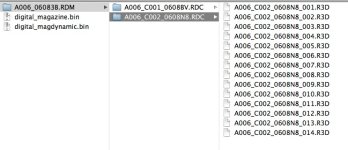
Apart from the audio drift-could anyone please tell me if it is normal that the camera produces several files of one uninterrupted take? i have this all the time with longer takes. thanks!
 

Attachments

  • Screen Shot 2012-06-09 at 18.55.26.jpg
    Screen Shot 2012-06-09 at 18.55.26.jpg
    64.3 KB · Views: 0
Apart from the audio drift-could anyone please tell me if it is normal that the camera produces several files of one uninterrupted take? i have this all the time with longer takes. thanks!

Yes that is normal.

A clip is a folder. That folder may contain more than one .r3d depending on the size of the clip as well as any number of side car files. You should always be dealing with the folders rather than the individual files that make up a clip.
 
Yes that is normal.

A clip is a folder. That folder may contain more than one .r3d depending on the size of the clip as well as any number of side car files. You should always be dealing with the folders rather than the individual files that make up a clip.

Thanks, Trent - I guess the r3d.s of one clip are all linked then and it doesn`t matter which one I use for editing in Adobe Premiere or viewing in the RED player? Both applications do not seem to recognize the folder as clip.

EDIT: found the thread here that explains the matter. Thanks again.
 
Last edited:
Back
Top