jussi rovanpera
Well-known member
Patrick, for video work you'd want the settings to be gamma 2.4 / 6500K / 100cd, and a fairly dark environment.

Follow along with the video below to see how to install our site as a web app on your home screen.

Note: this_feature_currently_requires_accessing_site_using_safari

Thanks Jussi, what do you think of just setting the monitor at DCI-P3 for feature film?Patrick, for video work you'd want the settings to be gamma 2.4 / 6500K / 100cd, and a fairly dark environment.
Thanks Jussi, what do you think of just setting the monitor at DCI-P3 for feature film?
I'm using the built in meter (it is very cool, drops down from the top like a small window shield wiper), and the software is called color navigator 6. Software is real easy to use and fully integrated with the screen (i have a display port connection between a k6000 and the screen, and a usb connection between the screen and the computer).Patrick,
P3 should be graded on PJ (if possible)... other than that, check the raw/native gamut of the CG318 first - make sure it covers... and/or please post a pic here of the raw gamut...
what's ur cal setup ? what meters and sw are u using ?
how does the 4K look on that screen ?
- M
I'm using the built in meter (it is very cool, drops down from the top like a small window shield wiper), and the software is called color navigator 6. Software is real easy to use and fully integrated with the screen (i have a display port connection between a k6000 and the screen, and a usb connection between the screen and the computer).
Your right on the p3, just doesn't feel right when I output from nuke to it on the screen(I wasn't planning on doing the dci grading anyway). The cg318 is 98% compliant on p3 though. On rec709 I think it's close to 100% compliant, but when I toggle back and forth between rec2020 and rec709 the greens look horrible on the rec709. Overall the picture looks great on the rec2020 ... feels like i'm looking into a theater. My favorite mode now is nuke with none set(instead of rec709) and the monitor set to rec2020. Atleast I think i'm getting the closest to how I shot it that way.
This is the first time i've been editing on a color correction 4k screen (the 4k tv's i've used just don't even touch this). It just feels SO REAL, like i'm working on the film rather then working on a computer. Since i'm going through a k6000 i'm getting super clean 10 bit, i love the shadows at this detail. This feels the closest to editing film like in the 70's, it just feels so much more "real" when editing. I can see why some people hated moving to 2k digital editing ... (2k I instantly "loose" the connection to the shot). I also get spoiled on having the extra green that the cg318 gives me on the color space at rec2020, when i drop to other color spaces they feel icky/digital/brown. I think if rec2020 ever gets out there big time consumers will love it.
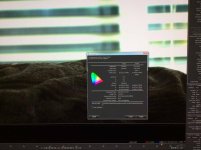
I posted a calibration picture. It's impossible to get the feel for the screen with a shot from my iPad.
thanks for the info, I will research that. I am using it for the initial ISO and kelvin r3d setting before going to vfx from nuke studio, also vfx to real footage alignment when it's back in nukex ... So I should be ok. The 318 actually comes with a bunch of cables, I am using the larger display port cable on both ends - where one side is squarish and the other side has a little notch.yeah, I always set the ViewerProcess to NONE inside of NUKE... ;-)
the built-in Eizo probe is of less quality... be aware of that... if u're just getting the CG/VFX in the general ballpark and then hand it over to color it's less of a concern, but for accurate grading u need a dedicated probe (at least an i1D3) and then a spectro (to create color accurate offsets for the i1D3)...
the great thing about this Eizo is that one can finally accurately calibrate a 4K screen... there are no 4K LUT boxes yet, so no real options unless the screen has built-in LUTs...
what cable connection are u using from the K6000 to the Eizo ?
Note that there isn't a single monitor on the planet that can reproduce all of Rec2020 yet, certainly not the Eizo:I also get spoiled on having the extra green that the cg318 gives me on the color space at rec2020, when i drop to other color spaces they feel icky/digital/brown. I think if rec2020 ever gets out there big time consumers will love it.


Marc Weilage said:Note that there isn't a single monitor on the planet that can reproduce all of Rec2020 yet
I'll do that when I get the meter.once u got ur meters, look into Lightspace (best IMO), Argyll (free !) and Calman for 3D LUT generation... LS and Argyll allow u to fully control (and adjust) the 3D LUT u're creating for calibrating the Eizo... CM doesn't but has an Eizo auto-cal mode (not sure CG318 is already supported)...
post some dE reports once u got proper cals done, would love to see how the screen performs and if they managed to improve the shadows a bit...
...
I think it's a mistake to try to judge color in a monitor that can't actually reproduce the colorspace you need to see. Even in the case of P3, there's such a huge difference in seeing those images projected at 48 nits (vs. 100 nits in Rec709), plus the huge size difference of the screen, it drastically affects your judgement.

It mentioned HDMI but did not specify 1.4 or 2.0, just a 30Hz max, which likely means 1.4.


Not the Eizo, they have not offered any real updates and their pricing is out of sync with the rest of the market. Depending on your intended use for the monitor, I would recommend the LG OLED or Samsung QLED for client/ playback/ color room displays. LG OLED 55” is < $1500 here in the States right now with holiday pricing.
If you specifically need a display with DisplayPort inputs, there are a few desktop class displays, some with very good color gamut and calibration abilities at reasonable pricing. You don’t need to spend a lot of money. LG and Dell are your best bet at the moment for mainstream options. If you can drive a Thunderbolt 3 display then the 5K LG is phenomenal and pretty well has full P3 gamut and calibrated very well right out of the box. They intend to release a DP 1.4 capable version of the display in the first half of 2018, or so I’m told.
There are some more 5K, 6K and 8K displays coming the first half of 2018. Most of which require Thunderbolt 3 or dual DisplayPort to drive them.
What would your budget be for this and what screen size?
Yeah, can’t say any more about that 6K screen... I think it will be great, but it could be 6~9 months before we see it.
Have not heard anything about the CG3145 pricing. Price was never officially announced and it seems that most of the numbers circulating are all speculative. At $10K+ they will be pricing themselves out of the market. Yet Eizo has enough loyal customers to keep things turning. You can’t go wrong buying one of their monitors, they’re just not always the most sensible choice for the money. I can get the CG318 with color probe and their basic calibration software here in the States for right at $6K or just under. About $5300 for the monitor alone... IMO it’s not a very great deal, I’ve used this monitor extensively and while nice it’s no better than my 31” LG 4K late 2016 model that has both DP 1.2 and TB2 inputs once calibrated. I can buy 3 of the LG’s for the same money and still have enough left over to take the wife for a nice dinner. Now 2 years prior to that when Eizo released the CG318, it was the 4K monitor to have. They just have not updated that monitor in 3+ years. And it shows when comparing to the newer (cheaper) offerings from others.
As for color probes, DataColor’s stuff is notoriously unreliable. The funny thing is that you can actually send the Spyder probes to places like CalMan and they will tweak and calibrate the probe and make it work properly. Have done that with a couple Spyder3 and Spyder4 probes as I was using the CalMan software for a time. IMO, the problem with the Spyder is the low cost and terrible inconsistencies in their manufacturing and supply chain. Sometimes you get a Spyder that works really well out of the box. And sometimes you don’t. I went through 3 or 4 Spyder3 probes before I found one that wouldn’t calibrate most of my displays with a yellow or magenta tint. And then it still struggled on the wide gamut displays until CalMan adjusted it.
I really liked where HP was going with the DreamColor monitors but they let that product line fizzle out. I actually met with them on a few occasions for a variety of things a few years back. Question number one from me was always “where’s that 4K DreamColor display?” At first they were resistant and didn’t understand why people were asking for one. Then that shifted to more frustration that they didn’t have one and didn’t have an answer. Finally they released an updated DreamColor that accepted 4K input, but still only had a 2.5K screen. Totally weird and it really pissed off all their customers. They supposedly, finally have a true 4K one coming... Next year sometime. What a joke.