Welcome to our community

Be a part of something great, join today!

  • Hey all, just changed over the backend after 15 years I figured time to give it a bit of an update, its probably gonna be a bit weird for most of you and i am sure there is a few bugs to work out but it should kinda work the same as before... hopefully :)

Dynamic Range charts

Joined
Nov 19, 2013
Messages
9
Reaction score
0
Points
0
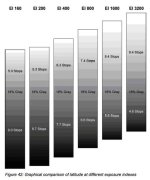
Hi, I'm trying to find dynamic range charts or diagrams identical to those released by Arri and Canon, showing exactly how many stops above and below middle grey are available at different ISO ratings. I can't find anything the same on the forum, so I wrote to RED. The guy there said he is struggling to find anything of this kind, which is remarkable given that it's essential information when using a light meter. Does anyone know where to find this information?

(Please see attachment, which is the Arri chart I refer to).
 

Attachments

  • dynamic range alexa.jpg
    dynamic range alexa.jpg
    43.3 KB · Views: 0
Thanks. I've seen this page. Unfortunately, nothing on it provides the information I'm after.
 
I think it's best to test it by yourself, testing the output through the whole workflow.

A good method is using this charts (very expensive !):

http://dsclabs.com/dsc-products/rear-lit/xyla/

But using calibrating software from Sekonic in conjunction with their "Exposure Profile Target II" or alternatively "X-rite Color Checker (Passport)" (cheaper but still good), still gives you good results.

http://www.sekonic.com/products/all/accessories/sekonic-exposure-target-ii.aspx


The Sekonic Software indicates the dynamic range, the clipping points and it's curve.

Hope this helps,

Philippe
 
You could also try using the internal exposure tools to get a decent idea (GioScope puts mid-gray a chip11 of 16!!!); Video Exposure has 18%gray, so if you had a chart you could probably work it out (though it's a bit of a pain in the ass.)
 
the arri chart is very clear , ilustrates an important idea and gives confidence... BUT really is pretty useless beyond that...

Your personal tolarances to over and especially underexposure are key... also the scene is so so important. If you take a very saturated bright red light and expose it 6 stops over at 400asa on a Alexa what will it look like? not red is a clue ;-)

I know it is can be tricky but building your own frame work from hands on experience with a camera, Light meter, good monitor (and hopefully a really on it DIT) is much more important..

good luck
 
the arri chart is very clear , ilustrates an important idea ....

What I find interesting: according to this chart when you need the greater sensitivity of increased ISO most to dig into shadows (in low light scenes) the shadows begin to block up. And visa a versa, when you don't need the greater sensitivity to dig into shadows and instead need greater range to maintain detail in highlights (day interiors/exteriors) the highlights burn out. If only it were the other way around.

Paul Dean
 
the arri chart is very clear , ilustrates an important idea and gives confidence... BUT really is pretty useless beyond that...

Your personal tolarances to over and especially underexposure are key... also the scene is so so important. If you take a very saturated bright red light and expose it 6 stops over at 400asa on a Alexa what will it look like? not red is a clue ;-)
Why is that chart useless? It pretty much shows just what you state in your example. A red light 6 stops over at 400ISO is right near the clipping point that the chart shows and where one would find that the color/exposure is clipped (given the tolerance for the .3 of a stop on the chart and various reflected light meters).
 
What I find interesting: according to this chart when you need the greater sensitivity of increased ISO most to dig into shadows (in low light scenes) the shadows begin to block up. And visa a versa, when you don't need the greater sensitivity to dig into shadows and instead need greater range to maintain detail in highlights (day interiors/exteriors) the highlights burn out. If only it were the other way around.

Paul Dean
With the Alexa and all Red cameras changing the ISO DOES NOT INCREASE THE SENSITIVITY. If you set up a gray card, light it to 24 foot-candles, meter at 800, set your camera to 800 ISO, the meter will tell you to shoot at f2.8. Shoot it. Then change the ISO on the camera to 400 but change nothing else. Shoot it. Change camera to 1600 ISO but change nothing else. Shoot it. All three images will be at the exact same exposure. Changing ISO does not change the sensitivity of the camera. It changes meta data that tell viewfinder/monitor/color correction systems where to put mid gray so that it looks normal. When you change ISO and then light according to that ISO, you are then placing your exposure higher (400 ISO/ more light) or lower (1600 ISO/ less light) within the range of the sensor's overall dynamic range. When you choose 1600 ISO you are not increasing sensitivity, but rather you are exposing your scene in the darker part of the sensor's dynamic range. The opposite is true for 400 ISO. All of which the Alexa chart makes perfectly clear. ISO is all about where you want to place the exposure of your scene within the sensor's overall dynamic range, basically just like bracketing exposure. Higher ISO place the exposure in the darker part of the overall range closer to the noise floor (thus increased noise). Lower ISO place your exposure in the brighter part of the overall dynamic (thus cleaner but less headroom). Just like in the chart.
 
With the Alexa and all Red cameras changing the ISO DOES NOT INCREASE THE SENSITIVITY. If you set up a gray card, light it to 24 foot-candles, meter at 800, set your camera to 800 ISO, the meter will tell you to shoot at f2.8. Shoot it. Then change the ISO on the camera to 400 but change nothing else. Shoot it. Change camera to 1600 ISO but change nothing else. Shoot it. All three images will be at the exact same exposure. Changing ISO does not change the sensitivity of the camera. It changes meta data that tell viewfinder/monitor/color correction systems where to put mid gray so that it looks normal. When you change ISO and then light according to that ISO, you are then placing your exposure higher (400 ISO/ more light) or lower (1600 ISO/ less light) within the range of the sensor's overall dynamic range. When you choose 1600 ISO you are not increasing sensitivity, but rather you are exposing your scene in the darker part of the sensor's dynamic range. The opposite is true for 400 ISO. All of which the Alexa chart makes perfectly clear. ISO is all about where you want to place the exposure of your scene within the sensor's overall dynamic range, basically just like bracketing exposure. Higher ISO place the exposure in the darker part of the overall range closer to the noise floor (thus increased noise). Lower ISO place your exposure in the brighter part of the overall dynamic (thus cleaner but less headroom). Just like in the chart.

This is very well written, and the information so academic that lots of people don't know it because they have never read something as clear as this before.

However, even if they do read your clarity, they still might not get it.

:)
 
Back
Top