Welcome to our community

Be a part of something great, join today!

  • Hey all, just changed over the backend after 15 years I figured time to give it a bit of an update, its probably gonna be a bit weird for most of you and i am sure there is a few bugs to work out but it should kinda work the same as before... hopefully :)

DSMC2 + Mixpre 3 II

Toby Wilson

Active member
Joined
Oct 2, 2015
Messages
27
Reaction score
0
Points
0
Just thought id post here my findings to any people interested about adding a Mixpre 3 II to their red rig for some half decent sound and to not have the issues i ran into..
I used the Mixpre 3 I on a shoot that was so last minute we couldn't organise a sound operator and was pretty happy with it. So i was even happier to see the Mixpre 3 II come out with all its improvements like internal timecode and 32bit sound recording so i purchased one.

Design:
It has a great profile to fit in with the reds boxy design, and mounts well on a camera with the buttons and screen all designed really efficiently for this purpose. I had a H6 and it was horrible to use in any sort of tidy manner.
You could also use a Wooden Camera recorder slide to mount it on rails. Although its a pricy piece of metal and reasonably heavy.

Powering Mix Pre:
It chews AA batteries like no tomorrow. Would not recommend attempting to run it like this unless its a very basic quick interview. An all day shoot and its super painful, expect to use at least 12 lithium rechargeable's for an 8 hour day.
Hawkwoods make a hirose adapter and you can power it from any standard v-mount. D-tap, 2 pin lemo, whatever you want to use as long as the voltage is 10-20V.
Also take USB C power but i find the connector too scary to use professionally.

2 channel Mix from Mixpre to red via 3.5mm cable:
You can send a 2 channel mix from the recorder to the red if you want and you can choose the channels either pre or post fade (ch1 and ch3 etc). I have always found the internal audio of the red especially dodgy with many issues so i don't even bother, just have a scratch mic running on the body just in case and using timecode to sync in post.

Power loop issue:
If you power the Mixpre via the hawkwoods adapter, expect to get power loop noise (a very low hum) in the audio being recorded into the camera via the 3.5mm cable (not inside the actual Mixpre recordings). This is a common engineering issue which comes from powering camera and audio devices from the same power source then passing that sound back into the other device.

Timecode:
The mixpre 3 II now has internal timecode generator (unlike the old one) which is great. Apparently even when powered down it doesn't drift until after 4 hours.
This timecode can actually be sent to the camera constantly from the recorder using a 3.5mm to red sync cable and the red accepts the timecode from the Mixpre which is great.
I use the tentacyle sync-e boxes and the same cable for the sync-e to red works for the mix pre too. Mixpre also easy to jam from tentacyle sync using 3.5mm to 3.5mm cable.

HDMI Trigger and timecode:
This feature unfortunately does not currently work due to the red camera not outputting HDMI timecode or record flags.

32bit audio:
If you know, you know.


Very happy with this solution as it gets out of my way as much as possible and is reliable and pretty cost effective. If i'm forced to be shooting cinema verite without a sound person i just hit record, make sure the mic's are behaving and at a sensible gain setting (even though its 32bit) and shoot away.

Final take-away. Hire a sound operator but if you can't this might save your ass.

Photo of a rough build using rails and wooden camera recorder slide: https://www.dropbox.com/s/obdfgubvrktc4uj/82248873_1326229297561257_4415210497498939392_n.jpg?dl=0
 
Last edited:
I've got a MixPre 3 ii and coming from an H6, it's unreal awesome. I echo Toby's feelings. Some thoughts...

1. I can get about 2.5 hours on 4 Eneloop Pros recording one track with phantom (which is most of my corporate gig needs) but also carry a fully charged Anker battery as backup.
2. I bought a timecode cable to try to feed my Epic-W directly (don't really need a Tentacle for my work, it's overkill) but there's a 2 or 3 frame mismatch that Sound Devices was unfortunately unable to help me fix. I just sync in Premiere using the scratch track instead now.
3. 32-bit is amazing - I just set my NTG3 (outdoor) or Audix SCX1-HC (indoor) mics on boom holders along with a Sanken COS-11d lav mic to a wireless system like the G3 and I'm good to go for most of my one-man-band shoots
4. Backup to USB isn't as nice as dual SD (copies from SD to USB instead of recording both simultaneously) but coming from a H6, I'll take it

I don't think I'll have to worry about another recorder for a long while now.
 
I've got a MixPre 3 ii and coming from an H6, it's unreal awesome. I echo Toby's feelings. Some thoughts...

1. I can get about 2.5 hours on 4 Eneloop Pros recording one track with phantom (which is most of my corporate gig needs) but also carry a fully charged Anker battery as backup.
2. I bought a timecode cable to try to feed my Epic-W directly (don't really need a Tentacle for my work, it's overkill) but there's a 2 or 3 frame mismatch that Sound Devices was unfortunately unable to help me fix. I just sync in Premiere using the scratch track instead now.
3. 32-bit is amazing - I just set my NTG3 (outdoor) or Audix SCX1-HC (indoor) mics on boom holders along with a Sanken COS-11d lav mic to a wireless system like the G3 and I'm good to go for most of my one-man-band shoots
4. Backup to USB isn't as nice as dual SD (copies from SD to USB instead of recording both simultaneously) but coming from a H6, I'll take it

I don't think I'll have to worry about another recorder for a long while now.

Nice points. I didn't realise there was a frame mismatch, argh, thats a shame... Will have to go back to using two tentacle syncs i guess. Thanks for the heads up!
 
I've got a MixPre 3 ii and coming from an H6, it's unreal awesome. I echo Toby's feelings.


Yes, nobody should ever buy any handheld recorder for film shoots in 2020. Not when we've had great recorders such as the Sound Devices MixPre 3 / Zoom F4 / F6 available for years now for very little money.

2. I bought a timecode cable to try to feed my Epic-W directly (don't really need a Tentacle for my work, it's overkill) but there's a 2 or 3 frame mismatch that Sound Devices was unfortunately unable to help me fix. I just sync in Premiere using the scratch track instead now.

Is the RED 2 or 3 frames late?

As I've had exactly this same issue with other cameras, and it is because audio is such a low priority that the camera doesn't start recording audio until very slightly after the video has started recording. Thus you get a couple of blank frames of audio at the start of every video file.

There is nothing Sound Devices can do, the problem is with the camera manufacturer for not caring about audio.

4. Backup to USB isn't as nice as dual SD (copies from SD to USB instead of recording both simultaneously) but coming from a H6, I'll take it

Yes, this is fake "redundancy" that Sound Devices does with their MixPre Gen2 series.

Any error on the SD card will be duplicated on the USB drive.

They're not true media redundancy like you'd get with the Sound Devices 8 series / Aaton / Sonosax / Zoom F series / etc

Still, better than nothing! (at least it is a preventative measure against human errors, as that is the greatest risk! That the DIT will drop your media or accidentally format it or otherwise screw up! You'll still have your own copy of the audio with yourself)

Power loop issue:
If you power the Mixpre via the hawkwoods adapter, expect to get power loop noise (a very low hum) in the audio being recorded into the camera via the 3.5mm cable (not inside the actual Mixpre recordings). This is a common engineering issue which comes from powering camera and audio devices from the same power source then passing that sound back into the other device.

Instead of Hirose you could power the MixPre with NP-F batteries, they last longer than AA and are less hassle than fussing around with a handful of AA batteries when doing battery swaps
 
I'm ordering the MixPre-3 for an upcoming project. I'd like to run the power from my D-tap. Anyone know where I can purchase that cable? How about the TC cable from the MixPre to Red?
Thanks!
 
I'd be interested in a link to a TC cable from MixPre to Red as well. Current MixPre 6 ii owner here and love it! Using it with NTG3 and a Sanken COS-11d with g4 kit shooting on Gemini. 32-bit float is for real if you do Foley and a lot of sound design. Highly recommend these recorders if you work with RED.
 
I've been using the first generation Mix-Pre-3 I on my Epic Dragon and syncing through waveforms in post.
I've thought about getting a Mix-Pre 3 II for timecode-out and 32-bit seems like a nice bonus.

I send Mix-Pre 3's stereo out signal to the Epic mic input as scratch audio, so I can listen to good audio while watching playback on the Epic, so I'd still need to do that anyway. And syncing by waveforms in Resolve is pretty easy and accurate in my experience w/ the latest version.

1) Do you think timecode-out would even be worth the upgrade in my case? (If timecode is off by 2-3 frames, as mentioned above, then def not)

Also, for those using 32-bit recording, do you also enable the limiter on the Mix-Pre 3 or are you just manually bringing the audio levels down in post, to remove the distortion?
Theoretically, manually adjusting the audio level in post, to remove the distortion would give you more control than the Mix-Pre 3's fixed limiter settings, but

2) Is the manual process worth the extra steps in post vs the limiter, as far as quality? Bringing those audio levels back down is manually doing the same thing that the limiter was already doing, right?
 
Last edited:
We use the Mix Pre 10 V1 all the time, and it's worked great. The timecode and dual backup look the same as whats now on the Mix Pre 3 II.

Highly recommend.

We've never had timecode issues, btw - and what David says is exactly right, that's a video record issue (common in the industry).
 
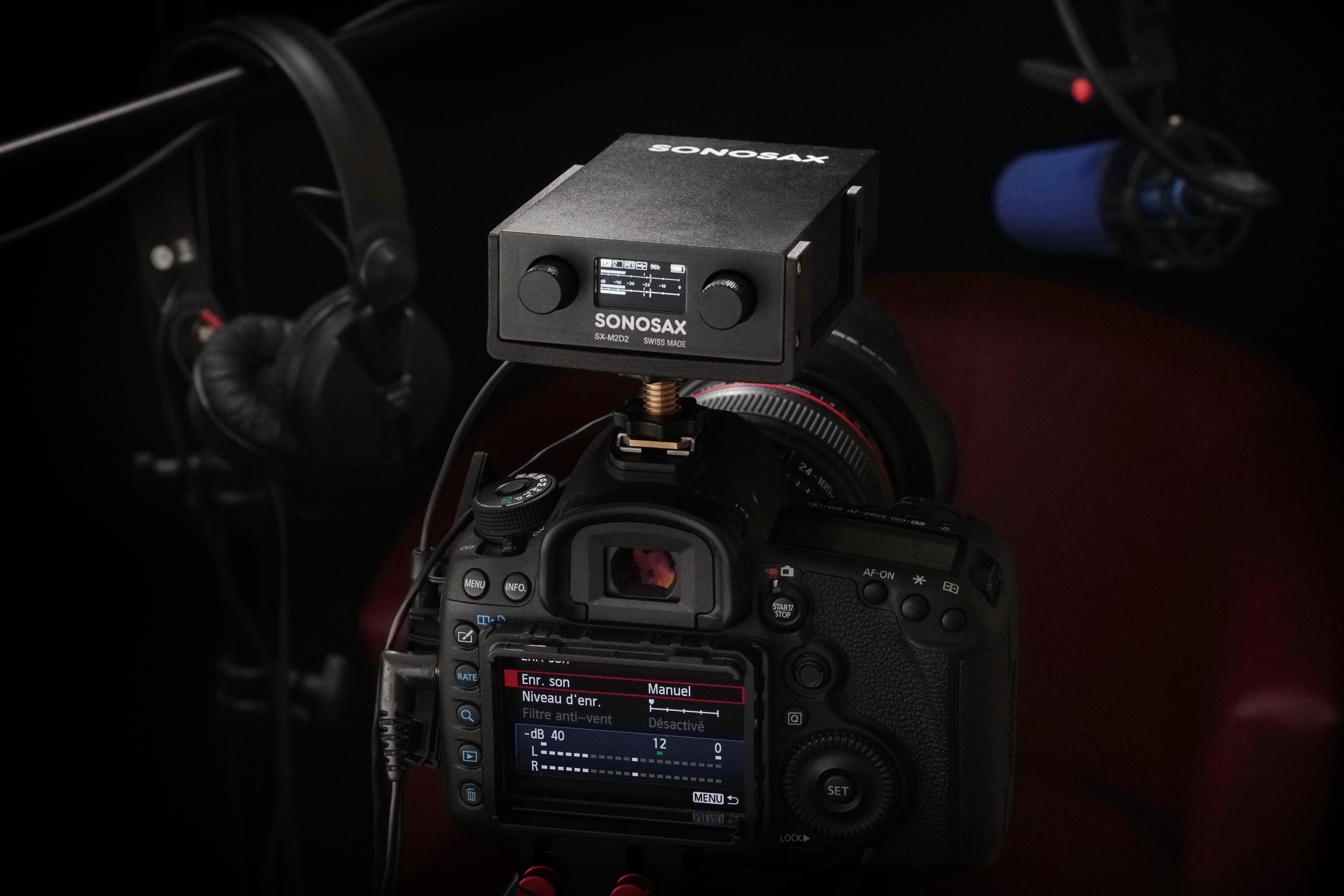
If you want a small state of the art preamp with 48v, limiter/compressor to connect derectly to your RED through minijack/XLR/AES I can't recomend enough the M2D2 from Sonosax.
It's 132db DR and the limiter makes it usuable in any situations where you can't have an eye on your levels all the time.
It can be powered directly form an internal battery, Hirose or USB-C connector.


Best mini preamp out there but it comes at a cost...

See you
Patrick
 
Yes, I always leave the limiters enabled most of the time even when utilizing 32-bit. Honestly, for scratch or live audio as a single shooter (your method), 32-bit vs 24-bit is a toss and I am not sure how often you will really utilize that wider dynamic range in those instances unless in an odd and challenging environment where people are really quiet then screaming at the same time. 32-bit float may be beneficial to bring levels down if you run hot on your gain however, but no matter what when you run heavy gain you are always going to induce excess noises which will needed to removed in post so I am not sure what the big deal is in all the 32-bit marketing at better controlling levels. 32-Bit doesn't mean cleaner audio it just means a wider recording spectrum so low/high sounds can be recording more easily without a cut-off and amplified later in post. 32-Bit being modeled as a "fail safe method of recording unintelligently where you can magically pull your levels back down in post if they clip" is kind of a joke and marketing more than anything. Where I notice the difference of 24-bit and 32-bit float is in recording foley and ambience for projects where I am actually recording with low gain to reduce noise and help reject unwanted sounds in the field and then going back pulling levels up drastically in post and amplifying particular sounds while removing others. I have a lot of confidence in the Mix-Pre ii and a good mic for allowing you to pull out some pretty impressive sounds. However, I have found with any recorder/mic combo if riding the gain towards the hot end you will always pick up lots of unwanted artifacts, handling noise, increased deflections from poor environments and more signal/self noise which just makes your job harder later in mixing. Whether recording at 24/32 bit the process is the same so the benefit of 32-bit on running levels on the higher end may not be that useful when recording live sound as you are going to be doing a lot of mixing to remove all that unwanted noise whether you can bring the levels down or not. I often don't rely on the wider dynamic range to pull levels down but rather up. If adjusting for low-noise with lower gain at the forefront I find the limiter perfect for acting as a secondary fail safe since you already are conservative by not pushing up the gain from the start. I just prefer to pull sounds out rather than make unwanted noise go away or reducing hot levels later as the work is time consuming. The end result is much cleaner by being conservative and pulling sound out of your file. However if you were doing sound of a race car exhaust, of course there may be scenarios where the higher dynamic range in upper frequencies will allow for a fatter file and more mixing/EQ flexibility in post where a limiter may actually not be what you want in that instance. However, for scratch or live audio of events for the background to say a doc or corporate event shoot you aren't going to see that much of a difference between 24-bit and 32-bit but if you have it why not use it all the time anyhow, I know I do? It's not like it makes a difference in the size of the WAV file as it is a non-issue compared to the size of R3D's.

I've been using the first generation Mix-Pre-3 I on my Epic Dragon and syncing through waveforms in post.
I've thought about getting a Mix-Pre 3 II for timecode-out and 32-bit seems like a nice bonus.

I send Mix-Pre 3's stereo out signal to the Epic mic input as scratch audio, so I can listen to good audio while watching playback on the Epic, so I'd still need to do that anyway. And syncing by waveforms in Resolve is pretty easy and accurate in my experience w/ the latest version.

1) Do you think timecode-out would even be worth the upgrade in my case? (If timecode is off by 2-3 frames, as mentioned above, then def not)

Also, for those using 32-bit recording, do you also enable the limiter on the Mix-Pre 3 or are you just manually bringing the audio levels down in post, to remove the distortion?
Theoretically, manually adjusting the audio level in post, to remove the distortion would give you more control than the Mix-Pre 3's fixed limiter settings, but

2) Is the manual process worth the extra steps in post vs the limiter, as far as quality? Bringing those audio levels back down is manually doing the same thing that the limiter was already doing, right?
 
Last edited:
Akin, the limiters aren't selectable when recording in 32-bit float mode, and are only adjustable in 16 & 24-bit mode.

Here's an explanation of 32-bit float mode - http://www.sounddevices.com/32-bit-float-files-explained/

I'd be looking at how often you're hitting the limits of your current dynamic range to determine if 32-bit mode is worthwhile.

Similarly, I dont think the Mix-Pre 3 II's built-in timecode alone would make the upgrade worthwhile, if you already have a workflow that doesn't need it. Changing how you work to make use of the feature could potentially be a good thing though.

An easier upgrade choice would be the the Mix-Pre 6 II, if you needed/wanted the extra couple of inputs along with the timecode and 32-bit mode.
 
Thanks, Andrew and Les.

I now see that the Mix-Pre 3/6 II don't have a dedicated timecode-out port. If I have to use the stereo out port to send timecode to the Epic, that's a deal breaker, since I need that stereo out port to send scratch the the camera, to check playback w/ sound.

I'm guessing a work-around would be using the Mix-Pre's headphone out port to send scratch to the Epic mic input, at the expense of quality (?), and then monitor the sound directly through the Epic's headphone output.
If that works, it seems annoying, lol.

I'll just stick to my current setup.
 
mix pre 3

mix pre 3

With respect to AA power.. make sure your phantom power is off and you'll get better life on the unit.
We use an Anken powerpack for powering via USB-C. It lasts a day or 2 and is lower profile than the L-Batt or AA batt adapter.
32 bit is super nice to have! The unit worked flawlessly for a 2 week shoot in Peru at 30C weather.
One bit of caution - I filled up an 8gb sd card and this corrupted all of the audio on the card (recoverable thanks to help from a friend, data was offset)
My unit is also 'ghosting', the buttons are pressing themselves so the unit is on it's way back to SD for repair...
 
Thanks, Andrew and Les.

I now see that the Mix-Pre 3/6 II don't have a dedicated timecode-out port. If I have to use the stereo out port to send timecode to the Epic, that's a deal breaker, since I need that stereo out port to send scratch the the camera, to check playback w/ sound.

I'm guessing a work-around would be using the Mix-Pre's headphone out port to send scratch to the Epic mic input, at the expense of quality (?), and then monitor the sound directly through the Epic's headphone output.
If that works, it seems annoying, lol.

I'll just stick to my current setup.

I didn't realize the audio output and TC output were the same port. I may forgo that as I also had planned on feeding my audio into my Epic as scratch/backup if the recorder died or the files became corrupt.
 
I didn't realize the audio output and TC output were the same port. I may forgo that as I also had planned on feeding my audio into my Epic as scratch/backup if the recorder died or the files became corrupt.
The waveform syncing still works well, if that's an option for you.

But yes, I just checked the user guide. It even refers to the port as "Stereo or Timecode Output" in the II series. For a dedicated timecode-out port, the next option is the Mix-Pre 10.
 
With respect to AA power.. make sure your phantom power is off and you'll get better life on the unit.
We use an Anken powerpack for powering via USB-C. It lasts a day or 2 and is lower profile than the L-Batt or AA batt adapter.
32 bit is super nice to have! The unit worked flawlessly for a 2 week shoot in Peru at 30C weather.
One bit of caution - I filled up an 8gb sd card and this corrupted all of the audio on the card (recoverable thanks to help from a friend, data was offset)
My unit is also 'ghosting', the buttons are pressing themselves so the unit is on it's way back to SD for repair...


Cmon Thomas splurge on that 64gb Card! ;) Have you upgraded your firmware recently to possibly fix the possible issues?
 
You’re correct Akin. I emailed Sound Designs and they confirmed what you said. I guess for redundancy I’ll forego timecode syncing and run the sound into my Epic and sync in post. I’ve never had any real issues with that in Resolve.
 
Back
Top