Welcome to our community

Be a part of something great, join today!

  • Hey all, just changed over the backend after 15 years I figured time to give it a bit of an update, its probably gonna be a bit weird for most of you and i am sure there is a few bugs to work out but it should kinda work the same as before... hopefully :)

Dragon noise - is this too much or is this normal? Seems strange.

Andri Peetso

Well-known member
Joined
Jun 16, 2013
Messages
75
Reaction score
0
Points
0
Location
Tallinn, Amsterdam
I'm a new dragon owner and it seems as if I'm getting too much noise on my camera. A few clients have also commented on it.

I did this tests after the latest firmware update, just after blackshading and everything running optimal. If there are any better ways to detect abnormalities, please let me know.

I first noticed it when we were shooting outside and the client commented on the noise issue seeing it on a big monitor. The ISO was set to 250, we were shooting in daylight and I just had done a fresh blackshade 30 minutes earlier. There seems to be a lot of noise in the midtones.

Is this normal? What could cause this (redgamma4?)? If it's not normal, how do I fix this?

(link dead - new link with new files below)

Edit:
Both of the shots here are from an earlier shoot. Is this caused by the 800 ISO? Should I always keep it on 250 on Dragon when possible?

https://www.dropbox.com/s/vfkvsy3z76lcvi1/epic_dragon_01_08_noise.zip?dl=0

Thank you!
 
Last edited:
Did you blackshade after the camera was pretty hot/warm? usually after 20 minutes of being on.

Also, the third clip is corrupted. The image noise is what I would expect for underexposed. If you were monitoring at 250, you would have seen the histogram being underexposed big time. You also also shooting 4K and 10:1 compression. All recipe for more noise. If its low key kind of look you're after, I'd suggest swapping the Skin Tone OLPF for the Low Light one.
 
Last edited:
I will upload another test tomorrow that will better demonstrate the issue; I'll shoot daylight at 250 iso and 5k with as low of a redcode as i can go. Blackshading was done correctly.
 
That is normal noise for 800ISO underexposed at 4K 10:1 compression with the Skintone-Highlight olpf. Use the low light olpf and you will be much happier in these situations... In daylight situations, the Skintone-Highlight olpf will cause red colored noise that needs to be dealt with by selecting DEB in RCX once you get near 500ISO and up. The Low Light olpf does not have this issue.
 
In daylight situations, the Skintone-Highlight olpf will cause red colored noise that needs to be dealt with by selecting DEB in RCX once you get near 500ISO and up. The Low Light olpf does not have this issue.

i don't totally agree with this. Have rated sth daylight at 1000 ISO with no need for DEB.
 
i don't totally agree with this. Have rated sth daylight at 1000 ISO with no need for DEB.

I have plenty of samples... You don't need to use DEB but for someone like me who hates any noise whatsoever, DEB is essential in that scenario. I just use the LLO Olpf for everything now anyway.
 
3 OLPF generations? First time I hear this, didn't know about it. Skin Tone OLPF with PL/EF motion mount is a compromising combo.
 
3 OLPF generations? First time I hear this, didn't know about it. Skin Tone OLPF with PL/EF motion mount is a compromising combo.

We had the 1rst gen OLPF wich was great, good in low light, no need of DEB but had some orb effect on candle light and similar.
Then came out the "better upgrade to it" one wich is the one RED had to crate DEB to kill the red dots effects and put some green in the shadows.
Then came out the official first Skin tone but give us noisy 1000 iso one
After this, to long in my opinon, came the LLO OLPF out wich is closer to the first gen of OLPF first Dragon cameras (user's cameras but not beta tester's ones) I didn't test if the orb is still there or if it has been changed. The one I use and I love.

Pat

Ps : Don't use RedGamma4 it's IMHO to harsh (or only if you want some special FX).
 
I didn't test if the orb is still there or if it has been changed.

The red orbs are still there when shooting directly into a light source.

Andri, get yourself the LLO and forget about STH. I use STH only in a controlled studio environment when there's lots of light available, anything else is LLO and it's doing great. We shot a commercial where 70% of shots were 2000 ISO and didn't use any noise reduction tool in post whatsoever. Because it wasn't necessary. With LLO and mini-mags low compression I feel that Epic Dragon has finally matched the initially promised specs.

P.S.: Always use the lowest compression setting available at current shooting resolution when dealing with low light situations, don't try to save media space unless you're really in a situation when you absolutely cannot offload SSDs. Save yourself time in post instead.
 
Last edited:
I'm beginning to suspect that there's different versions/batches of the Dragon sensor out there. There's just way too much disagreement and variety in terms of noise.
 
Demetri Zuev said:
The red orbs are still there when shooting directly into a light source.

There are two types. One is the red dots that show up in a pattern that occurs when you point at a bright light source and you are stopped down. The other is the one that show up around a light source, such as a candle flame in the dark.

Patrick Tresch said:
It depends of which Olpf generation you have. There have been 3 where 2 of them need DEB badly.

I received the Dragon upgrade in January of 2014. It came with the original OLPF that had the orbs and dots, which eventually became known as the LLO OLPF. I sent in my camera when the new OLPF came out, which resolved the dots and orbs. This was when DEB was introduced. This OLPF later became known as the STH OLPF.

Long story short, there have been two OLPFs and one that may benefit from DEB. 2.5 if the original/LLO OLPF was improved to reduce the orbs.

Personally, I use the LLO and will do so until I get upgraded to the 8k sensor. Mostly because I don't want to keep purchasing the same OLPFs. :) When I do get the 8k sensor, I will buy all of the OLPFs.
 
Charles Bergquist said:
There's just way too much disagreement and variety in terms of noise.

Could also be expectations. There are other cameras that perform better in low light. Be that with better sensor technology or through in camera noise reduction, I don't know. And some of it could be tolerance. Some people like less noise than others.

If you are shooting with RG4 and then switch over to RLF in post, you may be in for a surprise. RG4 seems to crush a bit more, than RG3, which could make someone think there is less noise. And of course RLF lifts everything up. This is just my opinion.
 
Andri Peetso said:
I first noticed it when we were shooting outside and the client commented on the noise issue seeing it on a big monitor. The ISO was set to 250, we were shooting in daylight and I just had done a fresh blackshade 30 minutes earlier.

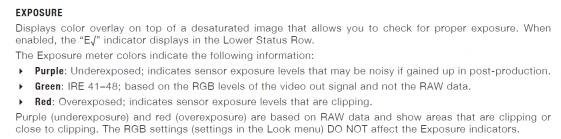
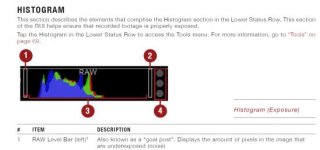
What did the RAW bar (goal post) on the left side of the histogram look like? What you want to do is to be sure the left goal post is empty. You should also use the exposure tool and see what areas of the image are purple. Anything in purple may result in noise.

I have uploaded a couple of clippings from the EPIC manual in regards to the goal post (1 in the image) and exposure tool.
 

Attachments

  • exposure.jpg
    exposure.jpg
    18.9 KB · Views: 0
  • Histogram.jpg
    Histogram.jpg
    19.9 KB · Views: 0
Thanks for the feedback! I guess I'll just have to get an LLO and give it a try!
 
Back
Top