Welcome to our community

Be a part of something great, join today!

  • Hey all, just changed over the backend after 15 years I figured time to give it a bit of an update, its probably gonna be a bit weird for most of you and i am sure there is a few bugs to work out but it should kinda work the same as before... hopefully :)

Dragon Color 2 Strange Clipping Artifacts

Thomas Gast

Member
Joined
May 26, 2009
Messages
13
Reaction score
0
Points
0
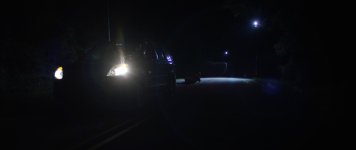
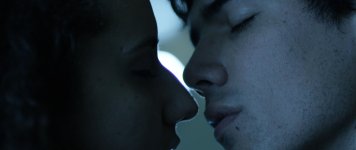
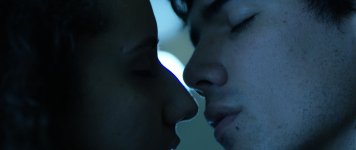
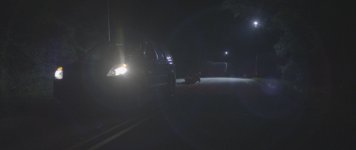
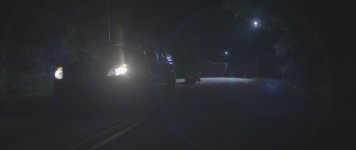
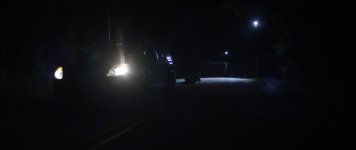
We have been shooting some tests and have come across some strange artifacts in some clipped highlights when viewed with DragonColor2. When viewed in DragonColor1 it mostly goes away.

Has anyone seen this before or know what causes its? Is this a sensor issue or a monitoring issue?

Thanks in advance for any help.
 

Attachments

  • Car_DRAGONColor1.jpg
    Car_DRAGONColor1.jpg
    30 KB · Views: 0
  • Car_DRAGONColor2.jpg
    Car_DRAGONColor2.jpg
    30 KB · Views: 0
  • Kiss_DRAGONColor1.jpg
    Kiss_DRAGONColor1.jpg
    53.6 KB · Views: 0
  • Kiss_DRAGONColor2.jpg
    Kiss_DRAGONColor2.jpg
    53.2 KB · Views: 0
Here are some examples using the RedLogFilm gamma curve.

Also, here is a wetransfer link to the original .R3D to help with troubleshooting.

http://we.tl/b3FxcT2pHg
 

Attachments

  • Car_LogFilm_DC1.jpg
    Car_LogFilm_DC1.jpg
    44.8 KB · Views: 0
  • Car_LogFilm_DC2.jpg
    Car_LogFilm_DC2.jpg
    46.1 KB · Views: 0
  • Kiss_LogFilm_DC1.jpg
    Kiss_LogFilm_DC1.jpg
    47.6 KB · Views: 0
  • Kiss_LogFilm_DC2.jpg
    Kiss_LogFilm_DC2.jpg
    47.3 KB · Views: 0
I dunno, I've used RedLogFilm and RedColor2 in post and never seen a harsh line that bad in Red footage. It looks pretty clean to me.
 
Similar issue in dragoncolor2 from this streetlight in the background, on his left cheek
 

Attachments

  • A006_C042_041535.0005344.jpg
    A006_C042_041535.0005344.jpg
    23.2 KB · Views: 0
Back
Top