Welcome to our community

Be a part of something great, join today!

  • Hey all, just changed over the backend after 15 years I figured time to give it a bit of an update, its probably gonna be a bit weird for most of you and i am sure there is a few bugs to work out but it should kinda work the same as before... hopefully :)

Dragon at 400 ISO

Rob Macey

Well-known member
Joined
Oct 25, 2011
Messages
377
Reaction score
0
Points
0
Location
Orange County, CA
After a 12 day run with my Dragon for 2 clients, I'm very happy with the results. My work is network and cable so bringing Dragon into the mix brought a few good surprised reactions from those that didn't expect it. I usually shoot with my F5, F3, and HDX recording to ProRes, DNxHD or 50mbps to .MXF. So, plugged in Dragon to Pix/Nano, like the others, and away we went. "Adaptive" mode is so nice during interviews. So nice.

I'm always looking for the cleanest/noiseless base iso to work from since most of my shooting these weeks involved having black/dark backgrounds. 400 looked great.

I've attached an R3D grab.


https://www.dropbox.com/s/fr9ftnbp007yfkr/A001_C002_0711N0.0000737F.R3D
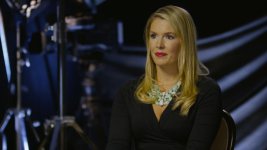
 

Attachments

  • TCA.jpg
    TCA.jpg
    24.8 KB · Views: 0
Dragon really gets the gold in skin tone. Shooting HSN commercials all week. The VP of production stopped by and said, man I like that ARRi camera. Director told him it was the new dragon, he just said "well I guess I like the red now too".
 
Dragon really gets the gold in skin tone. Shooting HSN commercials all week. The VP of production stopped by and said, man I like that ARRi camera. Director told him it was the new dragon, he just said "well I guess I like the red now too".

:) I punched the saturation to 1.4 to get colors to match the other cameras and added full cto to the 3200 kino globes. That's it. Wysiwyg.
 
I do something similar. I use tungsten key with 1/4 blue, with HMI/blue kino background, and back lights. I go about 1.2 on sat. 5000k WB.

Get the look nearly the same.
 
Looks great!

I would reset that particular saturation control back to default and use the saturation control under Post : Looks : Effects. I think you will be happier.

From RCX? In this case, The files are recorded straight to my Pix 240's and handed off end each day. Burning through interviews each day so capturing the look in camera is the only deliverable.
 
I do something similar. I use tungsten key with 1/4 blue, with HMI/blue kino background, and back lights. I go about 1.2 on sat. 5000k WB.

Get the look nearly the same.

I like the 1/4 -1/2 blue with that as well Timur. Are you White balancing through the 1/4 blue or just keeping it cooler with it? Good stuff.
Background lights were mixed daylight kino, ctb Dedo's/Source 4's. Dragon is tough to overexpose ;) It keeps going when other cameras hit the ceiling.
Xenar 95 on this one.
 
Glad to liked "adaptive" fan mode. I have some interviews coming up and am excited to try this feature. How long of a take can you get before the fan kicks in on this mode? Rooms air conditioned?

After a 12 day run with my Dragon for 2 clients, I'm very happy with the results. My work is network and cable so bringing Dragon into the mix brought a few good surprised reactions from those that didn't expect it. I usually shoot with my F5, F3, and HDX recording to ProRes, DNxHD or 50mbps to .MXF. So, plugged in Dragon to Pix/Nano, like the others, and away we went. "Adaptive" mode is so nice during interviews. So nice.

I'm always looking for the cleanest/noiseless base iso to work from since most of my shooting these weeks involved having black/dark backgrounds. 400 looked great.

I've attached an R3D grab.


https://www.dropbox.com/s/fr9ftnbp007yfkr/A001_C002_0711N0.0000737F.R3D
 
Glad to liked "adaptive" fan mode. I have some interviews coming up and am excited to try this feature. How long of a take can you get before the fan kicks in on this mode? Rooms air conditioned?

I had Dragon on for 10 hours straight. Rolling for 30 , then a 10 min. break to interview another celebrity, then rolling again. Same pattern for 4 consecutive days. Temp always stayed 65 and fans never made an audible sound. I have full confidence in Dragon staying quiet now.
 
Rob, what focal length did you use? How close were you to the interviewees? How was the audio recorded? I will be shooting a lot of doc interviews soon.

Thank you again for sharing your work.

Used my Xenar 95 for this shot from about 10-12 feet away I think? Audio into Dragon via A-Box and SDI out into Pix 240.
My Soundguy records on his 788-T as a backup too.
 
Very, very noise. I mean very very nice. (j/k).

TOJ_YHKA2fYN6UfY695kFAixW8uRcRt5YSZWYVujiYM
 
:) I punched the saturation to 1.4 to get colors to match the other cameras and added full cto to the 3200 kino globes. That's it. Wysiwyg.

Looks great!

I would reset that particular saturation control back to default and use the saturation control under Post : Looks : Effects. I think you will be happier.

From RCX? In this case, The files are recorded straight to my Pix 240's and handed off end each day. Burning through interviews each day so capturing the look in camera is the only deliverable.

I was going to say the same thing as Stacey but saw he beat me to it. If you can, maybe consider leaving the saturation in-camera at 0, to be added in post. A simple boost in saturation in any NLE would do the trick, even on the ProRes files.

The RAW (or metadata) saturation control (I don't know exactly what to call it) tends to make things go unattractively green very quickly, IMO, especially in skintones.

If there's not currently a way to add post-processed saturation on the outputs in-camera, there probably should be.

Rob, you should compare the two in RCX to see the difference and perhaps try to find an equivalent and viable solution with your setup.

Tastes vary, but I think the post saturation looks significantly better to the degree that it may justify a slight change in methodology. I realize it can be a delicate matter, especially when dealing with clients and their perceptions.

EDIT: I actually think a combination of the two controls in this case helps the image by keeping the lipstick from getting too bright, as it's tending to do when using the post saturation alone.
 
Last edited:
I was going to say the same thing as Stacey but saw he beat me to it. If you can, maybe consider leaving the saturation in-camera at 0, to be added in post. A simple boost in saturation in any NLE would do the trick, even on the ProRes files.

The RAW (or metadata) saturation control (I don't know exactly what to call it) tends to make things go unattractively green very quickly, IMO, especially in skintones.


If there's not currently a way to add post-processed saturation on the outputs in-camera, there probably should be.


Rob, you should compare the two in RCX to see the difference and perhaps try to find an equivalent and viable solution with your setup.

Tastes vary, but I think the post saturation looks significantly better to the degree that it may justify a slight change in methodology. I realize it can be a delicate matter, especially when dealing with clients and their perceptions.

EDIT: I actually think a combination of the two controls in this case helps the image by keeping the lipstick from getting too bright, as it's tending to do when using the post saturation alone.

Thanks. I hear what you're saying. However, I didn't notice any skin color shifts leaning towards green when I went from 1.0 to 1.4 sat. We shot 55 short interviews over 4 days; Clive Owen to Mira Sorvino, etc. Everyone looked great. Very nice skin tones overall. I wanted to set the client at ease with a look that was ready to air. Very little touch up if any at all.
 
He was trying to match the other cameras with his lights (its in the description); but yeah, on my screen it looks pretty yellow/sickly.
 
Rob, the saturation control you are using is performing the adjustment in linear light. The other saturation control works in gamma corrected space, which is how color controls usually function such as Photoshop. Since you are applying to the output, for your external recorder, you don't have much choice. Just something to keep in mind.

I will probably be ~6' away for my interviews, so I may have a little more fan noise to deal with. Thank you for sharing your details.
 
Rob, the saturation control you are using is performing the adjustment in linear light. The other saturation control works in gamma corrected space, which is how color controls usually function such as Photoshop. Since you are applying to the output, for your external recorder, you don't have much choice. Just something to keep in mind.

I will probably be ~6' away for my interviews, so I may have a little more fan noise to deal with. Thank you for sharing your details.

With Dragon in adaptive mode, you won't even hear the fans. They're pretty much dead quiet.
 
Hey Rob

Thanks for sharing this.

I am however curious as to if there's any particular reason you use the Phantom Power on the Red for your microphone, instead of using the pre-amps on the Pix and then feed from a line out on the Pix into the Red?

We have 2x Pix 240's and this is how we tend to run. Don't get me wrong, the pre-amps in the Reds are surprisingly good, but I think the Pix are better.

I'd really appreciate your view on this.

Thank you
 
Hey Rob

Thanks for sharing this.

I am however curious as to if there's any particular reason you use the Phantom Power on the Red for your microphone, instead of using the pre-amps on the Pix and then feed from a line out on the Pix into the Red?

We have 2x Pix 240's and this is how we tend to run. Don't get me wrong, the pre-amps in the Reds are surprisingly good, but I think the Pix are better.

I'd really appreciate your view on this.

Thank you

Sure. I had 4 hours to setup and light a series of 4-camera interviews over 4 days. Barely enough time for the initial setup. It's more efficient to run xlr from my Soundman's mixer to the four cameras and then SDI out from the cameras into the Pix's. Cleaner setup, less cabling and faster in this case. My Soundman has no complaints about audio from Dragon at all.
 
Back
Top