Welcome to our community

Be a part of something great, join today!

  • Hey all, just changed over the backend after 15 years I figured time to give it a bit of an update, its probably gonna be a bit weird for most of you and i am sure there is a few bugs to work out but it should kinda work the same as before... hopefully :)

DPX to post house for grade

For the R3D to AE workflow, you have three sensible options: REDlog DPX, PDlog985 DPX, 16 bit linear TIFF (Gamma Curve set to Linear). "Full Range" 10 bit DPX without a log curve loses too much precision, so it shouldn't be used when other choices are available. 16 bits are enough to represent the precision of the sensor, without a gamma or log encoding.

Importing PDlog985 into AE should be easy as it differs from Cineon only by the white point, which is 985 instead of 685. REDlog is a bit harder - its black point is 0, white point is 1023, but you'll have to find the correct gamma. Both should have "logarithmic conversion" turned on.

http://prolost.com/blog/2008/3/15/red-log.html

says that in AE the gamma should be set to 1.7, in Nuke to 1.02. See what works for you. :-)

(RED should really release a white paper for REDlog.)
 
Point of clarification: The Technicolor Clipster is sending me 10 bit full range DPX files gamma 1.0 - with an elevated black point reflecting 7.5% IRE - so I assume something like 76. So AE people need to set this in the Cineon color settings.
 
This from David at Clipster:

DPX Files can either be in head range or full range.

64-940: head range, 0mV - 700mV, 7.5IRE-100IRE, these are video legal ranges
0-1023: full range, -10mV-800mV
 
1 stop = 90 DPX LOG 10bit "points"

1 stop = 90 DPX LOG 10bit "points"

I was reading and found a pdf that says if you change the expsoure 1 stop the value of the subject should change 90 "points", up or down.

I think I see where 90 comes from, it looks wrong because 0.002*90=0.18 not 0.3 which is ND for 1 stop, but they take the negative contrast as 0.6 not 1.0, so 0.3 * 0.6 = 0.18! So it seems Kodak thinks one stop exposure change makes the gray card move 0.18 density up or down, I will have to check that on our Macbeth digital Densitometer. (funny but I try to just expose right but its a good way to check the lab's control contrast, you expose one stop up and down, and if you get +0.18 and -0.18 then the film is developed right?)

Also if you take 1023 and divide by 90 you get 11.366 f/ stops full range.

Each step in 0 to 1023 is 0.002 density in the negative, well if the negative was uniform that would imply exposure also, but since the film is an S-curve those density steps do not relate to exposure over the full range.

Anyway, if you make three shots of a 18% gray card you should get these numbers then,

-1 stop = 470 - 90 = 380

normal exposure = 470

+1 stop = 470 + 90 = 560

I wonder if that works out with RED ONE shots when you set the range to 0 to 1023?

Another odd thing is that putting 90% white card at 685 is far too high for something that is not near the most bright point in the shot, when all values above 685 are set to 685.

I was looking at the Panalog sensor conversion and it seems they put a white card near 16% of full sensor signal.

In film scans the counts between 685 and 1023 are not just log, but the film has its own roll off from the S-curve, so you get a double roll-off. With Digital Cinema Cameras, if the linear data is converted to Log 10bit there is no S-curve in the sensor data like there is in the film data, so that may be part of the "Digital" look. To convert sensor data to Log 10bit the sensor data needs to go through a S-curve before it is converted, otherwise it will not look like a scaned film negative? It seems Kodak did not plan for more than a two stop over or under exposure, with sensors being pushed to very high EI/ISO, how is the deviation of the sensor data in the highlights worked out so that it does not over-range the 10bit Log data?

If you pull process negative film so you get more than 11.3 stops of range, how does Kodak allow for that lower contrast negative, likewise if you push process where is the adjustment that makes up for the higher contrast negative and smaller stop range, and the shift of the mid-tone density? If you do that with the scanner gain, you lose range of stops in the pulled negative, and you get other problems with all the tones being in the wrong place from pushed negatives. Even if you use a LUT before conversion of the scan data to 10bit log, in some cases the negative will have compressed highlight or shadow detail, do you then alter the density step size in the DPX file?
 
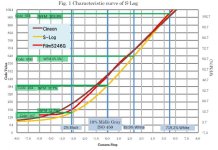
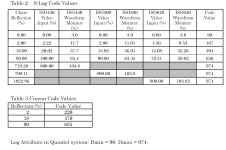
Cineon values vs. Sony S-Log values

Cineon values vs. Sony S-Log values

I noticed some data about Sony S-Log vs. Cineon values.

There is a table and graph you can see if you log in.
 

Attachments

  • SLOGGRAPH.jpg
    SLOGGRAPH.jpg
    90.6 KB · Views: 0
  • SLOGTABLE.JPG
    SLOGTABLE.JPG
    84.1 KB · Views: 0
Hm.

I wonder if we're going down the rabbit hole on cineon since film scanning is, well, soon to be dead technology.

My question is: does any of this really translate to the M or M-X?

My sense is I will just go with 16 lin into the Clipster and full range (0-1023) DPX out.
 
To clip or not to clip, that is the question?

To clip or not to clip, that is the question?

My sense is I will just go with 16 lin into the Clipster and full range (0-1023) DPX out.

There are a few main questions to ask:

1) Does the downstream workflow/software interpret the DPX file header to reproduce what you saw on the previous step in the DI chain?

2) Does the current software save the DPX file header with enough information, I noticed that many of the DXP header fields are "blank" in the DPX saved from REDCINE, so how many fields are "needed" and why are some not needed?

3) For projection, HD use, and making film prints mid-tone should be in the same place, which seems to be 470 if you shoot a 18% gray card, to get 445 you seem to need a gray card that is a bit lighter maybe 20% gray?

4) If you clip the highlights, there are "soft" clip options, if you don't use the soft clip options and go with 0-1023 then if the down stream software clips to 95-685 the highlights can look clipped and "blown out" like cheap video.

5) If you don't clip shadows at 95 and grade down to 0 of 0-1023 then your dark areas may block up since everything under 95 may get lost down stream when some programs clips the bottom off.

6) The DPX clip points relate to how DPX files were desigined to be used, to fit into the DPX/Cineon workflows that have been tested the 2%, 18%, and 90% points should match, so you need to shoot a test card to see how the T/ stop of your lens moves the points up and down and compensate to bring those points back to the right values.

I feel that the concept of clipping the image data is obsolete and should never be done, the highlights and shadows should be rolled off not clipped. The addition of "soft clip" to the Cineon/DPX format is an admission of that being the path to less video like results.

That's why I am using un-clipped TIF files in my workflow, its more like film-to-film printing where there is no "bottom" or "top" just a roll off of contrast at both ends of the S-curve. With a gamma 2.2 TIF you can look at it on any good monitor that is uncompensated and get a close view of what it looked like on another good uncompensated monitor, so both you and the "lab" and others working on the project can see more or less the same thing in all programs that can display the image data direct and as is, unlike DPX where every program may have its own way of converting the DPX data INTO gamma 2.2 data for the monitor.

So, anytime you use a file type like DPX that requires a LUT to be viewied on a monitor, you should test the workflow all the way through with a few minutes of footage to see if everything is going to hold up the way you would like it to, and write down all the setings used in a notebook, so you can try to get it to come out right again for 88 minutes+ of final edit...
 
16% vs. 18%, 470 vs. 445

16% vs. 18%, 470 vs. 445

I was looking at Kodak paper H-61a and noticed that the film LAD used a 16% gray not a 18% gray, so the lad standard was for a DARKER gray than the standard gray card.

BUT, the digital DLAD cin file has the mid-tone at 445 which is LIGHTER than the value kodak says the 18% gray card should be in a CIN/DPX file, which is 470.

So one document says the lad standard is Darker than 18% gray, and the other says it is Lighter than 18% gray?

Link to H-61a,

http://motion.kodak.com/motion/uploadedFiles/US_plugins_acrobat_en_motion_support_h61_h61a.pdf

Quote: [LAD Patch
Original scene had Munsell N 4.5
neutral having a reflectance of 16
percent.]

[Edit: see the post on the next page about how it seems Kodak got the 445 value]
 
Hm.

I wonder if we're going down the rabbit hole on cineon since film scanning is, well, soon to be dead technology.

I would say that the very existence of millions of hours of existing film sitting in temperature controlled vaults and underground storage facilities would suggest otherwise. Even if there is less new film production, scanning will be with us for a very, very long time.
 
I would say that the very existence of millions of hours of existing film sitting in temperature controlled vaults and underground storage facilities would suggest otherwise. Even if there is less new film production, scanning will be with us for a very, very long time.

I meant regarding Red footage - I think you are completely correct about film scanning. Wasn't "A Star is Born" just scanned at 8k? Meanwhile people argue circuitously that 1080p is enough...
 
1080p vs. 8k

1080p vs. 8k

People should spend more time in front of a movie theatre screen rather than a computer monitor, the monitor is sharper!

I was just at the Castro Theatre looking at "Clockwork Orange" and "Shinning" and they were projected totally out of focus, people were shouting "focus" not that anyone that could do anything heard them.

Sitting in almost the same seat I saw "Iron Man 2" projected digital, I guess "2k", on the same screen.

The "2k" digital projection was 2x to 8x as sharp on the screen. And on the screen is what matters unless people are going to look at your movie one frame at a time under a microscope.

It is sad that 70mm prints are no longer being made, since 35mm projection is the "weakest" link.

I have also seen a DVD projected on the Castro screen, and just after the two first "Creature from the Black Lagoon" movies, there was no 35mm print of the third movie. The 720x480 DVD was a little less sharp than the 35mm prints shot in the same camera and done at the same lab.

35mm film as projected has been show to have about 1280x720 resolution at high enough MTF to get past the out of focus projection lens. 1920x1080 is sharper than 35mm projection if it was from uncompressed images.

35mm film recorder much of the time only print 1828x1556 and so are not even 1920 pixels wide when so called "2k" prints are made!

There are reasons to scan at 4k and then down size to 2k in the film recorder, green screen and such works better if you can blur the matte lines.

A paper by ARRI seems to show that you can see maybe 0.3mm at 1 meter, well if you have "super human" eyes, DMV may be using 1mm at 1 meter. Anyway, if you could see 0.3mm at 1 meter you can work out that you cannot see 4k even from digital projection at the back of many theatres, so unless they make theatres with 200 seats its going to be hard to get value from 4k projection being 4x the cost and 4x the data volume, Oh, I forgot, they are going to use the same bandwidth for 2k and 4k images, so you see the same amount of data on the screen, just with MORE compression ratio?

Link,

http://www.arri.de/fileadmin/media/arri.com/downloads/Camera/Tutorials/SystemsTechnologyBrochure.pdf

==

Here is another odd thing about Kodaks DPX numbers,

If there is 2.5 stops between mid-tone 18% and 90% white, and there are 90 points per stop then you get:

90 x 2.5 = 225

Kodak says midtone is 470 for 18% so,

470+225 = 695

But Kodak says 90% white is 685

So what gives?

685 white clip is less than 695

Now if you set DLAD to 445 you get

445+225 =670

In the first case you are 10 points over white clip 685!

In the second case you are 15 points under white clip, which may be why they changes the DLAD to 445 but in that puts off everyone that uses the gray card for a mid-tone point, and anyone that uses a 18% gray card for a mid-tone ref point will have their film print off the DLAD density so their prints will be out of spec for projection?

[Edit: see the post below about the "magic numbers" to how Kodak seems to have gotten 445 for the DLAD value]
 
Regarding the DPX downstream issue - all good points, Dan.

However, in my case I am the end of the line. From here it goes onto tape or up to a streaming server, so handling of DPX data is moot since I deliver tape or QT.

I'm requesting 0-1023 DPX files to get the most data into my box - I set the clipping values myself.

I am curious about the DPX that the Clipster is making - can I upload a DPX for you to take a look at the header on? I'm afraid that is well outside of my skill set.

Thanks.
 
@ Dan: I really agree so much with you regarding projection!
Many cinemas don't care enough about the condition of their gates, lenses and the craft of projection. I've seen "Broken Flowers" by Jim Jarmusch a few times in cinema, and yesterday watched it again with a friend (an experienced cameraman) on my well-calibrated Panasonic PT-2000, upscaled by a PS3 from a 720p broadcast by ARTE. We both agreed that it looked better!
 
DPX header trace log

DPX header trace log

I am curious about the DPX that the Clipster is making - can I upload a DPX for you to take a look at the header on? I'm afraid that is well outside of my skill set.

It turns out I am working on adding a DPX/CINEON header trace feature to my de-Bayer program this week to try to de-Bug some of these odd issues with the 10bpc files.

It will make a *.TXT file you can read from all the fields, that way you can look and see why it will not load, it will even trace DPX types that I do not support for loading.

If you have a FTP I can download a sample DPX from or it is small enough (under 20MB?) you can email me one per email at:

tempnulbox [at] yahoo [dot] com

Be sure to mention "DPX sample file for header trace [DANCAD3D 24/7 SUPPORT]" in the email subject line so it does not get deleted unopened. I can then email back the *.TXT trace file as an attachment, its not large maybe 30KB or something.

The more sample DPX and Cineon files I have the better I will be able to de-bug my support anyway, so doing this for you is also a help for my development.

When I get my de-Bayer program out it will also batch process DPX/CIN and TIF/BMP files as well as process true RAW sensor data and Bayer DNG files, and in one of its menus will be the DPX header trace, so once it is done and posted for download people can check their files as they like and save the results in *.TXT files for reference.

It should also be able to CHANGE header settings in processed DPX files, and change endian, so maybe be useful to fix some of the issues, and adjust the transfer curve to get tones in the right place on the result file. Its about 80% done so far, so parts are working in Alpha test.

If anyone else has sample files from various Digital Cinema workflows and programs those would help me as well.
 
Remote control!

Remote control!

@ Dan: I really agree so much with you regarding projection!
Many cinemas don't care enough about the condition of their gates, lenses and the craft of projection. I've seen "Broken Flowers" by Jim Jarmusch a few times in cinema, and yesterday watched it again with a friend (an experienced cameraman) on my well-calibrated Panasonic PT-2000, upscaled by a PS3 from a 720p broadcast by ARTE. We both agreed that it looked better!

I heard that at ILM (when they were using film) they had a remote control for the projector focus that you could operate from inside the screening room, with a motor on the projector focus control.

Seems like a great idea to me, if the theatre owner is too cheep to use video cameras zoomed in of the screen and monitors with remote controls from the candy counter so the popcorn guy can focus the projectors, they should have a seat in the theatre one can sit at, like the emergency wing escape door seat on a airplane, where someone who cares about cinema could sit and keep the projector in focus for everyone. It would need to be in a close to the screen row, but not silly close.
 
I heard that at ILM (when they were using film) they had a remote control for the projector focus that you could operate from inside the screening room, with a motor on the projector focus control.

Seems like a great idea to me, if the theatre owner is too cheep to use video cameras zoomed in of the screen and monitors with remote controls from the candy counter so the popcorn guy can focus the projectors, they should have a seat in the theatre one can sit at, like the emergency wing escape door seat on a airplane, where someone who cares about cinema could sit and keep the projector in focus for everyone. It would need to be in a close to the screen row, but not silly close.

I used to use binoculars from the booth.
 
Magic numbers 445, 470, 0.666, 2.2

Magic numbers 445, 470, 0.666, 2.2

I figured out where the 445 value comes from in the Kodak DLAD, it goes this way:

1) Clip the DPX to 95 to 685 with no soft clip

2) Do 1.5 gamma correction (or 0.666 depending on the way the software works, 0.666 is the reciprocal value of 1.5, 1.7^1.5 = 2.2, DPX LOG are 1.7)

3) Measuere the 445 patch and you get about 0.458 the value for 18% gray at gamma 2.2

4) Measuere the 470 patch and you get about 0.500 the value of 18% gray at gamma 2.5

It seems they adjusted the DLAD for a gamma 2.2 monitor so the gray patch would be mid-tone. But when exposed at the rated EI/ISO the film scans lower at 470, so there seems to be some fudge in the speed ratings, but they made it come out at a nice number 0.500 when you have the "anti-log" gamma set right for "video gamma" use.

==

The idea Kodak had was to slide the negative scan over the "window" of 95 to 685 to compensate for exposure errors, like changing printing lights. In film printing though there is no hard clip, so the result is not the same. In that case, the film recorder will ONLY print values in the range of 95 to 685 so if you convert video or digital they should be scaled to fit into that range unless the lut/clip points in the film recorder or digital projector are adjusted.

That is probably where most of the problems come in, and the gamma of LOG DPX not being the same as video gamma 2.2, there is a 1.5 (or 0.666) correction needed. That correction value will not work with other clip points than 95 and 685.

==

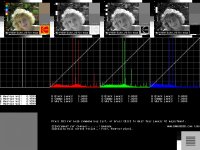
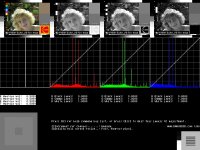
You can see my use of my "probe", I wrote exact values into the soundtrack and frameline space of the DLAD image so that I would have points to measure the "density" on with the exact values stated by Kodak as 470 being 18% gray card, and 445 being the new DLAD standard. With 445 being gamma adjusted by 1.5 or 1/1.5=0.666 the 445 patch reads close to 0.458 which is what should be 18% gray on a gamma 2.2 monitor or TV.

To view those attached images use a gamma 2.2 monitor.

Anyway, if you match those values in your grading, then all software should display the images right if it works with DPX or CIN files matching the file spec. If you go outside those ranges, then it can be hard to tell what might happen, it would depend more on what programs are being used, and how they are setup.

Kodak says in their pdf that you should not do the inverse of softclip on writing files from digital sources, rather fit the tones between 95 and 685 and hard clip above and below. Soft clip is used on film scans since the scanner is not outputting graded results, once graded, the results should be hard clipped. In some systems the grading will be "meta data" rather than changes to the image data, in that case the data output mirrors the data input and would not be clipped at all, or otherwise changed during "grading".

If you put the mouse cursor over the thumbnail you can read the filenames, one marked 470 and the other 445, to tell which is which. The histogram on the left side is just a line because I am reading the gray patches and all the pixels have the same brightness. The probe outline is hard to see on one of them because the XOR makes the outline invisable when the patch is in balance.

Notice in the 445 file, that the gray balance "widget" in the lower left corner shows no features and so is balanced for the 445 signal when I have my "widget gamma" set to 2.2, but the 18% gray card value of 470 is a little out of balance. This is something to note, since if you shoot a 18% gray card with your RED ONE, it should not match the 18% gray standard of 0.458 on the gamma 2.2 monitor, but should be lighter and read 0.500! You cannot use a 18% gray card for the print density LAD, its off, Kodak says they used a 16% gray card in the old film LAD, so that is something to keep in mind!

By some math I have not done yet it should be possable to use the ratio of 16/18 to equal 445/470.
 

Attachments

  • Dlad445a.jpg
    Dlad445a.jpg
    86.6 KB · Views: 0
  • Dlad470a.jpg
    Dlad470a.jpg
    86.7 KB · Views: 0
Back
Top