Welcome to our community

Be a part of something great, join today!

  • Hey all, just changed over the backend after 15 years I figured time to give it a bit of an update, its probably gonna be a bit weird for most of you and i am sure there is a few bugs to work out but it should kinda work the same as before... hopefully :)

Does anyone ever use Audio recorded in camera?

I just bought a Scarlet Dragon. I sometimes do sit down interviews so I will run sound. I have a Sound Devices 442 and an Abox on the camera. The inputs on Cam Analog are microphone inputs. Where do you switch them to line inputs? I read the manual but I can't find that. The 442 lets you send out balanced mic levels, which works, but can you use these inputs to accept balanced line inputs or do you need the Pro I/O?
 
Yes you are correct. DSMC provide 2 channels of microphone level. (See page 130 of the Ops Guide) For line input the Pro I/O is required.
 
Thanks for confirming that. I did read the manual, I just didn't believe it. ;) So then if others are using mixers then we are still hitting those mic preamps in the camera? Hmm...
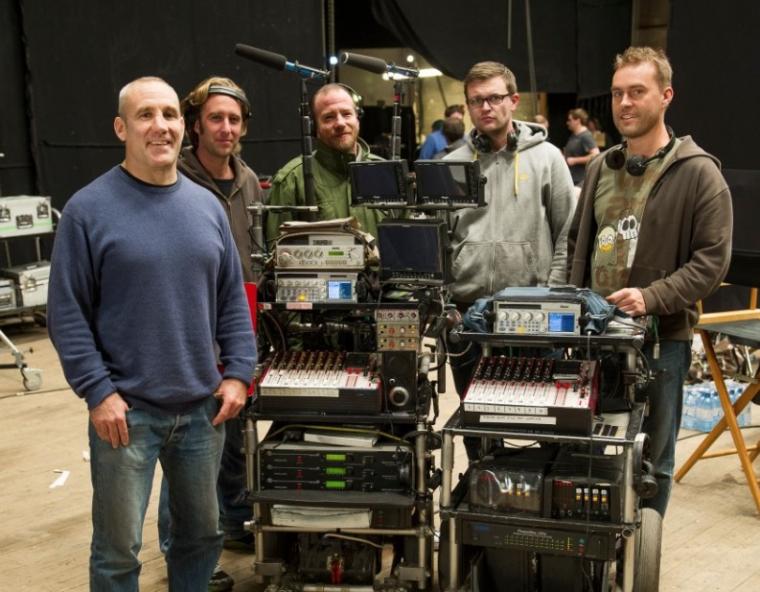
 
Sounds fine. The 442 has variable output (line, -10, mic) at the breakout cable which is what I use for these jobs. Selecting mic on the 442 output, sending tone and setting the levels in camera got it all on track. I still wonder what people are doing to attenuate line mixer outputs into those mic inputs if their mixer does not provide for it.

It's better to have a production sound engineer with me but this provides a necessary option. And now, back to the Weapon threads!
 
What's also insane these days is how content is being approved. All my clients watch every cut on their Imac on a 720p H264 quicktime. They couldn't tell the difference between a $50 lens and a $25,000 Master Prime if it slapped them in the face. Same for sound. Under those circumstances, they can't tell whether it's recorded in camera, or on perfect Wav files. Their "speakers" in their offices are terrible anyway. It sucks, but that's the way it is. Even the premium spots are approved/critiqued this way too. The days of clients coming into calibrated edit rooms are long gone. We don't even go to mixes anymore. They are all done unsupped, and we listen to them on laptops and call in and give feedback.

LOL this is so true...and on top of that, ideas being squeezed in on the set, voice overs nobody has rechecked because everyhting is COPY/PASTE amongst the clients' employees, it's technology making us faster and dumber
 
I mostly spend a day just syncing and organizing material when doing an edit for something. I started a thread about why we still record sound separately with an always buggy timelock. There are very few productions where everything went so smooth that there were no problems in post. As an editor I'm sick and tired of being handed material that wasn't capture entirely correctly. It's not that the errors aren't easily fixed, it's that it demands a detective job to find the errors so nothing gets lost when auto-syncing.
Bear in mind there are a lot of projects out there that use tons and tons and tons of audio tracks simultaneously. Sure, recording in-camera is fine if you're just doing a sit-down interview; not so good if you're shooting Les Miserables. Simon Hayes, the Oscar-winning mixer on that production, just posted a photo of his sound setup:

post-1-0-03247400-1355008129.jpg


Trust me, you're not going to want to try to record 24 simultaneous wireless mics to a camera. You need a separate audio recorder to manage all these tracks, get the metadata straight, and provide backups. And I've done two or three low-budget indie films where we had 10-12 wireless mics every single day, on almost every take (large cast, tons of dialogue), with every mic constantly judging level, changing positions, moving booms around, the whole deal. Not possible going to camera.

The simplest way to sync audio quickly and easily: 1) make sure the camera and sound department have identical timecode. This is very inexpensive and easy, and every 2015 editing program on the planet will autosync the two in seconds. If the timecode doesn't match, then go to method 2): hire an assistant editor to sync up all the material. Even in the union, they only make about $200 a day. This is a tiny price to pay for them to sit there for 3 or 4 hours syncing up all the material, making backups, organizing the bins, and getting the system completely ready for the editor every day -- particularly on heavy-footage shows like reality shoots or documentaries.
 
I endorse the Zaxcom audio input, via their proprietary Zaxnet technology. Great for scratch track and the ERX units, are very light-on board batteries go all day and will synch Timecode, if using a non Dragon camera (at the moment), just fine, throughout the same ERX box. Can attach the ERX, with velcro, wherever or with an aftermarket metal enclosure.

Thank you very much

Fury

Hi Fury,

Can you let us know more about which ERX unit you have, where/how you are mounting and how you're powering it?

We are looking at this solution for a low budget documentary which will have myself shooting and a producer running sound - potentially with the MAX mixer/recorder, if we can afford it.

Would love to get good sound straight into the camera and R3Ds as it would save us plenty of time in post.
cheers
 
Hi Fury,

Can you let us know more about which ERX unit you have, where/how you are mounting and how you're powering it?

We are looking at this solution for a low budget documentary which will have myself shooting and a producer running sound - potentially with the MAX mixer/recorder, if we can afford it.

Would love to get good sound straight into the camera and R3Ds as it would save us plenty of time in post.
cheers

Hi Brendan,

ERX takes power from 2 AA bateries. Any of the ERX flavours can and NEED to be upgraded, if not enabled for Time code. The original designation was TCD, on the ERX. I think I paid $100 to make a non TCD ERX into a software enabled ERX TCD (no hardware required). I frequently have a velcro attachment, as mentioned between the ERX's case and the camera/battery/other, as space permits (cable length I have allows this.

The method I use is to have the ERXtransmit TC and an audio track to the camera. I also have calibrated the ERX to the TC of my Nomad, which is the Tc source that I use. All the ERX Tc crystals are not created equally of course, and the ver 2.0 of ERX software allows the calibration capability, which should be turned off, after you run it, to avoid spurious signals hitting the ERX and altering the calibrated level. OTOH, dpending on your choice of workflow, The ERX can transmit only audio (won't need a custom cable as required for Tc and Audio, from ERX) if you setup the ERX to do such (menu driven).

Dpending what your finished audio quality desires are, there are myriad optons as well. I would think that getting a file from the MAX and doing some processing in post would be helpful, but you may be happy with the mix right then and there and sent to the camera as well...

Thank you very much

Fury
 
Back
Top