Welcome to our community

Be a part of something great, join today!

  • Hey all, just changed over the backend after 15 years I figured time to give it a bit of an update, its probably gonna be a bit weird for most of you and i am sure there is a few bugs to work out but it should kinda work the same as before... hopefully :)

DNG file support

Well well...

Let's rephrase it...

Does anyone have the need or see any advantage to work in a open, non proprietary RAW format like DNG?

Patrick
 
Lumiere_web.jpg

Lumiere 4K RAW (DNG) camera with Nikon-G 14-24mm f/2.8 on affordable 701 HDV Manfrotto fluid head/tripod kit.

Lumiere 4K RAW (DNG) camera looks interesting and was mentioned in Adobe Cinema DNG Initiative pdf>>>

Lumiere 4K you can hook via PCIe card to PC and straight record 4K RAW DNG to SSD.

Weight just 1.6 kg.

RED1, EPIC and Scarlet posible alternative???!!!

kousei.jpg


Lumirer_Rear.jpg


Who knows maybe Bolex-Digital would be interested in to buy this Lumiere 4K DNG RAW camera patent???!!!
 
Hello Sanjin,

As I see, Bolex-Digital only make film transfert and do not manufacture cameras... It's a too different business to jump in and they are very small. They have a partner agreement with Bolex HQ from Yverdon wich essencially is an technical and "name trade mark" agreement.

I would love to see the others company envolving in the camera domain like :

Ikonoscop http://www.ikonoskop.com/
There was a Swiss based company with a camera design (in Zurich I think) I can't remember
Aaton digital
Kinetta (if they still inted to develop it)
Bolex could alos jump in...
...

Lumière is interesting but looks like the early Viper with computer and storage hurdle.

Patrick
 
Patrick,

if Swiss are so hard with investment in the new digital technologies then

maybe ARRI should buy Iconoscop because ARRI don't have a small HD camera

that can continue Arriflex-16ST film camera success

and also Lumiere 4K could become ARRI first 4K camera ever that also using DNG RAW.

They could fuse those two DNG RAW recording technologies that means also

they should get rid of 'troubled" ARRIRAW codec as a recording format in the future.
 
DNG support

DNG support

I have DNG support in the de-Bayer program I am working on for Bayer DNG, Linear DNG may load if you rename them TIF, but since Linear DNG are already interpolated I DO NOT recomend using Linear DNG as you have more control over the end image quality using the Bayer DNG.

I have been getting very nice results from the Acam dII sample images since I have 100% manual control over the de-Bayer processing, unlike the Adobe (tm) products that give "auto-matic" processing.

One issue with "auto-matic" processing of DNG, like in DCRAW, is that it can act like AGC on the images can change the processing as you pan the camera and the light changes like a window with bright sun comes into the frame.

With my processing I keep the control values the same for the shot like in a motion picture printer, so that you get more film-like results, without the un-wanted AGC effect.

My de-Bayer program supports Linear sensor data as RAW data in various packings and through a TIF or BMP input. During development one camera maker sent me some monochrome BMP files of Bayer data, so I added support to de-Bayer those to get balanced color output.

I can now convert,

RAW -> DNG or Delta-Encoded for Archive
DNG -> DNG (with bad pixels and FPN removed), RAW or Delta-Encoded for Archive

And de-Bayer to BMP/CIN/DPX/TIF and my internal formats

Also for use with processing RED footage I can now,

BMP/CIN/DNG/TIF to DNG with reverse de-Bayer

and

BMP/CIN/DNG/TIF to BMP/CIN/DNG/TIF for CC green screen titles opticals etc.

The release has been held up while I deal with some of the DPX time code issues, but its working everyday about for alpha testing and is about 98% to first release stage. It works with frames up to maybe about 8K, I have not de-Bugged it on larger frames since its nuts to do an un-compressed DI larger than that at this time, although who knows in a few years.

When I get it done it will be posted as a "freeish" "beta-test" download on my web site.

It works with my DI system and could be useful for RED people to do CC and other opticals with. If EPIC will output True RAW DNG files, that would be great since I would be able then to maybe add a menu option for that camera type, right now I have SI-2K (tm), Kinor-2K (tm), Acam dII (tm), and some other makers in my Digital Cinema Camera maker setup menu that adjusts some things unique perhaps to the various cameras.

Adobe has a convertor program that can convert Canon and other raw formats to Bayer DNG (you need to change the check box in the second level menu from Linear DNG to Bayer DNG in that Adobe program). I don't know if Adobe could add Epic's "lossless" REDCODE mode as one of their "raw" formats to convert to Bayer DNG?

It is possable to convert a good uncompressed TIF to a Bayer DNG file (with the program I am working on), but there is not much advantage in that since you lose quite a bit of quality and pick up some Bayer artifacts.

Bayer DNG is best used for actual True RAW sensor data fresh off the sensor, I don't even need or want the bad pixels taken out with my program so that I can make up for black level drift with the camera and sensor heating issue.

==

Do you know the MSRP of the camera in the render?
 
Bayer DNG is best used for actual True RAW sensor data fresh off the sensor,...

Is REDCODE also a "true Raw" sensor data? Or do the wavelet compression change "the structure" of the data?

Patrick

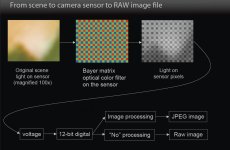
Picture from the CinemaDNG presentation showing RAW capture:
 

Attachments

  • Rawcapture.jpg
    Rawcapture.jpg
    82 KB · Views: 0
what does True mean?

what does True mean?

Is REDCODE also a "true Raw" sensor data? Or do the wavelet compression change "the structure" of the data?

Because we cannot see the R, G1, G2, B images after the wavelets are de-compressed (without interpolation) vs. the original data to do a subtraction to find the error bits, one can only surmise based on the de-Bayered version.

RED seems to have said that there will be a version of REDCODE for Epic that will top-out as "mathematically lossless" allthough what that means at 18bits is hard to tell...

One funny thing, the sample DNG file on Adobe's web side that shows the rainbow over Hawaii seems to be a reverse de-Bayer from a JPG image, if you look at the red and blue image planes it seems to have compression artifacts, or at lease something I have not seen in any real RAW data from sensors, so what is that about?

The conclusion before in these topics was that RAW can mean anything you want it to (?), so maybe now there can be a discussion of what "True" means?

==

What would be more constructive would be to talk about what they are going to compare the 2.5:1 compression ratio to? Is it to a 48bpp TIF file or a 30bpp DPX file, or what, so far I have not gotten an answer to that, that I can make out.

I know with delta-encoding it is 100% lossless because if you take RAW sensor data saved from the sensor (not a standard file format, just a file of the RAW sensor data values) and delta-encode it, the de-code it and use the DOS FC command you read that the source and result files are the same bit for bit.

Delta-Encoding of 12bit packed data (like Acam dII) uses, gives from 0 to 50% smaller files, with about 20 to 25% being typical depending on the exposure and subject matter, as the deltas are larger for high contrast subjects with fine details of high contrast over a large area of the frame.

So you still need enough bandwidth to record the bit-packed format, but you can save some diskspace so get longer record times.

I don't see how 2.5:1 reduction over bit-packed Bayer data is possable without any loss for images that are not very under-exposed or blured. It is possable to decrease percision of the delta values but then everyone would agree that it is lossy.

Sometimes people say the lower bits are "just noise" but that is not true if the camera is working right and you have 100% of the sensor data as it comes out of the ADC, you just have signal mixed with other signals, and you can average pixels by area and in time (using temporal noise reduction) to extract image data below the various types of noise.

==

On RED's web site they seem to have said before that there was some difference between the image quality of REDCODE at its various bit rates, so from that you can assume that something in REDCODE does have an impact on the image. If there was no impact then why would there be more than one bit rate?

==

Anyway, it would be nice to see a actually lossless delta-encoded module for all the RED cameras that would allow for Bayer DNG output or even just a RAW data file of the sensor data. The reason they have given before that the raw port for REDONE not being made was that it would not be possable to make one low enough in cost that people would purchase it and have it work with the slow motion. Well for normal feature filmmaking all you need is 24fps, so what about that? Maybe Epic will get close to lossless, or maybe BE lossless, without a way to check though its just a concept.

As long as the data only comes out de-Bayered in the RED software/SDK as a RGB file, and cannot be de-Bayered in other programs from the sensor data (ADC data values), you cannot tell much or anything for sure.

There was also the reason given for the lack of an actually RAW port that "nobody wants" real RAW data because it takes more disk space and such, and that "people" shown tests of some kind processed it seems in the SAME de-Bayer software could not tell one from the other.

==

Is the future of filmmaking 1920x1080 compressed, as ALEXA with Prores seems to be focused on.

I was shocked to find out that DCI projection is not using 1998x1080 for the 1.85:1 format, but it seems from what I was told, people just pillar box 1920x1080 into the DCI because the projector is masked or over projects, that means that the lens on the Digital projector DOES NOT HAVE A LENS that can project 1998 wide? The focal length is short, so the 1080 gets cut down as well perhaps. So you see stamp boxed 1920x1080 rather than 1998x1080?

==

Its all a bit confusing, but maybe Epic could record full sensor bandwidth, and maybe it could make Bayer DNG files that have 12 or more bits of the ADC data as it came out recorded. If we only get interpolated RGB output from Epic, then its not True RAW Bayer sensor data format and I think that can be agreed on?
 
This is the Ultra geek thread. LOL

@Dan Hudgins, dont take this the wrong way. I just visited your site its very difficult to navigate and read. What you are working on is very interesting I must say. You should take a look at weebly.com its a free content management web design online application for building websites fast and easily updating them. That will greatly help a busy individual like yourself.

thanks for all your info and good luck with the projects.
 
Websites

Websites

This is the Ultra geek thread. LOL

@Dan Hudgins, dont take this the wrong way. I just visited your site its very difficult to navigate and read. What you are working on is very interesting I must say. You should take a look at weebly.com its a free content management web design online application for building websites fast and easily updating them. That will greatly help a busy individual like yourself.

thanks for all your info and good luck with the projects.

Thanks for the suggestion, I do have a application that generates the HTML for the whole site in about two minutes, it reads a "dot command" type text file script.

The site does display well on an Ipad though and even DOS browsers, because so many of my users have been in third world type places using older computers I tried to keep the bandwidth as low as I could.

Many of the Cinema related web sites I try to visit don't display on my w95 web computer because they use Flash, so it seems that many Cinema people have fast Mac computers.

So there is an accessibility issue with Web sites, and how fast they can download and display in remote places around the world.

It would take maybe 3 months probably to re-do the whole site and proof read and reformat the text in all the converted pages, but I may try that later on. One can ask if people are interested in the programs or not, would that change anything though to "dress up" the web site?

Right now I am working on getting the de-Bayer program working, then I need to add some features to the DIY film-recorder program. As someone on CML pointed out, I should get that finished before Kodak stops making color print stock! Which may not be that much longer, I have a two stroke ACME Vista-Vision camera for my test film-recorder so I can do 'Scope with no frame line, and the other parts have been sitting around. We did some 16:9 flat tests in our Mitchell NC with an ACME animation motor on it, using a 1600x1200 LCD and my multi-pass gamma spread option and the results looked good from RED ONE demo shots, I just need to increase the back light by taking the monitor apart and putting a large fresnel lens behind the LCD pannel like people do with DIY video projectors made out of LCD monitors. I took a monitor appart and have the LCD pannel now, so I need to find time to glue the wood frame together to hold the driver electronics near the LCD and to support the LCD so it does not break, my Brother found a big fresnel lens in a trift shop in new condition so it should give enough exposure to reduce the exposure time to maybe 1 second per pass, there is no limit to how short the exposure can be if you pump enough light through the LCD and use heat filters, the only limit maybe is that you need maybe 1 second not to get flicker unless you sync the movie camera shutter to the monitor V-sync pin.

Sorry that the Web site has a lot of things not directly related to filmmaking, and I need to improve the Digital Cinema section, but if people have an interest in that they can always email me with particular questions.

I would like to maybe port the Cinema parts of the programs to some new GUI MAC program, but with FCP taking maybe 98% of users, would there be any interest in something like what my programs do in a "freeish" MAC program?

You can run my programs on a "junk" PC that costs less than $200, whereas a MAC cost maybe 10x to 20x that for the same harddrive space, so what sence does a low cost DI system make for people with enough money to purchase a MAC?

Anyway thats the delemma I am facing as Windows XP Home seems to be the last version that can run all my programs to some extent, and Micro$oft will stop granting the activation codes for that, so my 26 years of work will become wortless to most potental users as there will not be a compatable OS for their needs.

Porting to other OS such as Ubuntu or MAC leads to issues of how to re-write the video and serial port code to work with the real time parts of the program for the SMPTE LTC I/O and such.

Anyway, my goal was to make a low cost uncompressed DI system to produce "studio quality" results for our own use that would intergrate with our DIY film scanner made out of an Oxberry optical printer, and our to be finished DIY film recorder. If a film ever got "sold" we would have the master color corrected 2K or 4K frames that the distributer could run off on a ARRI Laser film recorder, or use to make a DCI package. If anyone wants to use the programs they are up for "beta-testing". I am working with some Digital Cinema camera makers files to have support, I asked ARRI for some of their ALEXA raw files but did not get a reply to my email, so its their loss. I'll try to support True RAW Digital Cinema Cameras, like Bayer DNG, as I am able, and others through DPX/TIF maybe.
 
I don't see how 2.5:1 reduction over bit-packed Bayer data is possable without any loss for images that are not very under-exposed or blured.

Hello Dan,

I had problem with a R3D file that showed me banding on my Imac monitor...
It's exactly the case of blured and slightly under exposed. Strange that I never saw any banding on my Imac before and when I stress the file in REDCINE-X with a harsh curve I see the banding coming along. In color it's still worse when I apply a slight curve in the secondary Hue tab.

I've submitted the question to reduser and Greame told me he hasn't that problem when he renders it on 16bit tiff on his monitor.

You can download the trimmed R3D clip here (1 frame):

http://dl.free.fr/aqgEZiYhi

Click on : Télécharger ce fichier in the above links

R3D files until this example allways gave me (and my workflow) great results. I think this clip was the only one shot in Redcode28.

Patrick
 
ISO in de-Bayer vs. grading curves

ISO in de-Bayer vs. grading curves

Sometimes its better to change the ISO or "color space" in the de-Bayer program that has full control over the sensor data, or at least the compressed signal close to the sensor data.

If you adjust the RGB file output from the de_bayer to grade up, you may see some issues from the various compressions more since lossy compression tends to reduce data in the dark parts of the image.

A Bayer RGB derived image is not like a low noise RGB film scan done well, there are some artifacts still in the data, so its best not to "over grade" frames shot with a Bayer sensor. In a good 35mm step type film scanner a monochrome camera is used with color seperation exposures, so you do not have Bayer artifacts in the data at all. Nor do you have compression artifacts if the scanner is made to process and save all uncompressed to a good fromat like TIF 48bppm the the scanner can get 14bits of real data out of its ADC.

What may work better is to change the ISO in the de-Bayer program, and maybe even have the result a bit light, then use it as is or grade down a bit, as in lossy compressed images you get to get the most in the upper mid-tones.

Also if you export as 16bit TIF, some programs do not process the data as 16bit but may reduce it to 8bit, so if you grade in those programs you WILL see banding since even minor grading can reduce you to 7 bits and any low contrast low noise image can show banding issues with histograms gaps limiting you to 127 or fewer tones.

You need closer to 511 to 1023 tones in a noiseless image to not see banding. So you cannot get that on a 8bit display board without dithering in the display program. Dithering works better on image resolutions of 2K or higher.

To not see banding at 63 tones, the dithering noise is very high, worse than 500T 16mm maybe.

Anyway, you can try ISO up and down before you render and see if that helps change what you get after grading to the look you want, perhaps.

I know in my program I'm working on its better to make the adjustments in the de-Bayer program then later in touch up grading because the various moire and aliasing etc. noise filters work better with the result closer to final mid-tone ISO level.

Adjusting the ISO up and down moves where mid-tone comes out of the original data, higher ISO = lower ADC numbers, lower ISO = higher ADC numbers.
 
Hello Dan,

I had problem with a R3D file that showed me banding on my Imac monitor...
It's exactly the case of blured and slightly under exposed. Strange that I never saw any banding on my Imac before and when I stress the file in REDCINE-X with a harsh curve I see the banding coming along. In color it's still worse when I apply a slight curve in the secondary Hue tab.

I've submitted the question to reduser and Greame told me he hasn't that problem when he renders it on 16bit tiff on his monitor.

You can download the trimmed R3D clip here (1 frame):

http://dl.free.fr/aqgEZiYhi

Click on : Télécharger ce fichier in the above links

R3D files until this example allways gave me (and my workflow) great results. I think this clip was the only one shot in Redcode28.

Patrick

If you're looking at it on an imac, then the monitor is going to be the source of the banding. In three years we've never seen banding on an R3D.
 
Back
Top