Martin Christien
Well-known member
- Joined
- Apr 29, 2009
- Messages
- 54
- Reaction score
- 0
- Points
- 0
- Location
- Los Angeles, CA
- Website
- www.ditstation.com
We are pleased to announce that The DIT Station is now available through Maxx Digital.
http://www.maxxdigital.com/dit-s.html

To celebrate this we are doing a special introductory price only available through Maxx Digital.
The Sales Bit!
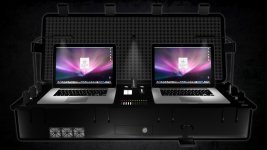
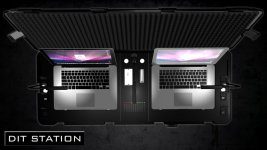
The DIT Station is the most portable on-set data management unit you can buy. Innovative and practical design results in a truly all-in-one work station, created for professionals working with digital media cameras.
This product includes all you need to perform data management, image review and full 4K resolution playback whilst providing a comfortable and practical work station wherever you are.
Features Included:
- Docking for 2 MacBook Pro laptops
- Maxx Digital’s Mobile Rocket installed with full external output and dedicated ventilation
- Dual access storage (with 2-Bay or 4-Bay options)
- I/O and power for additional digital storage
- RED Drive Dock and CF Reader (1.8” / 2.5” RED Station docking available)
- Ventilation and lighting (fully controllable for silent / dark running)
- Relocated I/O ports for expansion and output
- Custom, lightweight stand
- Full system UPS (giving 20mins of back-up power)
- External power outlets
- CF card organizer
- Fully portable, with wheels and handle
- .... and a cup holder!
The DIT Station can be up and running in an amazing 60 seconds so eliminates long setup and break down times on-set. No need to carry a separate table and scramble for multiple outlets. The DIT Station is your table, and runs off one UPS / surge protected power feed. This is the only all in one, Mac based, on-set data management system that you can fit in back of the car.
You can see our 3D Visual of the DIT Station, http://vimeo.com/19880301 , which shows off the station in all its glory.
Produced by Pietari Creative http://www.pietaricreative.com/
We will be updating this forum with new pictures and other new information. In the mean time this is for your thoughts about The DIT Station.
When a job is worth doing, we’ll help you do it right!
For more information and to take advantage of this introductory price please contact Devon at Maxx Digital on 714.374.4944 or email at ditstation@maxxdigital.com
DIT Station :emote_happyhappy:
WWW.DITSTATION.COM
http://www.maxxdigital.com/dit-s.html
To celebrate this we are doing a special introductory price only available through Maxx Digital.
The Sales Bit!
The DIT Station is the most portable on-set data management unit you can buy. Innovative and practical design results in a truly all-in-one work station, created for professionals working with digital media cameras.
This product includes all you need to perform data management, image review and full 4K resolution playback whilst providing a comfortable and practical work station wherever you are.
Features Included:
- Docking for 2 MacBook Pro laptops
- Maxx Digital’s Mobile Rocket installed with full external output and dedicated ventilation
- Dual access storage (with 2-Bay or 4-Bay options)
- I/O and power for additional digital storage
- RED Drive Dock and CF Reader (1.8” / 2.5” RED Station docking available)
- Ventilation and lighting (fully controllable for silent / dark running)
- Relocated I/O ports for expansion and output
- Custom, lightweight stand
- Full system UPS (giving 20mins of back-up power)
- External power outlets
- CF card organizer
- Fully portable, with wheels and handle
- .... and a cup holder!
The DIT Station can be up and running in an amazing 60 seconds so eliminates long setup and break down times on-set. No need to carry a separate table and scramble for multiple outlets. The DIT Station is your table, and runs off one UPS / surge protected power feed. This is the only all in one, Mac based, on-set data management system that you can fit in back of the car.
You can see our 3D Visual of the DIT Station, http://vimeo.com/19880301 , which shows off the station in all its glory.
Produced by Pietari Creative http://www.pietaricreative.com/
We will be updating this forum with new pictures and other new information. In the mean time this is for your thoughts about The DIT Station.
When a job is worth doing, we’ll help you do it right!
For more information and to take advantage of this introductory price please contact Devon at Maxx Digital on 714.374.4944 or email at ditstation@maxxdigital.com
DIT Station :emote_happyhappy:
WWW.DITSTATION.COM