Welcome to our community

Be a part of something great, join today!

  • Hey all, just changed over the backend after 15 years I figured time to give it a bit of an update, its probably gonna be a bit weird for most of you and i am sure there is a few bugs to work out but it should kinda work the same as before... hopefully :)

DIT/Loader Cart

Jesse Johnson

Well-known member
Joined
Apr 7, 2008
Messages
49
Reaction score
0
Points
6
Hey guys, need some help here. I'm wanting to build a DIT/Loader cart and thought I'd see what the forum had to say, especially since most of you have far more experience than I. :)

Is there any company out there that specializes in building/selling DIT and/or Loader carts for work with RED EPIC? And if not, what would you guys suggest building if money was no problem (it isn't)?

Hell, what would your "dream DIT/Loader cart" be?

Thanks in advance! And just FYI things are pretty crazy right now so I may only be able to check this thread once a day, but I will be checking back as often as I can. I appreciate any help/suggestions!
 
Here is a couple of our carts:
http://www.digitalfx.tv/services/production/mobile-studio

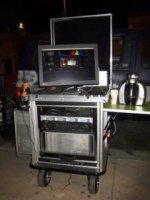
The one on the left is for data management (its a Backstage cart), the one on the right is a Big Foot Cart and is used for either data management or video assist. The Big Foot carts are nice, just very heavy. The Backstage carts are very vice too and much lighter.
 
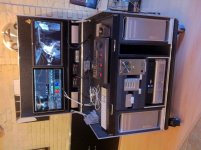
Here's the cart I just had custom made this fall. Made locally in Winnipeg, Canada. I do rock a third monitor on an Ergotron arm on the right hand side that wasn't mounted yet when I took this photo.
 

Attachments

  • photo.jpg
    photo.jpg
    95.1 KB · Views: 0
Here's the cart I just had custom made this fall. Made locally in Winnipeg, Canada. I do rock a third monitor on an Ergotron arm on the right hand side that wasn't mounted yet when I took this photo.

Ryan

Interesting cart. What's your setup with it? 2xMacPro. What you running through the Cubix?

:))
 
Hey Steve,

Both MacPros are running DaVinci Resolve, the Cubix is to run all the cards for DaVinci in the left MacPro. The left MacPro handles all the copies and color timing in DaVinci, the right MacPro is for rendering in Resolve to Prores or Avid as well as H.264. Here's the breakdown:

Left Mac Pro:
8-Core 2.26GHz
ATI Radeon 5770
ATTO R680
Decklink Extreme 3D
Cubix Xpansion card

Cubix:
RedRocket
Quadro 4000
Black Magic Ultrascopes
Caldigit 4-port ESATA

Right MacPro:
8-Core 2.4GHz
ATI Radeon 5770
RedRocket
Quadro 4000
Matrox CompressHD

The RAID is a 16-Bay 32TB iStoragePro enclosure (exact same enclosure as MaxxDigital but significantly cheaper). Super fast RAID and works great, but if I were to do it again I would find an enclosure that isn't so deep (it's about 25.5" deep).
 
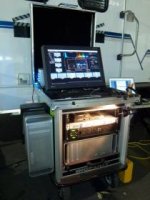
Doug Solis at Big Foot Mobile Carts designed mine, and the guys over at Maxx Digital in Huntington Beach sell them. It's a work in progress, but I love it, and love working at it, very comfortable.

Von
 

Attachments

  • CARTPRESSO1.jpg
    CARTPRESSO1.jpg
    10.4 KB · Views: 0
  • CARTPRESSO2.jpg
    CARTPRESSO2.jpg
    12 KB · Views: 0
  • DTNYC Cart.jpg
    DTNYC Cart.jpg
    12.1 KB · Views: 0
Ryan - going to PM you. Got a few questions for you if that's okay with you?

:))
 
Doug Solis at Big Foot Mobile Carts designed mine, and the guys over at Maxx Digital in Huntington Beach sell them. It's a work in progress, but I love it, and love working at it, very comfortable.

Von

First off - Von is a quality guy and a DIT guru.

(its been a while my friend. Have to catch up when I'm back in LA around December).

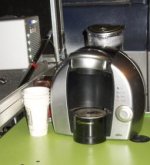
2nd - what no cup holder???

Doug is certainly a great guy. Had numerous conversation with him on the phone and am working with him on my own design and ideas. Doug would certainly be the first point of call for Jesse.

:))
 
Wow, lots of great info! Thank you so much for sharing, everyone! This has definitely helped me out! I really appreciate it.
 
Hi guys, thought I would break my silence and make a few comments on the DIT subject. Steve, Greg and Von, thanks for the good words! I wanted to clarify a couple of things on this post that I think will be informative when looking at the big picture. As this is a fluid and quickly moving time for these systems and the actual app may vary in terms of DIT, color grading, straight data wrangling etc. it helps to know why we do what we do and how we can help in all those areas. As Steve mentioned we can customize anything for our clients as really that is essential for every system as not one person has the exact same gear or personal preferances. We also take into account transportation methods as well as future gear changes that will be inevitable. We do alot of design work as a courtesy and this needs to be added into your cost comparisons. I find many guys don't take into account the time it takes if they do it themselves. We have added numerous base cart designs over the years as our clients' needs have expanded. Many are familiar with our original "Classic Series" open frame aluminum carts we have sold hundreds of, but we have also added to that series a "Split-Apart" design of carryable modular units, the "Roadie Series" carts which are again based around our unique aluminum welded, shock mount frames,and include ABS weather proof Roadcase style material&hardware. All our units can be built in any size MACPRO based single combo rack, double rack, or we have our new and very popular MAC N' RACK (rack+MACPRO verticle). With wide drawer and monitor lid options among others we can meet about any requirement. Our latest addition is the "Versa FLypack" which is a much different concept than standard carts designs. We issue I would like to clarify is the accept of Bigfoot carts weight. Please keep in mind we build ALL our units around an aluminum frame. These is no lighter frame on the market that has the proper strenght to hold the kind of weight your systems typically add up to. Any open cart like the Backstage small cart will be lighter because there are no side panels, no internal monitoring capabilities, and no top or bottom included that handle the gear weight our carts can. There is also less functionality in terms of connected integration or as an example MACPRO drawer etc. If you weigh any of the large wood only based systems I have seen on this post I assure you they will weigh more than our carts. We build our carts and rack accessories with an alumnum core for the main reason of light as possible, but as the more clients have been wanting to minimize the set up times more gear is being included as a package and many may not realize why the aggreagated weight of the systems may seem heavy. As I mentioned this is why we developed the split-apart base designs which Steve and me have been working on for him. Because of our specialization we are continually adding new features and options requested by our worlwide clients that become "production" level products and minimizes the costs of customization for all. If anyone has any specific questions or wants to reply outside the forum It would be a great pleasure to speak or write directly. I can be reached at (707) 333-4400 or doug@bigfootmobilecarts.com To all who have posted pics on this thread, Dusty, Ryan, your carts look great!
All the best! Doug
 
Andrew, we surely wouldn't, couldn't keep any secrets about this stuff.LOL. We have actually sold quite a few of the split-apart carts with two sections in our open frame Classic designs but Steve was looking at a "twist" on those previous setups. The advantage is putting the UPS and utility stuff along with the base and wheels together which is the heavier parts of the cart , and then racking up the rest of the gear and includes quick release hardware and cool carrying handles. I'll shoot you some pictures on an email of some of those units so you can see what others have done. Let me know if you have nay questions in the meantime.

Take care,
Doug
 
Hey guys, I'd appreciate some advice along these lines.

We're starting to look at building out a cart for our own needs. I keep coming back to look at storage types though, and am driving myself in circles.

First, what we do: I'm a small piece of a small media department for a much larger non-media company. We make all sorts of internal videos, as well as web videos and commercials. Almost every commercial is shot on a Red One MX, which we own. Almost exactly a year ago, we tried, for the first time, not only transferring and backing up the footage on set, but also transcoding using our Red Rocket card and even pumping out a super super rough cut by the end of the shoot day. It went from extreme experiment, to expectation. In fact, in our own little bubble now, "DIT" means "Copy, verify, transcode, bin out, and rough rough cut". When I'm on set, I often find myself unable to cut, as the drives are so busy copying, verifying, and transcoding, that I don't want to slow myself down by editing.

So, we have an 8-core Mac Pro sitting on set, with 2 G-Drives connected via Firewire, and the Red Mags (usually CF cards, occasionally hard drives, hopefully we'll finally move to SSD in the very near future) also connected via Firewire. So that's 3 of the 4 Firewire connections, all pumping data at full speed allotted. We transfer using R3D Data Manager, so from one Mag, out to two external drives simultaneously, and with a MD5 checksum. Depending on the speed of the turnaround requested, I may also transcode from that Red Mag at the same time that it is running through R3D Data Manager. The Transcodes output to one of the external drives, which I then mirror over to the other drive periodically throughout the day. We'll also pop audio scratch files, script notes, etc. onto these external drives, which I'll rsync at the end of the day. So, 2 fully mirrored drives, and they usually go with two separate people from our shooting location, back to our home base to be loaded onto our 'industrial strength' NAS system for editing.

That NAS is fairly new, and feeds about 15 editors currently. We recently upgraded from an XServe running XSan; an older version of XSan that prevented us from upgrading to OSX 10.6.

Which brings us to the question of the DIT Mobile Cart.

We have some XServe hardware, and a few Promise raid arrays. All are now out of warranty, as they are, minimum, 2.5 years old (they were purchased before I started working here). If we were to set them up for the DIT cart, we would get the benefit of faster transfer speed to a raid array. This would take some work to get it up and running though, as I'd have to learn from scratch how to set up an XSan. But we wouldn't need any new hardware for that, as we've got a pile of stuff that we ripped out from upgrading to the NAS. This would give us 4Gb/s speed to a raid array via fibre channel, which wouldn't bog down the Firewire bus as much as it's currently bogged down.

But, then we still need to get the data OFF the raid array, on to mobile drives. So I don't see how this would actually help us. But I know there are DIT carts in existence that aren't far off from this setup. It would allow us to hook up a second CPU though as well, just for Transcoding or just for editing. And the way we're set up, the cart would RARELY be in the same location as our NAS, so hooking the two up for a data dump is, I would consider, not and option.

Alternatively, we could spend a little more money (and less of my time) and purchase a small NAS. This would skip much of a the setup time and learning curve, and afford the same multi-CPU ability, but with slower transfer speed (eSata at best, Gbit Ethernet at worse, but still not bogging down the Firewire bus). But we would STILL have the issue of having to move the data off the NAS and onto mobile drives. I suppose we could unhook the NAS and take it back to our home base; but that seems impractical, and not good for the life of hard drives to be tossed into a car and bussed back and forth as often as 4 times a week.

So the questions I have are as follows:

1) If we are only going to use one CPU, is there any point to using any sort of XSAN or NAS? I can only see it making a difference if we can grab another CPU.

2) If we are able to dedicate a second CPU (or if there is a benefit to the SAN or NAS with one CPU), will there be a huge difference in performance between the XSAN and the NAS? Keep in mind, the XSAN will probably need a software upgrade, so $$ cost is probably close to even. But the NAS seems waaaaaaay easier to setup.

3) The elephant-connection in the room: Thunderbolt. I was hoping it would be more prevalent by now. But, are we better off getting a MacBook Pro, a Maxx Digital Red Rocket case, and daisy-chaining Thunderbolt external drives to the MBP? (Red Mag hooks up to MBP via Firewire ---> R3D Data Manager transfers data simultaneously to two daisy-chained Thunderbolt drives, with a monitor probably attached on the far end of that daisy chain ---> simultaneously Transcode from the Red Mags to one of the External Drives just like we are currently.) How much would the diminished CPU power and RAM affect the overall speed and efficiency of the task at hand? Would we just be trading one bottleneck (Firewire bus bandwidth) for another (CPU speed and multiprocessing)? Cost wise, this is probably pretty close to the two options above, maybe a little less.

4) Speaking of Thunderbolt. Should we just wait and pray that Mac Pros are coming with Thunderbolt, and that a NAS system is also incoming with Thunderbolt? Am I wrong in thinking that the ideal would be a NAS with at least two Thunderbolt connections, and a Mac Pro with a Red Rocket and Thunderbolt connection, with an eSata card for input from the Red Mags?

5) I suppose the other options is splitting the difference, building a PC with USB 3.0, grabbing some 3.0 external drives. Then the only question is how hard is it to get Windows to transcode R3Ds to Apple ProRes. I can't remember off the top of my head if that's easy, hard, or impossible. I know Linux is not a fan of ProRes.


So, lotta questions, I know. But I've been going around and around on all this in my head, and I can see reasons for doing each one of the above options. But it really all boils down to: In terms of speed and efficiency on a fast-paced commercial shoot set, what is our ideal, but also practical, solution?
 
Hi guys, thought I would break my silence and make a few comments on the DIT subject. Steve, Greg and Von, thanks for the good words! I wanted to clarify a couple of things on this post that I think will be informative when looking at the big picture. As this is a fluid and quickly moving time for these systems and the actual app may vary in terms of DIT, color grading, straight data wrangling etc. it helps to know why we do what we do and how we can help in all those areas. As Steve mentioned we can customize anything for our clients as really that is essential for every system as not one person has the exact same gear or personal preferances. We also take into account transportation methods as well as future gear changes that will be inevitable. We do alot of design work as a courtesy and this needs to be added into your cost comparisons. I find many guys don't take into account the time it takes if they do it themselves. We have added numerous base cart designs over the years as our clients' needs have expanded. Many are familiar with our original "Classic Series" open frame aluminum carts we have sold hundreds of, but we have also added to that series a "Split-Apart" design of carryable modular units, the "Roadie Series" carts which are again based around our unique aluminum welded, shock mount frames,and include ABS weather proof Roadcase style material&hardware. All our units can be built in any size MACPRO based single combo rack, double rack, or we have our new and very popular MAC N' RACK (rack+MACPRO verticle). With wide drawer and monitor lid options among others we can meet about any requirement. Our latest addition is the "Versa FLypack" which is a much different concept than standard carts designs. We issue I would like to clarify is the accept of Bigfoot carts weight. Please keep in mind we build ALL our units around an aluminum frame. These is no lighter frame on the market that has the proper strenght to hold the kind of weight your systems typically add up to. Any open cart like the Backstage small cart will be lighter because there are no side panels, no internal monitoring capabilities, and no top or bottom included that handle the gear weight our carts can. There is also less functionality in terms of connected integration or as an example MACPRO drawer etc. If you weigh any of the large wood only based systems I have seen on this post I assure you they will weigh more than our carts. We build our carts and rack accessories with an alumnum core for the main reason of light as possible, but as the more clients have been wanting to minimize the set up times more gear is being included as a package and many may not realize why the aggreagated weight of the systems may seem heavy. As I mentioned this is why we developed the split-apart base designs which Steve and me have been working on for him. Because of our specialization we are continually adding new features and options requested by our worlwide clients that become "production" level products and minimizes the costs of customization for all. If anyone has any specific questions or wants to reply outside the forum It would be a great pleasure to speak or write directly. I can be reached at (707) 333-4400 or doug@bigfootmobilecarts.com To all who have posted pics on this thread, Dusty, Ryan, your carts look great!
All the best! Doug

My pleasure Doug.

What is this top secret design you speak of? Steve you sly dog!

No top secret design (insert Dr Evil Laugh here...)!!!

Andrew, we surely wouldn't, couldn't keep any secrets about this stuff.LOL. We have actually sold quite a few of the split-apart carts with two sections in our open frame Classic designs but Steve was looking at a "twist" on those previous setups. The advantage is putting the UPS and utility stuff along with the base and wheels together which is the heavier parts of the cart , and then racking up the rest of the gear and includes quick release hardware and cool carrying handles. I'll shoot you some pictures on an email of some of those units so you can see what others have done. Let me know if you have nay questions in the meantime.

As Doug has mentioned, its a split away cart. Here is my thinking. For me, I love the classic cart, like the Lightiron Outpost. But when we saw the size of it at REDucation last year, it got me thinking - I need a van to transport it. That's not an option. So I thought, how could we achieve the same principle to house a MacPro (or 2), UPS, either rack mount RAID or smaller towers, etc but make it so it fits in the back of an average UK family car. The solution I came to was to split it. I have been talking on and off with Doug about this for over a year and I think what we are working too is a very workable solution that is transportable.

You have the wheel base, then the main utility unit which would house a UPS and either 1 or 2 MacPro's which are rack mounted / on pull out drawers. This allows either an addition MacPro or multiple MacMini's (or whatever becomes the logical replacement for the MacPro!!!). The you have a Storage unit that would hold either a rack mount RAID (whatever you want really) or with enough high for smaller tower units RAID units. There is then space for your offload units (RED Stations), an external LTO or what ever.

This is topped off with a monitor top to house a 27" monitor wit keyboard etc. So the three parts can be broken down and fit in the back of a standard UK car. You take each part out and built it up as you bring it out the car. Module. Adaptable. That way, if your storage requirements change, then its the top module that you could change, make bigger, whatever and not the whole cart. This also means that if I have a smaller job where the MacPro isn't required, then the top unit can be used with say a MacBookPro laptop and its still easily transportable.

I know that I will want to swap out between smaller Tower RAID units (say the ProAvio units) to rack mounted RAID storage at some point, so trying to make the cart adaptable. The same with the bottom. I know I'll use one MacPro at the moment, but gives me at option for a second or multiple MacMini Pros!!! ;))

Doug has been great in taking my ideas and coming up with even better ones from that.

Questions...

:))
 
Nick,

GET RID OF FIREWIRE!!!!!!!!!! It is your main problem! Get an eSata card and bump all your drives and Red SSD to eSata. SSD drives connected via firefire are still slow as firewire and a waste. Cheap laptop drives are faster than firewire, so don't waste money on SSD drive until you get rid of firewire.

I would avoid xServe and xSan on set. Your macPro with Atto 6G SAS/eSata card will make your life a ton better. Atto makes one card you can connect 8 eSata devices for about $500 and another that you can connect 16 eSata devices for about $1000.

Thunderbolt will be useful when things a re shipping, but a good eSata card and lots of eSata devices will be faster than Thunderbolt.

The little 1u four drive raid that OWC sells is a nice solution. They also have a square version if you don't rackmount your stuff.
http://eshop.macsales.com/shop/hard-drives/RAID/Rack_Mount/

You can config that as Raid 0,1,3,5 and as Clone to make multiple exact copies. In clone mode your computer only sees one disk in the enclosure, but the enclosure writes the same data to all the drive in it. Nice way to make multiple copies with one write. Lots of ways you can use those to improve your situation.

Hopefully that atleast gets you a start.


Dusty
 
Back
Top