Welcome to our community

Be a part of something great, join today!

  • Hey all, just changed over the backend after 15 years I figured time to give it a bit of an update, its probably gonna be a bit weird for most of you and i am sure there is a few bugs to work out but it should kinda work the same as before... hopefully :)

Digging the Dragon... not worried about noise

Ken Willinger

Well-known member
Joined
Jan 25, 2007
Messages
883
Reaction score
0
Points
16
Location
Boston, MA USA
Website
www.kenwillinger.com
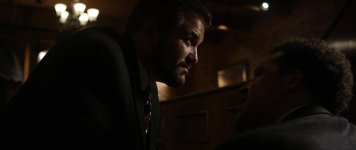
Filming an indie feature with Dragon. The director has released one frame so I'm sharing here with two JPGs, one unprocessed, the other slightly processed. This scene is meant to be dark. I'm very impressed so far with how lovely the images are. Once I get the OK I'll share some more. I tried to figure out how to share the R3D but it's beyond me!
 

Attachments

  • not processed.jpg
    not processed.jpg
    84.4 KB · Views: 0
  • A021_C010_0625O3.0000384.jpg
    A021_C010_0625O3.0000384.jpg
    88.6 KB · Views: 0
Love it, keep lighting dark with dragon!
 
Looks great, what was the ISO at?
 
I was curious to see how clean the image is, and just adjusting the exposure in Preview app (mac), it looks acceptable. (Of course modifying the R3D would have been better).
Their black suits hold the detail well.
 

Attachments

  • Edited.jpg
    Edited.jpg
    87.1 KB · Views: 0
i usually take a r3d snapshot and host it on dropbox is my technique for sharing r3d files...
 

https://www.dropbox.com/s/6e0f1wpq66khbdp/sexygrain.png
Pushed it around stupid, careless like I do. Plain curve, basic chroma denoise to get rid of nastiness. Yes, it's still grainy, but to my eyes it looks like sexy film grain, would look even better in motion. Of course we all hope RED will solve the noise floor problem real soon. Otherwise the images look fukken fine. On par with F65 or better. Even if the latitude isn't greater than Alexa's, remember Arri went with double sensor readout trick, bigger photosites and sub-4K image in ArriRAW. Let's wait for Alexa 4K+ and then compare (the 35mm sized one, not the rumored 65mm, that's bigger photosites too).
 
still here we have the red noise - this will be past soon, and then you have a very fine grain in it - and do not forget: there is no NR process in the raw, so when you add a slight NR it will be much better i am sure -(if you want the pure clean image) - in this scene i think it fits, it´s rougher. indeed, the red noise is not nice, but as we know it will be fixed next weeks. on the other side: this scene seems to be very dark in real too, may you add some more light for areas like the cloth, just a little kicker for the sensor you will get even more fun with Dragon.

small fast grade:
http://we.tl/wIcVKlejue
 

Attachments

  • grade_A021_C010_0625O3.0000384F_S000.0000000.jpg
    grade_A021_C010_0625O3.0000384F_S000.0000000.jpg
    83.9 KB · Views: 0
and if you go to develop it as it was shot it looks really good

this is with ISO 640, i put it on a 4K screen an it looks like joe pesci may come around in the next scene

http://we.tl/JyZRVfsshy

looking forward to the new firmware to compare then scenes like this, the best yet to come ;-)
 
For the most part folks who have played with this image are making it too bright for the actual scene, and bringing out noise. It is meant to be dark, in the Gordon Willis school of the Godfather. In the minor grade that I did (the slightly brighter of the 2 images I posted in the original post) I used RedcineX for, Dragoncolor, Redgamma4, 800 iso, flut adjustment of .119, sat at 1.0, contrast at 0.3, exposure at 0.209 with denoise set at 3. Nothing else was done. I am not a post/color person so I was just screwing around to get it close to where the scene will play. The blacks are great and pretty much noise free for a really dark image. It would be very easy to introduce lots of noise by pushing this image beyond its intended look. That being said, it is amazing how much this image can be pushed and still look very good.
 
these days i am testing a lot for an upcoming project with Dragon´s image in tungsten and available, low light

this had originally nothing to do with the noise discussion, but it is there, so i want to throw some of my tests again in the round and my impressions regarding this "issue" or "non issue":

1. Dragon is no Low Light Killer Camera that sees more in the dark as the human eye - but you can capture every mood and available light situation with a pleasent image. if you want it brighter, you must add light.

2. if you really have to push, there is noise, but if you don´t have these huge expectation to turn rooms without light into daylight scenes, you can push it with getting an useable image, even when the native capture was very low.
the new firmware should help here a lot.

3. the performance in tungsten is much better. it´s cleaner.

to the test stills:

here we are in the costume room of our studio.

https://flic.kr/p/nXC2n6

there are 3 spots from top, 2 are actually not working at the moment, so one spot is in this room.

https://flic.kr/p/oeVdud

it was shot with a f1.8 and you see at the redcine info: it´s very dark.
pushed to ISO 800 with a curve, it is useable, with NR absolutely ok. new firmware will do the rest.


the painting here

https://flic.kr/p/nXAX4R

one tungsten light, image is very clean overall.
even the moscito keeps quite good the sharpness at f1.8. i have to clean this wall btw

https://flic.kr/p/nXAGLy


the floor :

https://flic.kr/p/nXALpf

only the painting light, very dark in reality. watch the histogram. it´s playing in the darkness.
you are not able to push this to daylight scene, of course. some want to, i know. not possible. get a 7s 8bit HD camera ...
but you can capture this mood in a quite clean image. no problem. but even in a low budget set up, i would always add light here, some moonlight and some more practicals. you don´t need much to get the best of the sensor.
i had to push to 800, to see the 2 frames on the left at the wall in the very darkness. testing with ADD was clean, a "normal" NR did a good job too. the histogram shows ISO250, the image itself the pushed ISO800.
but all what you see here: no ADD, no NR.
notice again, jpg does not show the best result here as they produce artifacts.
there is an amount of our red noise, yes, but i am full of hope that there will be the improved firmware before we start shooting the "low light" project. then, there are no concerns for me to shoot in this conditions.
otherwise i have no trouble with using ADD in those shots and do a render night. why not. your work should earn this time.

summary: i can easily use all this images, shot under low available light and with some NR and care in the post i see not the drama described in some posts here (clients giving back cameras or fear to rent the camera)

even if you would say the Dragon sensor is more pretentious than other cameras, ... if you do right you get one of the best digital images on the market, and especially one of the closest to the "filmlook", that all companies building a digital CINEMA (!) camera want to achieve since years.
 
70hrew.jpg
 
Ken is that bloom naturally in the image (ie is that Dragon by itself), or did you add some filtration? Shot looks great, btw.
 
I think what you are seeing Nick is the natural quality of the lens that I'm using (which I think offsets the sharpness of the Dragon beautifully). On this film I used a set of cinevised Canon FD lenses (this one was a 35 2.0).

Sounds awesome Ken. Yeah Im shooting on several cinevised vintage sets of primes, and loving their look also! Cant wait to see your trailer!!
 
Back
Top