Welcome to our community

Be a part of something great, join today!

  • Hey all, just changed over the backend after 15 years I figured time to give it a bit of an update, its probably gonna be a bit weird for most of you and i am sure there is a few bugs to work out but it should kinda work the same as before... hopefully :)

Current RCX build keeps crashing on exports

Jason Kraynek

Well-known member
Joined
Oct 19, 2013
Messages
161
Reaction score
0
Points
0
Location
Chicago
Website
jacenk.net
Was working fine throughout the morning/afternoon, now i cant get past 1-2 exports w/o crashing. Reboot it, 1-2 exports= crashing again.
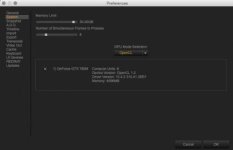
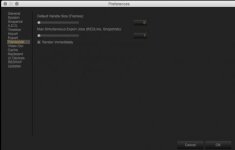
Have been exporting QT 444 6k file clips all morning, just different in/out points. the only thing i can think of is the setup of my memory/export settings
any idea?
 

Attachments

  • Screen Shot 2015-08-09 at 4.31.18 PM.jpg
    Screen Shot 2015-08-09 at 4.31.18 PM.jpg
    14.7 KB · Views: 0
  • Screen Shot 2015-08-09 at 4.32.10 PM.jpg
    Screen Shot 2015-08-09 at 4.32.10 PM.jpg
    8.1 KB · Views: 0
  • Screen Shot 2015-08-09 at 4.32.40 PM.jpg
    Screen Shot 2015-08-09 at 4.32.40 PM.jpg
    7.5 KB · Views: 0
I have had no problems the past week with this build...but today, build 35.1.38139 is crashing up my system. On export, it will just hang and NOT produce nor export anything. All was in fact good just yesterday exporting 6k dragon footage. Today i'm exporting older RED 1 4k footage and it just won't work.
 
EDIT:
new information:
I was exporting while i had a second monitor & video out via SDI/Redrocket card--that would not work at all; then i disconnected the video out via redrocket--that also did not work. Now i turned off my 2nd monitor and exported--this DID WORK...not ideal, but a small work around in my case.
 
i tried to lower my frames from 8 to 4 (though i have no clue really what they should be at in the first place)
my biggest issue is that it was working fine for like 7 hrs and then all of a sudden just couldnt get through 1 export without crashing
 
I suggest turning off all other attached monitors via SDI, closing your second monitor if you have one connected---but just via the software (so it does not display the viewer on your second monitor)....then in preferences, under system settign set GPU to none....try that. I'm using CUDA no problem, but this is a good start.
 
no second monitors or red cards on my system- just a beefed up imac
 
Perhaps turn off GPU under prefs/settings
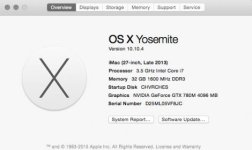
ive been going back and forth as ive just upgraded my machine to Yosemite and now have lovely graphic glitching while using Cuda like everyone else so i've stuck w OpenCL (which for the most part has fixed it). i know there are a few issues w the currently RCX build so hopefully this gets included in the fix.
 
Hi Jason,

Could you send verbose logs to redcinex at red dot com? Please do a save report from the help menu. The cuda graphical glitching is news to us -- we'll take a look.

Thanks,
David
 
will do, i kept deleted cache's and such as i thought it might help so idk if any of the crashes are included as i cant really read the files. so send it here or email it to redcinex@red.com ?
 
I experienced the same issue and I noticed:

If you use A.D.D. it does not work at all.
If you use anything other than Custom Output it will not work.
 
Back
Top