Welcome to our community

Be a part of something great, join today!

  • Hey all, just changed over the backend after 15 years I figured time to give it a bit of an update, its probably gonna be a bit weird for most of you and i am sure there is a few bugs to work out but it should kinda work the same as before... hopefully :)

Cubix Break Out Box vs Render Farm

David Sharp

New member
Joined
Jan 14, 2013
Messages
3
Reaction score
0
Points
0
I was looking into trying to get faster renders out of my MacPro but as I started doing research into Cubix, I also stumbled across an article on using a render Farm using AE. I was curious if anybody has used this feature vs using the Cubix box?
http://help.adobe.com/en_US/aftereffects/cs/using/WS3878526689cb91655866c1103a4f2dff7-79a3a.html

So for the cost of a Cubix + Cuda Cards I could instead:

Assemble 5X: I7, 3.5ghz quad core Processors, 8gigs of ram, 1TB HD, with 1 GTX 680 Nvidia card running on Windows 7 Pro Machines. Then install AE, RedcineX, Magic Bullet, and Trapcode as render only modules. Every thing works off of cat5 Ethernet with a generic PC running the network with VNC. When I finish editing in Premiere Pro, I dynamic link everything to AE apply effects then have AE and then have the Farm crunch back .DPX stills, reassemble the stills in Premiere and Export the Final?
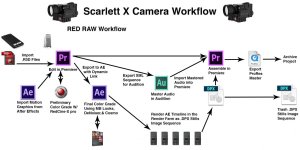
 

Attachments

  • Scarlett Work Flow-a.jpg
    Scarlett Work Flow-a.jpg
    88.7 KB · Views: 0
Generally speaking, multiple computers will perform better than one computer with better hardware, dollar for dollar.

The caveats, however, are the following:
-Each computer needs to have it's own license of software. Including plugins. More and more software these days have floating licenses (for which you will need a separate computer to handle the licensing across your network), and even render licenses, which are cheaper than full licenses and are only useful for rendering, since they don't allow access to the software's GUI. If you're just using AE and Premiere, cost isn't so bad. Throw in a few plugins and some Maya and plugins for that and then Nuke . . . . cost starts going up pretty fast.
-While this setup is great for exporting image sequences, you cannot render a Quicktime movie, or most other movie clips, this way. For a full movie clip, you can, currently, only do that on one machine. If your intended render output workflow is DPX sequences (as it appears to be) then this won't be an issue. But you should be aware that if you go the multi-computer route, it limits your rendering options if you want to maximize speed. I wouldn't call it a bad thing. Just a thing.
-This will take some tweaking to get running and running well. Don't assume it'll be all sunshine and puppies right out of the gate. And also, while more and more people are starting to do things this way, I still find it surprisingly difficult to find good walkthroughs, troubleshooting, and how-tos searching through Google results. They're out there; it's not impossible. But there's certainly less than I would like.

You could check out something like Boxx Technologies; they make and sell small boxes made just for this; a few CPUs in a small enclosure that is just there to chug through renders.
 
thanks for the tip. Interesting though I did some research on the software front. AE can be installed as a "render only mode "on an unlimited number of computers off of 1 license. Magic bullet and Trapcode can do 5 "Render only Mode" installs off of 1 license.

In my current adobe workflow because I have a lot of lower thirds I have to put in from AE, it means I have to render the Effects in the timeline or else I get render Errors (green frames) So its 11hrs to render effects and 11hrs to render the episode. My thinking is even if it takes the farm 11hrs to render the the timeline, the second render of the .DPX files would only be about 20min max on a Mac Pro with a Quadro 4000 on it.


Boxx is definitely interesting I will look into it.
 
Back
Top