Welcome to our community

Be a part of something great, join today!

  • Hey all, just changed over the backend after 15 years I figured time to give it a bit of an update, its probably gonna be a bit weird for most of you and i am sure there is a few bugs to work out but it should kinda work the same as before... hopefully :)

CS5 QT Audio Sync Problem..

Mohammed El Sharqawy

Well-known member
Joined
May 4, 2007
Messages
579
Reaction score
0
Points
0
Location
Cairo, Egypt
Hi all,

I'm writting this of course after long search, trial and error with this issue..
I'm getting sync problems with Apple ProRes 422 quicktime files played back inside premiere pro cs5..

- when I open the file in the source monitor and hit play.. audio goes out of sync..
- droped the clip into the timeline and play.. out of sync..
- exported the timeline into h264 file.. out of sync..
- opened in a new project and tried.. out of sync..
- also tried to extract the audio and put audio and video together on the timeline.. out of sync..
- opened the project in CS4.. audio goes fine.. no problem except that the audio waveform showed out of sync in relation to the playhead..
- opened the file in quicktime.. audio goes fine too..

this is very strange... I don't know what to do..
I updated my audio drivers and nothing changed..

I'm running Windows 7 64bit.. on the following hardware:
Intel i7 920 - Overclocked to 3.36GHz
Gigabyte X58-UD4P board
the audio hardware is built into the board
12GB of RAM
nVidia 9600GT

and by the way.. the same problem happens on my HP Core2 duo laptop with the same files..

any help is apreciated..
thanks in advance..
 
Hi all,

I'm writting this of course after long search, trial and error with this issue..
I'm getting sync problems with Apple ProRes 422 quicktime files played back inside premiere pro cs5..

- when I open the file in the source monitor and hit play.. audio goes out of sync..
- droped the clip into the timeline and play.. out of sync..
- exported the timeline into h264 file.. out of sync..
- opened in a new project and tried.. out of sync..
- also tried to extract the audio and put audio and video together on the timeline.. out of sync..
- opened the project in CS4.. audio goes fine.. no problem except that the audio waveform showed out of sync in relation to the playhead..
- opened the file in quicktime.. audio goes fine too..

this is very strange... I don't know what to do..
I updated my audio drivers and nothing changed..

I'm running Windows 7 64bit.. on the following hardware:
Intel i7 920 - Overclocked to 3.36GHz
Gigabyte X58-UD4P board
the audio hardware is built into the board
12GB of RAM
nVidia 9600GT

and by the way.. the same problem happens on my HP Core2 duo laptop with the same files..

any help is apreciated..
thanks in advance..
Maybe the audio is out of sync in the original files? Can you send me a copy?

Cheers

Dave
 
ok, I'll try to get you a sample.. just the files are too big to send over the internet..

I discovered something:

first I read somewhere that AE CS5 is having sync trouble with compressed audio in quicktime files.. and this has something to do with the 32-bit QT importer..
I checked my files and discovered that the audio is compressed using Big Endian..
I opened the file in quicktime.. exported the audio to wave.. opened both files in PPro CS5 (QT & WAV) .. and voila.. sync went fine..

now I think I need to convert all the audio tracks from the quicktime files and then re-wrap them again into the same QT file.. coz I edited a lot in this project and I don't know a way to relink the audio of audio/video file to a new audio file.. (is there a way?) and really now I don't how to re-wrap the quicktime with new audio.. will search and see..

EDIT: Sorry for my ignorance,, Big, Little-Endian is a byte order and not a compression.. but, the technique of exporting to wave made it sure that it has something to do with reading the audio from the QT file.. coz I tried also to export to an .aif file with big Endian integer put the two tracks together on the timeline.. and the sync went ok..

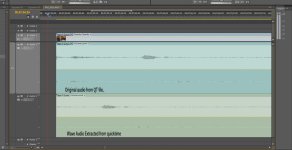
EDIT2: I discovered something new.. check the attached thumbnail.. it seems that PPro CS5 reads some bits of audio that other apps doesn't read..
 

Attachments

  • screen shot cs5 audio.jpg
    screen shot cs5 audio.jpg
    83 KB · Views: 0
I'm afraid there's just an issue with AIFF at this time, while WAVE is going fine.
 
All the QT files I got have the same problem.. it seems that there is an extra audio in the begining of the file that all other apps forget about except PPro CS5.. (CS4 and quicktime plays the files with no problem)
that wave file I exported from quicktime.. so, simply quicktime cut the small area in the beginning while exporting .. I'm not sure..
 
Hi, Mohammed -

ok, I'll try to get you a sample.. just the files are too big to send over the internet..

A 1-sec file with a clapboard would be small-ish and would work perfectly as a test file if you can provide one. Do we think CineX generated ProRes files are failing sync, or just any ProRes file made anywhere? I'm guessing the former, and will try different approaches, but a small test file would be really helpful.
 
Hi, Mohammed -


A 1-sec file with a clapboard would be small-ish and would work perfectly as a test file if you can provide one. Do we think CineX generated ProRes files are failing sync, or just any ProRes file made anywhere? I'm guessing the former, and will try different approaches, but a small test file would be really helpful.

Just FYI Nick is another Adobe eng who like me has worked on QuickTime issues for too long ;)

We really want to find/fix this issue soon so any test file would help.

Cheers

Dave
 
Yep, I'm another QuickTime nerd, thanks Dave.

I tried the following to test ProRes sync:

- Exported an R3D file w/ 4-channel audio (dramatic footage of someone banging a couple of drum sticks together :) ), exported to a ProRes+pcm audio QuickTime file via CineX.
- Also exported a few ProRes directly from directly form Premiere using audio blips + 1-frame mattes to test sync.

I couldn't detect any problems with audio sync, on Mac or Windows; all the files I made looked/sounded correct. I'm sure there's a problem lurking here, but I don't know what to try next to reproduce it. Help?
 
Mohammed-

not to mention it was ok in FCP were it was born...
Okay, I missed the FCP connection in your description. Can you give me more info about your workflow?

- The clips originated on a RED camera, right?
- You imported the R3D files into FCP and converted them to ProRes QuickTime using FCP?

I don't have FCP at hand, but I'll get someone to replicate those steps if they are the correct ones.
Thanks.
 
I'm very sorry everyone for confusion.. I know that this is RED forum.. but, really this is the best place to discuss technical issues and the most forum I use.. please forgive this..

these files were not converted from R3Ds.. they were captured from HDV tapes as part of multi-format workflow.. capture was done in FCP using HDV - Prores 422 preset..

I tried a lot to find any small sample files that can show the problem, but the smallest one was about 800 MBytes.. simply I can't cut a piece of a file and export it.. that won't show anything.. I'll do my best to upload that file.. and hope the screen shot showed anything useful..

sorry again for this confusion.. and thanks a lot for your support..
 
I'm very sorry everyone for confusion.. I know that this is RED forum.. but, really this is the best place to discuss technical issues and the most forum I use.. please forgive this..

these files were not converted from R3Ds.. they were captured from HDV tapes as part of multi-format workflow.. capture was done in FCP using HDV - Prores 422 preset..

I tried a lot to find any small sample files that can show the problem, but the smallest one was about 800 MBytes.. simply I can't cut a piece of a file and export it.. that won't show anything.. I'll do my best to upload that file.. and hope the screen shot showed anything useful..

sorry again for this confusion.. and thanks a lot for your support..

We just reproed this... more info soon

Cheers

Dave
 
i've also been running into issues of vanishing waveforms on the timeline. shows in source monitor fine, even plays back on timeline fine, but i can't see the actual audio file, or manipulate it in any way. it sprouted when i did a xml import from FCP, and tried to replace a audio track with a new one. i tried looking for solutions with no avail, and my only work around was to drop the new audio in a fcp timeline, and export a xml from that, import into premiere, and it finally worked!

are there any other solutions? i've read that some people encountered this issue of vanishing audio in cs4 as well...
 
We have this fixed... It will be in a future release. Thanks for helping us track this down.

Cheers

Dave

may I ask what was the technical issue behind this? its nice to know..

thanks for taking it into consideration..
 
may I ask what was the technical issue behind this? its nice to know..

thanks for taking it into consideration..

It was a simple programming error. We read the audio natively out of the movies and by pass QuickTime.. (quicktime is old tech and we try and avoid it when we can) In the case where you capture to prores from hdv the edit list had a value we didn't see before and caught a bug...

Cheers

Dave
 
We have this fixed... It will be in a future release. Thanks for helping us track this down.

Cheers

Dave

Less than 12 hours for a fix from the last crucial bit of background info - impressive Adobe gentlemen! :thumbsup: :biggrin:
 
Back
Top