Sage Humphries
Member
- Joined
- Feb 22, 2016
- Messages
- 21
- Reaction score
- 0
- Points
- 0
- Location
- Newport Beach
- Website
- humphriesorthodontics.com
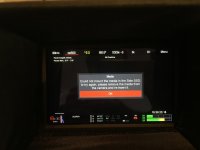
My wonderful wife bought me a 960GB Mini-Mag last month. I loaded it in the camera and was off and running. The next time I powered on the camera I got this message:
Could not mount the media in the Side SSD; to try again, please remove the media from the camera and re-insert it.
But, after doing so, the card was not recognized. I tried about 10 times with no success. After the shoot I put it in the USB C card reader. After inserting it somewhere between 5 and 10 times the computer saw the disk and I offloaded my footage. I put it back in camera and it seemed to work fine. I then used the card 3 or 4 more times only to have the same thing occur. I shot, powered down the camera, then started it again an hour later and the media wouldn't mount. Powering the camera off and on didn't help. My other cards worked fine. Again, multiple insertions in the card reader and it mounted and now it mounts on the camera.
I have no confidence in the card. I am terrified that it is going to leave me high and dry. Has anybody experienced this? Any help you can offer? Any suggestions would be appreciated.
Sage
Could not mount the media in the Side SSD; to try again, please remove the media from the camera and re-insert it.
But, after doing so, the card was not recognized. I tried about 10 times with no success. After the shoot I put it in the USB C card reader. After inserting it somewhere between 5 and 10 times the computer saw the disk and I offloaded my footage. I put it back in camera and it seemed to work fine. I then used the card 3 or 4 more times only to have the same thing occur. I shot, powered down the camera, then started it again an hour later and the media wouldn't mount. Powering the camera off and on didn't help. My other cards worked fine. Again, multiple insertions in the card reader and it mounted and now it mounts on the camera.
I have no confidence in the card. I am terrified that it is going to leave me high and dry. Has anybody experienced this? Any help you can offer? Any suggestions would be appreciated.
Sage