Welcome to our community

Be a part of something great, join today!

  • Hey all, just changed over the backend after 15 years I figured time to give it a bit of an update, its probably gonna be a bit weird for most of you and i am sure there is a few bugs to work out but it should kinda work the same as before... hopefully :)

Compression Wedges

...as will a second of video shot at 12 fps. I did my own testing and found that looking at still images did not give me nearly the information available from looking at a looped playback of video. In my tests, available via this dropbox link

https://www.dropbox.com/sh/bhpx7hx6xavyfae/AAB6IY0Znf5qQ7TEN0HaSIxja?dl=0

the complex pattern of the floor is perfectly stable at lower REDCODE compression ratios, but becomes very distracting as compression rates go up. Pixel-peeping at a single image doesn't tell you how much motion noise you are going to see.

Thanks! These are great. Yeah, it's hard to see chroma noise on a static image without tearing apart the HSV channels. This is a good illustration of how the grain characteristic changes.

Gavin,

Thanks for spending the time to do some valuable testing. Can I ask at what crop or magnification are the images that you posted?

Magnification was 1x for 6k, 1.2x for 5k, 1.5x for 4k and 2x for 3k. The framing was identical at every format (by adjusting focal length, moving the camera would be better if someone wants to improve on the test), all shots were rescaled to 6k so that the cropping would be consistent.
 
Some animated gifs to illustrate how noise gets more "chattery" at higher compression. 25MBs total. Might take a minute to load. (Note there is a good bit of atmospheric distortion in there too.

EDIT: Changed to links. All of them couldn't play back smoothly at the same time.
2:1
6:1
11:1
15:1
22:1

nWL6QmN.gif

 
I should have paid more attention to my motion tests and Michael's motion tests. I would strongly dissuade anyone from shooting above 13-14:1. I wonder how much Dragon grain complaints are related to compression issues. On the shoot I'm on currently we have 2 shots which aren't really usable because of compression at 17:1 (min compression at 96fps 6k WS on a 1.8" drive). As a result we've relegated 96fps to 5kWS.
 
I should have paid more attention to my motion tests and Michael's motion tests. I would strongly dissuade anyone from shooting above 13-14:1. I wonder how much Dragon grain complaints are related to compression issues. On the shoot I'm on currently we have 2 shots which aren't really usable because of compression at 17:1 (min compression at 96fps 6k WS on a 1.8" drive). As a result we've relegated 96fps to 5kWS.

The money question in this case is whether 17:1 @ 6K scaled down to 4K is better or worse than 13:1 @ 5K scaled down. And also whether 17:1 @ 6K scaled down to 4K is better or worse than 8:1 @ 4K (no scaling). Of course I have my own data to look at, but I'm too lazy to do my own test right now.
 
The money question in this case is whether 17:1 @ 6K scaled down to 4K is better or worse than 13:1 @ 5K scaled down. And also whether 17:1 @ 6K scaled down to 4K is better or worse than 8:1 @ 4K (no scaling). Of course I have my own data to look at, but I'm too lazy to do my own test right now.

In my opinion less compression scaled up is less sharp but way less noisy which is a good tradeoff. The noise is also more than 15% larger so you're getting like 100% larger chroma flicker in exchange for 15% more luma resolution. That's a pretty big sacrifice. I think the HSV samples above illustrate that well. There is far more color detail in 11:1 compared to 17:1. And it makes sense, compression isn't magic, the data has to go somewhere. If you try to compress high frequency data to 1/17th of its original size then you are losing mathematically about 1/8th of the information no matter what. It's just gone.

Excessive compression is a lot like aliasing. A soft image is better than image with irreversible artifacts. If you have a nearly static image with high frequency visual noise it's going to be way less distracting than the image being softer. It's also important to keep deliverables in mind. If you're delivering 6k for 1080p will the additional supersampling actually be that beneficial. On the other hand, like Moire, almost no amount of supersampling will defeat it. Best to just soften the image with an OLPF.
 
Gavin this is an incredibly informative and relevant thread!! Thanks so much for your time and energy in doing these tests (Michael you too!).
 
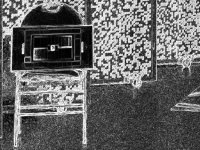
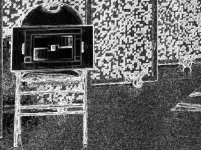
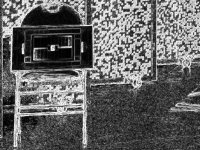
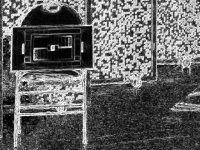
I'm feeling less lazy today, so I took a page from Gavin's process. Using RCX, I made TIFF snapshots of my studio shots at 2:1, 6:1, 8:1, 10:1, 12:1, 14:1, and 22:1. I decomposed into HSV, then focused on the S layer. I used an edge-detector (Sobel) to help me see what the saturation layer looked like in that "light". Here are the images, and my take on what, if anything, they tell me.

Using RC-S-Sobel-02.jpg (REDCODE 2:1 Saturation Sobel Edge Detection) as our baseline, we see some "edginess" throughout--an artifact of the edge-detection filter, but the grains are small, and really don't clump into lines and/or squares. If one were to blur the lower right quarter of the scene (studio floor), it would average a light shade of gray--indicated that what's being averaged are mostly the edges of the different saturation values.

At REDCODE 6:1 this is largely preserved, and at REDCODE 8:1 this is still the predominant character, though lines and squares are beginning to emerge. The average of the floor remains light gray.

At RECODE 10:1 and 12:1 the lines become more pronounced, and the average color of the floor begins to darken, indicating that edges are less frequent and saturation values are starting to clump together.

At REDCODE 14:1 the lines become more pronounced, and there's a distinct darkening of the floor average.

At REDCODE 22:1, even moreso, with the floor average distinctly dark.

Since the forum will only let me attach 5 images per post, see the next posting for REDCODE 14:1 and 22:1.
 

Attachments

  • RC-S-Sobel-02.jpg
    RC-S-Sobel-02.jpg
    103 KB · Views: 0
  • RC-S-Sobel-06.jpg
    RC-S-Sobel-06.jpg
    103.2 KB · Views: 0
  • RC-S-Sobel-08.jpg
    RC-S-Sobel-08.jpg
    103.1 KB · Views: 0
  • RC-S-Sobel-10.jpg
    RC-S-Sobel-10.jpg
    103.4 KB · Views: 0
  • RC-S-Sobel-12.jpg
    RC-S-Sobel-12.jpg
    103.7 KB · Views: 0
Continuing above with REDCODE 14:1 and REDCODE 22:1...
 

Attachments

  • RC-S-Sobel-14.jpg
    RC-S-Sobel-14.jpg
    102.8 KB · Views: 0
  • RC-S-Sobel-22.jpg
    RC-S-Sobel-22.jpg
    103.7 KB · Views: 0
What the above tells me is that REDCODE 8:1 is really the beginning of where difficult-to-remove artifacts even begin to creep in. I am reasonably confident that with a modicum of post-processing (which almost any video house would do), this can be cleaned up to a level of acceptability for nearly any client. REDCODE 10:1 make these artifacts more visible, but they remain characteristically small, and likely very easy to deal with. But, one can see even from the thumbnails that the average floor color is getting darker from 8:1 to 10:1 to 12:1, so real information is being lost. At REDCODE 14:1, the game changes, with darkening becoming more pronounced. At REDCODE 22:1, "one of these things is not like the other".

Based on this, which is just a single image in a single studio, and using a very artificial way of looking at image noise and information, and based on setting a very picky standard, REDCODE 7:1 or better is a target if you plan no additional image processing, REDCODE 10:1 or better is fine if you don't mind doing light noise reduction in post, and that REDCODE 14:1 or more should only be used to support necessary frame rates. And I agree with Gavin that it's better to chop resolution first to meet a frame rate requirement, if the resolution is there to give.

For a less picky standard, 8:1 or better is perfectly reasonable--it's what I use by default, and I don't bother with extra noise reduction. REDCODE 12:1 probably works fine with reasonable NR. But I think I'll stay away from higher compression rates unless necessity dictates AND testing validates the decision. YMMV.
 
On today's footage we found 5k 12:1 way better than 6k 17:1. As Michael said, I see compression motion artifacts at around 10:1 on many shots. 5:1 would be my ideal although I shoot a lot at 6:1. For greenscreen work I would say it's worth going all the way to 3:1 or 2:1 since it'll save you a ton of time in keying if your channels aren't borked. I shot some 8:1 greenscreen and that ended up being a huge PITA to key since there was chroma chatter. I had to rely far more heavily on luma keys.


The wildcard of course is how much detail there is in your scene. If your subject has lots of detail and it's surrounded by white clouds you'll be fine. The compression engine should discard all of the useless puffy white cloud detail and since they're neutral and have little to no color detail they shouldn't really artifact. Meanwhile your high detail subject will get all of the bandwidth and look great. However with the same compression option you might have a subject on a grassy field with deep focus. Now you're screwed because the compression engine will look at the image and say "Hmmm this grass is all high detail I should preserve it. But this mass of pink/brown face in the middle is really low detail. I should take some of its bandwidth and give it to the grass." So the most important part of your shot in that instance gets massive compression artifacts in order to give more data to the 'high frequency' parts of the image. That's how compression is supposed to work, but it can't distinguish between a cloud and an actor with smooth skin.
 
On today's footage we found 5k 12:1 way better than 6k 17:1. As Michael said, I see compression motion artifacts at around 10:1 on many shots. 5:1 would be my ideal although I shoot a lot at 6:1. For greenscreen work I would say it's worth going all the way to 3:1 or 2:1 since it'll save you a ton of time in keying if your channels aren't borked. I shot some 8:1 greenscreen and that ended up being a huge PITA to key since there was chroma chatter. I had to rely far more heavily on luma keys.


The wildcard of course is how much detail there is in your scene. If your subject has lots of detail and it's surrounded by white clouds you'll be fine. The compression engine should discard all of the useless puffy white cloud detail and since they're neutral and have little to no color detail they shouldn't really artifact. Meanwhile your high detail subject will get all of the bandwidth and look great. However with the same compression option you might have a subject on a grassy field with deep focus. Now you're screwed because the compression engine will look at the image and say "Hmmm this grass is all high detail I should preserve it. But this mass of pink/brown face in the middle is really low detail. I should take some of its bandwidth and give it to the grass." So the most important part of your shot in that instance gets massive compression artifacts in order to give more data to the 'high frequency' parts of the image. That's how compression is supposed to work, but it can't distinguish between a cloud and an actor with smooth skin.

Thanks for sharing this info. Great stuff here to keep in mind.
 
It's not very encouraging for the scarlet dragon.

That's what we kinda came to the conclusion with when we compared the scarlet x to the epic dragon. Is there a difference... Your damn right there is, but even at 6:1 on the 6k there was not a ton of detail increase... And that's looking at the footage on a 52 inch 4k display. The 6k is over all smoother at 6:1 compared to the scarlet 4k at 6:1. Detail wise you add the faintest amount of sharpening on the 4k and they feel like they resolve the same amount. You of course get to punch in on your 6k if need be, but I would reckon you will have to sharpen it if you crop much past 4k. Noise was more apparent on our tests in dragon, but more organic feeling and overall better. It's a great camera, just currently worth 20k more of my money. Scarlet dragon seems like a def no go with all the compression, but I havnt been able to test.
 
That's what we kinda came to the conclusion with when we compared the scarlet x to the epic dragon. Is there a difference... Your damn right there is, but even at 6:1 on the 6k there was not a ton of detail increase... And that's looking at the footage on a 52 inch 4k display. The 6k is over all smoother at 6:1 compared to the scarlet 4k at 6:1. Detail wise you add the faintest amount of sharpening on the 4k and they feel like they resolve the same amount. You of course get to punch in on your 6k if need be, but I would reckon you will have to sharpen it if you crop much past 4k. Noise was more apparent on our tests in dragon, but more organic feeling and overall better. It's a great camera, just currently worth 20k more of my money. Scarlet dragon seems like a def no go with all the compression, but I havnt been able to test.

In regards to noise, try the low light olpf... That will be my default olpf since I like clean images.
 
Hats off, Gavin.
 
Back
Top