Welcome to our community

Be a part of something great, join today!

  • Hey all, just changed over the backend after 15 years I figured time to give it a bit of an update, its probably gonna be a bit weird for most of you and i am sure there is a few bugs to work out but it should kinda work the same as before... hopefully :)

Comparison of CC workflow’s: Film Log vs. Linear REC709

I don't have any problem with Evangelos' description or logic, but it carries with it two very significant caveats and one omission.

Caveat #1: Everything Evangelos said makes sense - provided a film print is your primary target. If film is not your primary target, well,,,,,,

Caveat #2: Going into a film targeted post path means shifting the color pallette to that of film print stocks. If that's what you want, that's fine. But if you want the native color pallette, and a lot of colors and luminance values that film does not naturally produce, you're out of luck.

Omission: P3 is the native color space of digital cinema. This is not just about Rec709 vs. film targets. We are heading into an age where the film print is not the primary delivery target in many, if not most, cases. Digital cinema is the primary target of the future (and the present in many, many cases, especially with smaller productions), and it has less limited characteristics than Red709. That's one reason why a number of digital intermediate facilities have adopted it as their primary grading target, and why a number of DI's - particularly stereoscopic pictures shot on digital cameras, and CG animated features - are done in that color space.

Promoting film targeted paths in a digital world is a mismatch of the best characteristics of each. Digital images have a look all their own, and a color pallette that is not photochemically derived. Film images can be quite beautiful, but are best created by shooting on film negative in the first place. Digital images can be used to create excellent "fake" film images. But they are at their best when they are processed without a forced color pallette shift, as they are in a film targeted, LUT based grading environment. That's not to say that Evangelos' proposals don't work, they most certainly do. But if you are not making film prints, there are simpler, less compromised ways of doing things. And even if you are, you might prefer the color pallette of the digital camera to that of film - which is reality is a medium that you've chosen not to shoot with.
 
Mike, I will let Evangelos answer this one, but based on all my research, I will need to understand what are you referring as the film gamut/colorimetric characteristics limitations. I mean, with facts. To the best of my research, even P3 cannot reproduce all what film can provide (it falls short). So, what is the problem of targeting for film (giving us all we can get), and then convert to the lesser color spaces? That, for me, will be the answer that will settle this for me.
 
Mike, [If] I’m right in all the technical aspects of the graphs and technical arguments, [Then] in reality a master created in this way can be totally RE-Color Graded without significant loss… that means Film Log targeted workflow is a *mastering* workflow… [Else] I should be wrong…

Off course if you do TV shows, video clips and commercial stuff in general, a mastering workflow is meaningless… use a video calibrated monitor and off you go…

But if we talking about high end Cinema, a mastering workflow is paramount… for 1000’s reasons…

As for color palettes argument, Film, we all know has wider gamut than anything else, so Film is the big box that fits everything inside, especially with stocks like Vision Premiere that reaches D4.4 easily (that’s almost 15 stops). P3 is a subset of that as well as REC709.

If a workflow invented to cover that wide range color palette and more, to an extent that allows us to Re-Color grade our image, how we say that isn’t good enough for digital?

If film can cover the wider color palette how come and is not enough for P3 or REC709?

Does digital has some extraterrestrial colors that are invisible to film or cineon? Or what?
 
Mike, I will let Evangelos answer this one, but based on all my research, I will need to understand what are you referring as the film gamut/colorimetric characteristics limitations. I mean, with facts. To the best of my research, even P3 cannot reproduce all what film can provide (it falls short). So, what is the problem of targeting for film (giving us all we can get), and then convert to the lesser color spaces? That, for me, will be the answer that will settle this for me.

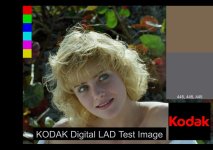
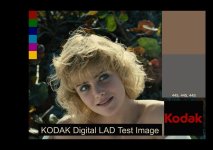
A film color pallette is different than an electronic pallette by nature of the chemistry of print film. The most obvious examples are in blues and greens, which have a much lower "luminance" (in film it's really exposure, but we'll use luminance as a more easily understood term) on film. For instance, if you photograph a grass lawn on a sunny day, the image on an electronic camera will give you a much lighter, brighter green than a film photograph will. Same with most saturated colors. If you look at the Kodak Digital LAD with a simple Cineon Log to Video LUT, and you look at the chips on the left side, they will have full saturation and luminance. But if you use a film targeted LUT, the colors will be much less bright and therefore take on a very different tone. Film also has far more pronounced tendencies to exaggerate cyan when it is present (and even if it's not). One is not necessarily better than the other, but they are very different, especially as the images are presented to you, and what is presented to you guides what you feel it should be. Attached are two images to illustrate this. The LogLin LAD image has a Cineon Log to Video LUT with no matrix applied, and a slight bit of color correction prior to the LUT to bring it within bounds (just a bit less gain, really). The FilmTarget image has a "typical" film target video LUT applied. You can clearly see the differences, especially in the chips on the far left. Note how the blue chip becomes almost dark purple, and how the yellow chip takes on a much more orange hue. Also note how the red is considerably less bright.
 

Attachments

  • DLad_LogLin.jpg
    DLad_LogLin.jpg
    80.6 KB · Views: 0
  • DLad_FilmTarget.jpg
    DLad_FilmTarget.jpg
    74.5 KB · Views: 0
Yup, just REC709 is perfectly correct and adequate.

Sure it's linear when you see it - but that's because you've got a non linear file on a non linear display (or a linear display with a non-linear curve to compensate!) - although the end result is linear, each of the stages is not :-)

Graeme

Ok done, no "Linear" word whatsoever...
 
If a workflow invented to cover that wide range color palette and more, to an extent that allows us to Re-Color grade our image, how we say that isn’t good enough for digital?

One would only completely "re-color" if the project was being re-mastered, in which case, it would be done from the original elements anyway, so the original processing path becomes meaningless. That's one of the biggest advantages of having RAW format recording. Any "re-coloring" in a normal deliverables process only involves minor tweaks to accommodate the different delivery formats, not a complete re-mastering step.
 
A film color pallette is different than an electronic pallette by nature of the chemistry of print film. The most obvious examples are in blues and greens, which have a much lower "luminance" (in film it's really exposure, but we'll use luminance as a more easily understood term) on film. For instance, if you photograph a grass lawn on a sunny day, the image on an electronic camera will give you a much lighter, brighter green than a film photograph will. Same with most saturated colors. If you look at the Kodak Digital LAD with a simple Cineon Log to Video LUT, and you look at the chips on the left side, they will have full saturation and luminance. But if you use a film targeted LUT, the colors will be much less bright and therefore take on a very different tone. Film also has far more pronounced tendencies to exaggerate cyan when it is present (and even if it's not). One is not necessarily better than the other, but they are very different, especially as the images are presented to you, and what is presented to you guides what you feel it should be. Attached are two images to illustrate this. The LogLin LAD image has a Cineon Log to Video LUT with no matrix applied, and a slight bit of color correction prior to the LUT to bring it within bounds (just a bit less gain, really). The FilmTarget image has a "typical" film target video LUT applied. You can clearly see the differences, especially in the chips on the far left. Note how the blue chip becomes almost dark purple, and how the yellow chip takes on a much more orange hue. Also note how the red is considerably less bright.

I'm 100% sure that if I want to get the left look with any of my film targets is just a flip of my finger in my Color app...

The left looks like a well balanced image coming from a film scan and the right is a scan almost raw with just a print stock applied (that's why its a bit yellow and dull)...

An other question... Marcie (the blond lady Kodak still) is a film captured image... how comes and its so beautiful when its processed digitally? if digital is so different why the image is so good?
 
One would only completely "re-color" if the project was being re-mastered, in which case, it would be done from the original elements anyway, so the original processing path becomes meaningless. That's one of the biggest advantages of having RAW format recording. Any "re-coloring" in a normal deliverables process only involves minor tweaks to accommodate the different delivery formats, not a complete re-mastering step.

Yehh, but if the color graded master images are so flexible with Film Log workflow, that means that the *essence* the container holds is as wide as the RAW is... so if in every step of delivery we use master images, so rich as the original RAW is, then our result coming from the precision conversion 3D LUT's to every different format will always deliver the maximum of each format is capable of...

Am I wrong?
 
Ahh, Evangelos. You keep thinking I'm arguing with you, and I'm not. I'm pointing out that there is no "one path to rule them all," and that depending on the intended target, different approaches have equal or greater value. Film and digital images look different, that's just fact. And in fact, if you did try to match the "video" image with the "film" image, you would likely wind up with a lot of visible grain in the chips (because you'd have to increase the exposure dramatically in each individual hue) and an unnatural result. It would also not be the direction a colorist would likely head towards because it's not where the film wants to be. Hence my point that the "natural" place for an image to fall is dependent on the path taken, and that influences what the colorist is going to do because it influences where he or she thought the original photography was intended to be.

There is no right or wrong here. There are different approaches. The film targeted path is not one that everyone wants because not everyone is going to do a film recording, and not everyone is in agreement that the film aesthetic is either "better" or "desirable." For those who do, that path is available. For those that don't, other paths are available that will yield the same deliverables, but look different. There is a reason why the folks at Red as a group largely feel that a digital cinema targeted DI path yields the best results with images captured with their cameras. You may not agree, and that's fine. But you've also spent a part of your life building a business based on those beliefs, and that often influences how one feels, regardless of what technology might come along to change it. I think to some degree, you need to open your eyes to other approaches and perhaps extend your business to accommodate them as well as the film oriented business you've already built up. The future of distribution is uncertain, and one needs to be open to changes if one is going to thrive in a multi-format future. That's what I've tried to do for my entire career, and I probably go back in this business at least as far as you do.

Just a thought.
 
There is a reason why the folks at Red as a group largely feel that a digital cinema targeted DI path yields the best results with images captured with their cameras. You may not agree, and that's fine. But you've also spent a part of your life building a business based on those beliefs, and that often influences how one feels, regardless of what technology might come along to change it. I think to some degree, you need to open your eyes to other approaches and perhaps extend your business to accommodate them as well as the film oriented business you've already built up. The future of distribution is uncertain, and one needs to be open to changes if one is going to thrive in a multi-format future. That's what I've tried to do for my entire career, and I probably go back in this business at least as far as you do.
These are very wise words. I agree with your overall point that, as time goes on, the issues of film-out deliveries are going to continue to diminish.

BTW, I have absolutely encountered situations where there we encountered colors we could see in D-Cinema that we couldn't get back off film. Super-saturated magentas were among them. A few years back, we did a five or six-step test trying different saturation levels on a specific scene; in digital, they looked massively different; on print film, the differences were practically invisible. The IN stock in the Arrilaser basically hits the wall and stops. The director wound up scuttling that approach and went in another direction, and was happy with the final result.

The lesson we learned there was: massive changes in saturation don't always work in print; in Rec709 or D-Cinema, no problem.
 
BTW, I have absolutely encountered situations where there we encountered colors we could see in D-Cinema that we couldn't get back off film. Super-saturated magentas were among them. A few years back, we did a five or six-step test trying different saturation levels on a specific scene; in digital, they looked massively different; on print film, the differences were practically invisible. The IN stock in the Arrilaser basically hits the wall and stops. The director wound up scuttling that approach and went in another direction, and was happy with the final result.

The lesson we learned there was: massive changes in saturation don't always work in print; in Rec709 or D-Cinema, no problem.

We keep talking about Film out because propably my signature suggests that... we keep forgetting that the workflow I suggest is still a technical method that can be used with real Film Targets, but also can be used with artificial Targets like Cineon 5500K that is using an artificial color space which heavily surpass everything...

But I thing the aim is not to create something that can't be reproduced widely... Marc if you have an overly saturated color in 1/8 of the screen your eyes will not be able to perceive accurately the rest of the colors that are on the screen... that's because our eyes are dynamically adjust and suppress all the other colors in order to see the new top... so that fact can create weird situations where optical illusions are dominant, like when that excessive magenta depress all the greens in the shadows in the rest of the image... not on the actual image but instead on your eyes and your brain... and not all the eyes are behaving the same when we talk about illusions... there are things we can do and thinks we must not....

Imagine your director to have a specific color perception problem unaware to you and to him... in what a mess that can lead you... On my signature says also consulting for a reason...

I do prefer to use as limiter a real Film target from an artificial one, because film is originally an analog medium and its limits are more naturally appealing to the eye limits... but that's, just me... you can use an artificial target that is not a limited one and get the max...

Also there are things some labs can do and others can't... In your tests back then, did you used a Reference ECN2 process? did you used a print stock like Vision Premiere? Was the projection room within SMPTE196M critical viewing conditions?***

One last thing that constantly is being ignored... or not understood well... when we use this method to see and color grade, we use the limited color space of our display device through a LUT that further limits the color space to a closely emulated color space, so what we actually see is 8-10 stops that our display can show limited to a color space subset.

What is a major thing to understand is that, when we render to create the master we don't use any LUT's... so what limits the image at this point is just the mathematical boundaries of the color processing engine, not a LUT, our eyes, or a color space... its limits are just the precision of the internal color range... so what is created as a Master has so much more image information that can be totally Re-Color Graded... and that fact is a proof of my claims, that none until now has said otherwise. (see post #28)

So that resulted master when its being converted, with the use of a LUT or the use of a real tangible material like film to a projectable image, the conversion every time takes as input this extremely wide range of image data and just fits them in the new given color space of each targeted display medium... so in this way every display device gets the maximum it can show...

What I'm showing here is a Mastering process that is color space agnostic... with real targets you get the max of the target, with artificial target you get the max of every display device...

***Do you know that there isn't a single lab in US that is being accredited as ImageCare compliant by Kodak? To be compliant you must follow very strict specs of ECN2 process and be repeatable stable and color constant any given day for at least a year... plus all the bits and pieces of critical viewing conditions for color assessment... http://motion.kodak.com/motion/Support/Kodak_Imagecare_Program/members.htm I just happen to have one of the first accredited ImageCare Labs in just 10 minutes away from me... so I can have repeatable results that can push the envelope to an extend that allows me to use always film print stocks like Vision Premiere and be able to get into extremes of high contrast/saturation and low contrast/saturation not typically achievable...
 
What is a major thing to understand is that, when we render to create the master we don't use any LUT's... so what limits the image at this point is just the mathematical boundaries of the color processing engine, not a LUT, our eyes, or a color space... its limits are just the precision of the internal color range... so what is created as a Master has so much more image information that can be totally Re-Color Graded... and that fact is a proof of my claims, that none until now has said otherwise. (see post #28)

Can we please - PLEASE - end this? Marc, myself, and numerous others here understand film, film color space, digital cinema color space, DI work paths, human perception, and deliverable targets very, very well, thank you. This constant repetition of the same themes is getting pretty tiresome. We see this the way we see it based on knowledge, intelligence, and experience, not ignorance or inexperience. You seem to feel you're educating us, but what you're really doing is trying to sell us on your point of view, which we don't happen to share. So I would humbly request that we'll stop commenting, and you stop selling. Let's get back to proper information exchange instead of advertising.
 
Then, stop. You have the power by just not responding. So, it is up to you.

However, I must respectfully disagree that Evangelos motive is "selling". Yes, he has a business based on this, but there is no one here that takes the time to EDUCATE the users using real facts.
 
Then, stop. You have the power by just not responding. So, it is up to you.

However, I must respectfully disagree that Evangelos motive is "selling". Yes, he has a business based on this, but there is no one here that takes the time to EDUCATE the users using real facts.

(my last post on this topic....)

I posted images to illustrate the points I've been trying to make. I think that qualifies as both education and facts. I don't like to use numbers because we work in a business based on images and results. Numbers are meaningless except as they relate to those images. There is also no one way to do just about anything in this business, and I've gone through some trouble to point that out. You believe in Evangelos' methods and that's fine, I have no problem with that. I have my own view of all of this based on my own years of experience and that should be fine, too. I think I've done plenty of educating in my own way here (I didn't start the "ask MM anything" thread, I was asked to do it), so I harbor no guilt about that. But I do believe that things should be presented here as "this is one way, you might want to try it or not" rather than long winded explanations as to why one should stick with what is quickly becoming an old model, and why they should do it with one company. That's what I read in all of Evangelos' posts. And that's why I've reacted.

I'm done now. :cheers2:
 
(my last post on this topic....)

I posted images to illustrate the points I've been trying to make. I think that qualifies as both education and facts. I don't like to use numbers because we work in a business based on images and results. Numbers are meaningless except as they relate to those images. There is also no one way to do just about anything in this business, and I've gone through some trouble to point that out. You believe in Evangelos' methods and that's fine, I have no problem with that. I have my own view of all of this based on my own years of experience and that should be fine, too. I think I've done plenty of educating in my own way here (I didn't start the "ask MM anything" thread, I was asked to do it), so I harbor no guilt about that. But I do believe that things should be presented here as "this is one way, you might want to try it or not" rather than long winded explanations as to why one should stick with what is quickly becoming an old model, and why they should do it with one company. That's what I read in all of Evangelos' posts. And that's why I've reacted.

I'm done now. :cheers2:

This will not be my last post...

Your images show nothing new to me... sorry, but the average user can be heavily misled with these...

Both images are coming from the same source:

http://motion.kodak.com/motion/Support/Technical_Information/Lab_Tools_And_Techniques/digitallad.htm

The lady in the middle is a scanned frame coming from a real film shoot. The chips in left and right are being added to the frame artificially (not coming from a real shoot).

This image before exposed or converted to a certain Film Target must be corrected accordingly to match the selected target. This image its NOT ready to be exposed as is. If the combination of negative and print stock is i.e. 2242 with 2393 or if it is 5201 with 2383, the resulted image projected in a theater will be vastly different in ALL aspects.

If this Cineon Log image is converted with the typical Cineon LUT to sRGB it will look as is looking in your left image with the saturated chips and the highlights to look white.

If the same image, the same file, is converted with a Film Target LUT uncorrected for the specific target and then presented in an sRGB display as all our computer monitors are, without white point compensation, the image will look like the image you have on the right side, with highlights look yellow and the chips bad.

BECAUSE the intended usage of the file and Film Target LUT is to be used and presented in a display device having proper color management and viewing conditions, color corrected for the given target, with white point 5400K and not 6500K that our laptops sRGB have...

So yes, in the way you choose to present them, the left image will look saturated and accurate and the right will like... well, awful...

BUT HEY isn't these steps you follow (or didn't follow) proving what I'm saying here? We have ONE image that has a very wide range info and by using different LUTs we can get the maximum of every target.... THE SAME image can perform in sRGB, in DCP, in REC709 and in Filmout??? That IMAGE is a LOG CINEON image that's why it can do all that... and the application of LUTs is the trick....

Isn't it that what I'm trying to say in the first place??? That Film Log (Film Log is Cineon Log) workflow is the most flexible and proper way to master films?

Please, Mike stop hiding your magic from people... I can understand your urgency to downplay it... And hey I don't sell... I disclose information here to people, for free... everyone can use my info, LUT's are everywhere as you know... they don't have to buy from me... there are many out there providing LUT's...
 
Ok since it was in front of me... this is a final rendered Master Film LOG image converted for sRGB viewing. If I print it on film, this is the way it will look... the highlights will be burned and the contrast will be high... the film target combination is Kodak 5201 neg and print stock Kodak Vision Premiere 2393, the short is shot with MX'ed RED ONE and the process is being done in Color with proper color management and REDfilmLog. If I will deliver it for HD DVD's this is the way director colorist and DoP choose to look... so this will be the REC709 result on DVD and DCP...

Rendered_original.jpg


Now this is the final Master Film LOG image Re-Color graded to my taste.... the contrast is totally restored...

Totally_regraded.jpg


Try to do the same with a REC709 final master...
 
Back
Top