Ok, so I know there are problems with quicktime not reading all the color info from RED files, but I'm seeing workflow issues with figuring out how to interepret a 'look'.
1 - In a RED application (In my case RedAlert) I create a Grade and save the files, including exporting out a ProRez file.
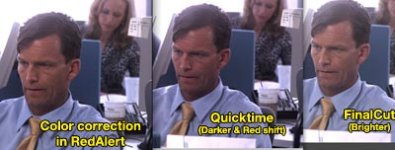
2 - Let's skip the discussion of the Proxies, since it is widely discussed that they are wrong right now - but as you see by the attached picture, when opening up the ProRez in Quicktime it is dark, and in Final cut it is bright.
I'll even bypass the Quicktime discussion for now. But what concerns me most is FCP. It seems that there is a gamma shift. I'm running Leopard (not Snow) and checking on/off the quicktime compatibility (in Quicktime prefs) is making no difference at all.
If I wanted to finish with the ProRez, is there a path that allows me to set the look in RedAlert and see the SAME results in FCP? Or do I need to degrade further with a second color pass in FCP? How do I know what is 'correct'?
1 - In a RED application (In my case RedAlert) I create a Grade and save the files, including exporting out a ProRez file.
2 - Let's skip the discussion of the Proxies, since it is widely discussed that they are wrong right now - but as you see by the attached picture, when opening up the ProRez in Quicktime it is dark, and in Final cut it is bright.
I'll even bypass the Quicktime discussion for now. But what concerns me most is FCP. It seems that there is a gamma shift. I'm running Leopard (not Snow) and checking on/off the quicktime compatibility (in Quicktime prefs) is making no difference at all.
If I wanted to finish with the ProRez, is there a path that allows me to set the look in RedAlert and see the SAME results in FCP? Or do I need to degrade further with a second color pass in FCP? How do I know what is 'correct'?