Welcome to our community

Be a part of something great, join today!

  • Hey all, just changed over the backend after 15 years I figured time to give it a bit of an update, its probably gonna be a bit weird for most of you and i am sure there is a few bugs to work out but it should kinda work the same as before... hopefully :)

Color Grading....HELP! Dragon and MX

Scot Yount

Well-known member
Joined
Dec 28, 2014
Messages
1,713
Reaction score
7
Points
38
Location
Marblehead, Massachusetts
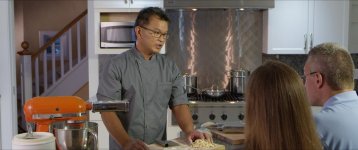
Hello color wizards. I am hoping some of you might be willing to help me with a problem I am having from a recent shoot. We shot a cooking show pilot on a Dragon running 5K WS, and my Scarlet MX, on 4K WS. We dialed in the exact same color balance and tint. I am just learning color, and I can make the Dragon shots look pretty good, but by comparison, can't seem to get the MX stuff to even look passable. The much more experienced shooter on the Dragon, checked my camera before we began recording anything, I think my camera is doing the best it could have done in that scenario. Here are a couple of jpegs and the links to the .r3d snaps if anybody cares to take a look and comment. I would love to see what the real color gurus could do, or might say. Thanks in advance everyone.

A001_C004_0930AF.0011661_zpsd5wwbovs.jpg

This shot is MX no grade at all.

A001_C002_0930FY.11062.0011062F_zps8sq2bzhw.jpg

And here we have the Dragon, no grade at all either.

The .r3d Dragon snap can be found here: https://www.dropbox.com/sh/zg7omdm17o4i13z/AACgs-IxbwnZkzdITPxBon1la?dl=0
And the .r3d MX snap can be found here: https://www.dropbox.com/sh/i1eqpdgkxxg602n/AAD1SrVofm3OObc_EWqNriJXa?dl=0

Thanks to anyone who is willing to help me out!!
 
I didn't set up the lights, but yes, there was an Ikan 1x1 to the right of the MX camera....The green is very evident in the MX shot, but not in the Dragon shot...again, we dialed in the exact same white balance...but it sure doesn't look that way......
 
As you know the angle of incidence=angle of reflection... And LED is very directional. My guess is the MX was catching more illumination from the LED than Dragon was. The light from the fixture was fairly targeted, so too will the correction need to be. Careful qualification on a secondary correction is required me thinks.

Edit: It looks as though the LED is being flagged from the CU by the talent screen right. I see little or no green tint on the cook's hands even in the MX shot.

These were just quickies but I think they show what can be done. I may have been a little too skin tone and red specific here. I think his shirt should be cleaned up too. A little more finesse should get it there.

attachment.php
attachment.php


There was some green in the upper mids of the hands but not much.

attachment.php


I went back this AM expecting to pull more green out of his shirt but the same correction targeted to those tones had less effect on the shirt than I was expecting, so I am left to presume that I am fairly close to the correct color for that. Does it seem right to you? The most dramatic change you will notice is the ruddy orange I removed from the halogens on the oven hood. The srgb conversion seemed to push them a little more blue than I was seeing in Resolve, but you may find it less distracting now just the same.
 
Last edited:
With two nodes, using secondaries and the "Hue vs Hue" curves I was able to balance out the purple and green hues back to something that looks more natural.
 

Attachments

  • 000046230020_1.2.1.jpg
    000046230020_1.2.1.jpg
    96.8 KB · Views: 0
Hi Scot

You're getting some good tips here, you should be able to get these closer when you grade it's one of the beautiful things about Raw.

In future I'd like to suggest a couple of things.

Lenses with different focal lengths, even of the same brand and type can vary in terms of how they render colour. Camera angle also makes a big difference in terms of how the camera receives the light because of things like angle of incidence. Doing an auto white balance of a large white card can help with matching cameras. This will take into account any lens coloration or filters used.

Also shoot a good quality Color Chart at the beginning of each lighting setup, we use the X-rite version. This helps dramatically when matching different camera types.

Lastly be careful with LED we got burnt early on with bad LED make sure you use ones with a high CRI.

These tiny Color issues aside, the shots look excellent.

Nice work!
 
If these are the only 2 shots that the difference in color, then the colour issue definitely has vastly more to do with the quality of the light than something being wrong with the MX sensor. Everything Scott observed about the shots is right on. That Ikan 1x1 is definitely causing the skintone issues.
 
I would also say hiring an experienced colorist will help solve the color matching problems. A large part of what a colorist does is figuring out solutions to shot matching. I agree with the others that if you have to use two different cameras to shoot the same scene, then set them up with decent charts -- the XRite and DSC charts are both very good -- and grab five seconds of chart footage on every lighting/setup change, place the chart where the actors are standing, and shoot them with identical lighting. If you match the charts exactly with scopes and looking at the monitor, then the actual scene will most likely be matched.

Note that we did this for decades with film where no charts were used, either. Time, experience, and skill generally would solve the problem.
 
Don't use cheap lighting, it's hard to color out without making other stuff look weird. I'm bet lots of people are learning this as the cheap Chinese led products flood the market
 
A color chart will help a lot, recently we used one and it helped a lot even with different branded cameras!
 
Thanks to everyone who replied or made a stab at a grade. I super appreciate it. We did btw use a color chart, and while with the right software I have seen this done in DaVinci, I don't really know how to do it in RCX.

Here are the frame grabs straight from the cameras with no corrections converted to jpeg.

Scarlet MX
A001_C001_09300U.0000162_zpsebovjgye.jpg

And the mighty Dragon

A001_C001_0930SW.0000000_zpsxryduzas.jpg


The .r3ds for each can be found here:
MX https://www.dropbox.com/sh/rhv5t66m6aoi1e8/AAB2BgckyaurfbfacYQ4HLg8a?dl=0
Dragon https://www.dropbox.com/sh/blc9hop5o3nw1u1/AADTEjeY53RogCCi_JwUWg6Ea?dl=0

Obviously the angle of incidence is different on the chart in each shot...

Thanks for all the input. O
 
Just out of curiosity, why did you choose to use the Dragon for the close ups and the MX for the wides? I tend to use the lesser format for the close ups so I'm wondering what your thoughts were.

I think it should've been the other way around, but the more experienced and certainly much more skilled shooter was shooting with his camera, and we both felt that he would be better at shooting the CUs because there would be a lot of focusing and following action. What further complicates things I guess is that he was using a Canon 70-200 IS lens, and I was using a RED Pro Zoom 18-85. Anyway, it probably should have been the other way around in terms of the cameras and their positions.
 
The Canon and RPZ aren't going to have the same color, but the skin tone seems off due to the LED (as others have stated). If you use the X-rite or similar color chip chart before each setup, then Davinci will do an auto WB. Just try to have the chart fill the frame. It's a simple process and will save a ton of time.
 
Ah... these would have been good to have initially. I can see the color of his shirt now as well.

Thanks to everyone who replied or made a stab at a grade. I super appreciate it. We did btw use a color chart, and while with the right software I have seen this done in DaVinci, I don't really know how to do it in RCX.

Here are the frame grabs straight from the cameras with no corrections converted to jpeg.

Scarlet MX
A001_C001_09300U.0000162_zpsebovjgye.jpg

And the mighty Dragon

A001_C001_0930SW.0000000_zpsxryduzas.jpg


The .r3ds for each can be found here:
MX https://www.dropbox.com/sh/rhv5t66m6aoi1e8/AAB2BgckyaurfbfacYQ4HLg8a?dl=0
Dragon https://www.dropbox.com/sh/blc9hop5o3nw1u1/AADTEjeY53RogCCi_JwUWg6Ea?dl=0

Obviously the angle of incidence is different on the chart in each shot...

Thanks for all the input. O
 
Scott,
Thanks for your input. Yes the cards were shot under the same light.
 
Scott,
Thanks for your input. Yes the cards were shot under the same light.

:-) Yes I see it on his arm. duh, me. Let's see what this gives me.

attachment.php


I'm much happier with this one overall, but the mixer looks more orange than I expect. Did I miss the mark?

attachment.php
 
Last edited:
Thanks Scott, the mixer might be a bit orange...you are using resolve right? No matter what, it is a much better result than I have been getting.
 
Thanks Scott, the mixer might be a bit orange...you are using resolve right? No matter what, it is a much better result than I have been getting.

Yes, Resolve. I'll take another look at the reds.

marginally better perhaps, but I'm not as certain as I should be. I'm mis-using the chart.

attachment.php
 
Last edited:
Back
Top