Welcome to our community

Be a part of something great, join today!

  • Hey all, just changed over the backend after 15 years I figured time to give it a bit of an update, its probably gonna be a bit weird for most of you and i am sure there is a few bugs to work out but it should kinda work the same as before... hopefully :)

Color 1.5 (MAJOR ISSUE)

David Battistella

Well-known member
Joined
Apr 30, 2007
Messages
10,003
Reaction score
6
Points
38
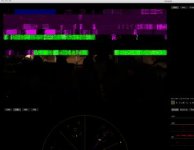
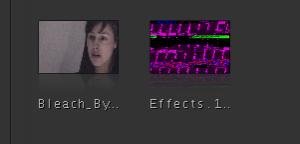
The top image shows what the old thumbnail would look like compared to the new.

The bottom image is a still store gone wrong.

Any help on this is appreciated. Also, all PROREZ HQ is rendering out the EXACT SAME WAY!

This is happening hen referencing R3D media but not when using rendered media.

Any help on this issue is appreciated.


David

system details:
Dual 3.0
8GIG RAM
Radeon 2600XT
 

Attachments

  • Picture 1.jpg
    Picture 1.jpg
    4.9 KB · Views: 0
  • Picture 3.jpg
    Picture 3.jpg
    10.8 KB · Views: 0
I am now having the same issue with footage from the latest build. Seems like the latest version of the Color RED plugin doesn't support the latest build.

BTW, my workflow is sending the proxies to color. They appear fine in Color, but the render comes out garbage.

Matthew
 
Matthew,

Good fine. Thanks.
 
I have nice renders from R3D files at 32bit floating point in Color 1.5.
Color doesn't support the new color science yet but my renders are fine. I'm on a mac book pro with ati card, I have to test it on my new mac pro 2.66 when I come back from holiday.
 
OK,

I have had no problems in 4:4:4:4 Prores, but I can say that I do have problems with the prores HQ setting. If I use the PROXY resolution then I get a clean render.

The problem is the HQ, that is giving me the garbage renders.

Are you also seeing the weird thumbnail issue when you save a look?

David
 
OK,

I have had no problems in 4:4:4:4 Prores, but I can say that I do have problems with the prores HQ setting. If I use the PROXY resolution then I get a clean render.

The problem is the HQ, that is giving me the garbage renders.

Are you also seeing the weird thumbnail issue when you save a look?

David
I have rendered a 4k R3d to 4k proresHQ with no problem and I had no problem with still store, grade and look. I think ati is more compatible with Color then nvidia.
Color 1.5 uses the old color science, IMHO the best way for now is to output from clipfinder/redalert/redrushes/redicine (all softwares that use the new color science) redlog prores 4, redlog dpx files or redlog proresHQ then import them into Color and grade and output to prores 4 or dpx.
 
Luca,

Thanks for this update. You are also correct that the new color science is not yet implemented in Apple Color 1.5. I now think that this is an Nvidia issue, but no new drivers are available to correct the problem.

For now I am getting some very unrelaible renders when using Color 1.5 which really has nothing to do with the card unless Color is using GPU acceleration to render the footage.

David
 
I don't know if it helps but before installing the fcp upgrade, I made a clear install of mac os X.
 
Hi there David,

Nothing really to add - except I can also confirm the new color science is not implemented in Apple Color 1.5 from what I know.

And last time I checked Apple IS using the GPU to render the footage - plain old single threaded GPU! NVIDIA cards are known for their 'unreliable renders' in conjunction with Color. I believe even from the Finaltouch days, Color was written to run with ATI cards.

Oh how nice it would be for Color to render using CPU...I've got over 40 macs I could cluster to hang off the back of it!....sadly not the case.

All the best, James
 
Those screen shots looks like a graphics card issue.

Looks like David has the ATI 2600 card which has 256MB of VRAM. My suggestion would be to try a graphics card that has 512MB of VRAM and see if the problem goes away. However, I'm guessing that, anything that was 'created' with the 2600 card, would probably still display the same way with a different card in there. Creat a new project with the same media, but, with a different graphics card.

Just an idea and should only take about 10 or 15 minutes to confirm.
 
Oh how nice it would be for Color to render using CPU...I've got over 40 macs I could cluster to hang off the back of it!....sadly not the case.

All the best, James


An absolutely gigantic and colossal problem that takes the software out of the PRO realm. It's such a fluid interface, but that is just plain awful.

I'll look at some ATI cards.

Sad.

David
 
An absolutely gigantic and colossal problem that takes the software out of the PRO realm. It's such a fluid interface, but that is just plain awful.

I'll look at some ATI cards.

Sad.

David
David, I bought a couple of months ago a mac pro 2.66 with the ati card on it just for this reason.
 
Luca,

I have a dual core 3.0 and it came with the Nvidia. More cores. Less power. I should have thought about this a bit earlier. I can always swap out the card.

David
 
I'm not sure if this is related, but ever since upgrading to FCS3, QT 7.6.2 and OSX 10.5.6 (about a week ago) I've been having weird issues similar to this in FCP with an 8 core, occasionally popping up. I since swapped out my card 2600xt with a ATI 3870 and still there are issues - occasional weird green screens/split screens (not as often though), but now there is also a slight flicker/shimmer withing gradations of colour on a 58" Panasonic series 11 that never used to be there.

I'm starting to wonder if it is a quicktime issue. After repairing permissions there now are is whole list of quicktime repairs that never get fixed. Googling this problem, people say these permissions are not an issue - I'm not sure.

Then again, that slight shimmer is also seen withing certain gradations of color on one of my screen savers, so not sure if quicktime would have any dominion over that. Perhaps it's a whole OSX/FCP thing and I need a complete new install - I really, really hate that.

Cheers,
Dale
 
I think that, based on a post Jim made last week, that SNOW leopard (the new MAC OS release) and the NEW version of QuickTime is going to be much more fluid that the performance we are seeing now.

That is a month away and there are always issues with new software, but hopefully this suite will start to really work as advertised. It's close, but it's making me think harder about the adobe production suite.

David
 
I think that, based on a post Jim made last week, that SNOW leopard (the new MAC OS release) and the NEW version of QuickTime is going to be much more fluid that the performance we are seeing now.

That is a month away and there are always issues with new software, but hopefully this suite will start to really work as advertised. It's close, but it's making me think harder about the adobe production suite.

According to rumors on the big interweb, SL is supposed to drop on the 28th (next friday.) Hopefully that will fix our issues...but I'm not holding me breath...

Matthew
 
Back
Top