Welcome to our community

Be a part of something great, join today!

  • Hey all, just changed over the backend after 15 years I figured time to give it a bit of an update, its probably gonna be a bit weird for most of you and i am sure there is a few bugs to work out but it should kinda work the same as before... hopefully :)

clapperboard / filenames

Michael Isbell

New member
Joined
Jun 9, 2009
Messages
2
Reaction score
0
Points
0
We're shooting a tv dramatic production, use a clapperboard to record reel, scene and take.

The file names RED creates are useless. We want the filename to reflect reel , scene and take.

is there a programmable clapperboard that will interact with the camera and record that information in the filename. It would save me many many hours of typing.

Thanks!
 
Is there ANY camera that uses reel/scene/take info to generate the filename? The RED system IS actually reel-based and fairly intuitive once you take a minute to understand how it works.

S.two has always generated directory names based on a hierarchy that includes camera, mag, scene, and take. And nearly all digital sound recorders allow for scene and take as either file names or metadata.
 
Red displays the reel and clip number on the HD-SDI outputs. The script supervisor just needs to record those and/or the timecode.

Even if someone did develop an in-camera slating app, I think having more stuff cabled up to the camera and waiting while someone types in the shot info would be more trouble than it's worth.
 
This is something Most DIT's do themselves. They create a Log that references the scene/take/filename, because if you intend to Online you CANNOT rename files.

So you would make Pro Res files in RedRushes, keeping file names, then import them all into Final Cut Pro. When using the Bin in FCP you can rename without fear of Losing an Offline Online Workflow. When you have a Log From the DIT the Assistant Editor can rename everything very easily and very quickly without referencing and finding shots. The DIT has already done that and left something in the notes if something is wrong
 
This is something Most DIT's do themselves. They create a Log that references the scene/take/filename, because if you intend to Online you CANNOT rename files.

So you would make Pro Res files in RedRushes, keeping file names, then import them all into Final Cut Pro. When using the Bin in FCP you can rename without fear of Losing an Offline Online Workflow. When you have a Log From the DIT the Assistant Editor can rename everything very easily and very quickly without referencing and finding shots. The DIT has already done that and left something in the notes if something is wrong

Yes, that is what I do. I also provide information about how it was shot including lens and F stop info. Also, filtering or any other notes that would seem pertinent for post when dealing with RED footage.
 
I like the idea of Lens and F-Stop a lot, also focal length might be nice.
 
When you reset the slate to camera A, B etc, how do you change the reel back to A01? Would be useful for the doco were about to start.
 
There's a Reel Reset option, just choose the reel number you want to reset to (#001 I guess) and on the next media format, it will begin from that number.

HTH

Paul
 
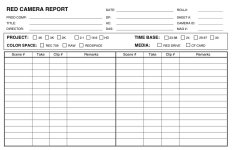
That's what camera reports are for.

I made this up for the last few features I've done. I usually have kinko's make me up 3 sheet carbon copies. Let me know if this helps or how you might change it.

Thanks!


-r
 

Attachments

  • RED_report_dean.jpg
    RED_report_dean.jpg
    85.5 KB · Views: 0
O.k so here is a question for RED:

Is there a way to generate the same file names as the camera creates?
I.e is there an algorithmic method that generates file names which is predictable, or are the ones generated by the camera purely random?
 
In clipfinder you can create a placeholder of the clip with the corresponding scene name, when you import the clip clifinder switch the placeholder with the original clip and match the scene information that you have entered before shooting.
 
Back
Top