

David Newman
Well-known member
Sorry for the delay in my responses today, very busy helping a partner getting reading for IBC.
Firstly there is a new version:
http://www.miscdata.com/red/R2CFv149.zip. Unzip the contents into: C:\Program Files\CineForm\Tools. To use this you must have NEO 4K or Prospect 4K installed on your Windows OS (trial version also work.)
Many minor internal updates, added new switch
-ROx - R3D SDK OLPF compession (0 = off, 3 = maximum)
-RNx - R3D SDK DeNoise filer (0 = off, 6 = maximum)
Alex:
In this new version I have exposed the R3D SDK's Optical Low Pass Filter Compensation and Denoise, the Detail is already defaulting to High. These are the only additional SDK controls that impact noise and preceived sharpness. The denoise is subtle, maybe it is more obvious with noisy source.
All sample below are 1024x768 1:1 pixel extract form a 4K frame, shown using JPEG 100% quality 1x1x1 sampling.
Here is the output from the SDK to DPX stock (Denoise and OLPF comp off.)
http://www.miscdata.com/blogimgs/R3DStock-DPX.jpg
Same DPX output with (Denoise at max -RN6.)
http://www.miscdata.com/blogimgs/R3DDeNoise6-DPX.jpg
The size of the JPEG is more telling than the image change, JPEG drop form 349kB to 299kB, the cleaner image being easier to compress.
Here is the OLPF set to maximum and exported as DPX. I don't like these results, while it does look a little sharper the highlights get halos (not recommended.)
http://www.miscdata.com/blogimgs/R3DOLPF3-DPX.jpg
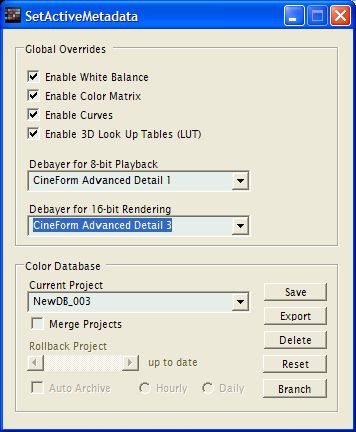
As you are looking to sharpen full resolution decodes, you can use CineForm RAW (-r option, I also left the -RN6 switch on.) As SDK doesn't have RAW these a back samples to CFA bayer before CineForm compression. Size reduction is significant, the DPX files were 36,866kB, and the CineForm RAW only 1,943kB (Filmscan 2), yet the quality is basically the same. With CineForm RAW you get to choose the demoasic filter during post, so sharpen can be controlled (without adding additional filters) at any time. The controls are with Premiere, set per project, custom set per clip, or global set with the SetActiveMetadata tool.
 .
.
These are two frame exported frames frame the same CineForm RAW encode using demosaic filters CineForm Advanced Detail 1 (default)
http://www.miscdata.com/blogimgs/CineFormDetail1.jpg
and CineForm Advanced Detail 3
http://www.miscdata.com/blogimgs/CineFormDetail3.jpg
This last image extracts more details/sharpness than using OLPF compenstaion, without causing the halos. If you want a extra but of sharpness to your CineForm RAW by default, you can specify the demosaic to use in the script. +DEMO=0x4 is for Detail 1, +DEMO=0x5 is for Detail 2 (not shown), and +DEMO=0x6 is for Detail 3.
Of course none of this prevents you adding more sharpness in post, probably where it should be added.
Firstly there is a new version:
http://www.miscdata.com/red/R2CFv149.zip. Unzip the contents into: C:\Program Files\CineForm\Tools. To use this you must have NEO 4K or Prospect 4K installed on your Windows OS (trial version also work.)
Many minor internal updates, added new switch
-ROx - R3D SDK OLPF compession (0 = off, 3 = maximum)
-RNx - R3D SDK DeNoise filer (0 = off, 6 = maximum)
Alex:
In this new version I have exposed the R3D SDK's Optical Low Pass Filter Compensation and Denoise, the Detail is already defaulting to High. These are the only additional SDK controls that impact noise and preceived sharpness. The denoise is subtle, maybe it is more obvious with noisy source.
All sample below are 1024x768 1:1 pixel extract form a 4K frame, shown using JPEG 100% quality 1x1x1 sampling.
Here is the output from the SDK to DPX stock (Denoise and OLPF comp off.)
http://www.miscdata.com/blogimgs/R3DStock-DPX.jpg
Same DPX output with (Denoise at max -RN6.)
http://www.miscdata.com/blogimgs/R3DDeNoise6-DPX.jpg
The size of the JPEG is more telling than the image change, JPEG drop form 349kB to 299kB, the cleaner image being easier to compress.
Here is the OLPF set to maximum and exported as DPX. I don't like these results, while it does look a little sharper the highlights get halos (not recommended.)
http://www.miscdata.com/blogimgs/R3DOLPF3-DPX.jpg
As you are looking to sharpen full resolution decodes, you can use CineForm RAW (-r option, I also left the -RN6 switch on.) As SDK doesn't have RAW these a back samples to CFA bayer before CineForm compression. Size reduction is significant, the DPX files were 36,866kB, and the CineForm RAW only 1,943kB (Filmscan 2), yet the quality is basically the same. With CineForm RAW you get to choose the demoasic filter during post, so sharpen can be controlled (without adding additional filters) at any time. The controls are with Premiere, set per project, custom set per clip, or global set with the SetActiveMetadata tool.
These are two frame exported frames frame the same CineForm RAW encode using demosaic filters CineForm Advanced Detail 1 (default)
http://www.miscdata.com/blogimgs/CineFormDetail1.jpg
and CineForm Advanced Detail 3
http://www.miscdata.com/blogimgs/CineFormDetail3.jpg
This last image extracts more details/sharpness than using OLPF compenstaion, without causing the halos. If you want a extra but of sharpness to your CineForm RAW by default, you can specify the demosaic to use in the script. +DEMO=0x4 is for Detail 1, +DEMO=0x5 is for Detail 2 (not shown), and +DEMO=0x6 is for Detail 3.
Of course none of this prevents you adding more sharpness in post, probably where it should be added.


