Welcome to our community

Be a part of something great, join today!

  • Hey all, just changed over the backend after 15 years I figured time to give it a bit of an update, its probably gonna be a bit weird for most of you and i am sure there is a few bugs to work out but it should kinda work the same as before... hopefully :)

CineForm Officially Supports Red One

Mike & Others,

I just made a small change in the v1.42 download. The scripts wouldn't always recurse the directories as I was incorrectly testing for hidden folders. The Download above is now up to date as the time of this new post.
 
Thank you David. I was having trouble but was sure it was something I was doing wrong (which it usually is). Seems to be working perfectly now.
 
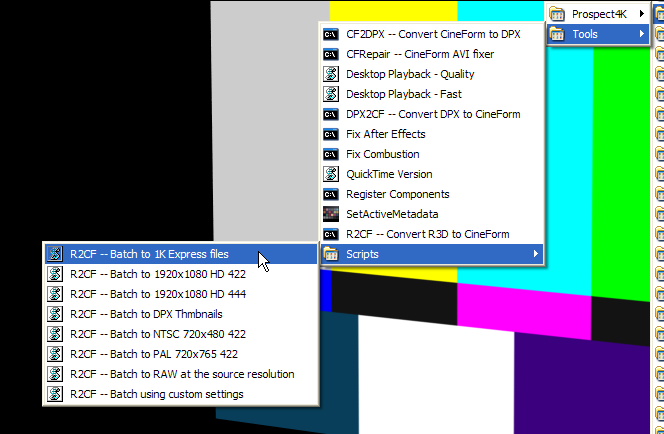
scriptmenu.png


The new beta of the Prospect 4k http://www.miscdata.com/cineform/P4Kb180.zip and NEO 4K http://www.miscdata.com/cineform/N4Kb180.zip. Simplifies access to the script engine. Now you can set up a batch from the Start Menu -> Programs -> CineForm -> Tools -> Scripts. These new build includes the 1.42 version of R2CF.
 
Hi David. I just downloaded this beta version to test the srcipts convertion from red files. I´m traying to convert the files to cineform HD444 but the image stays choppy like missing frames. The footage I have here are R3D files from a red one but they are at 120fps diferent sript for this?

Luis

:help:
 
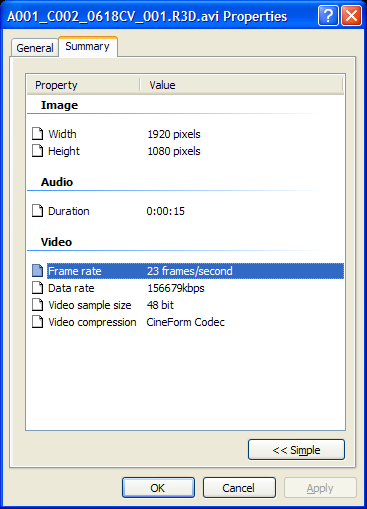
The scripts should be the same. The AVI produced will play at the intended playback rate. I just tested a 2K overcranked clip here using the HD444 script and it played back correctly at 23.976 for slow motion. Maybe you are trying to play back the clip faster than your PC is capable, and it is the playback that is skipping. Right Click on the AVI and select Properties, this indicate the playback rate it will attempt (rounded down to the nearest frame, so 23.976 will show as 23.)
AVIproperties.png


Now if your PC is a little underpowered, there is a work around. 1080 444 clips on my laptop play at 21 fps here (skipping a few frames,) there is a script to help you with that. Select Start -> Programs -> CineForm -> Tools -> "Desktop Playback - Fast". Now my laptop plays the same clip perfectly (if I turn off rate control -- play as fast as it can -- it will play the clip at 60+ fps.) Under Premiere we handle this automatically, so even on my laptop I can multi-stream edit in real-time.

If something else has gone wrong with the conversion, like it has duplicate or missing frames, I would love to see the R3D file. You could send that to me via yousendit.com to my email dnewman at cineform dot com. Sometimes the best tool for examining an AVI on a frame by frame basis is VirtualDub (I use it everyday.) Get your copy here http://www.virtualdub.org/
 
Posssible bug?

Posssible bug?

While creating CF express files in bacth R2CF got stucken with a directory containing the Pre*.R3D frames created by the pre-record mode of the camera. By stucken I mean R2CF was running (checked this by hitting crtl-atl-del) but nothing happened for an hour, it just kept running like the Duracel bunny. Is this a bug?
 
Another question, is the map from CF 4:4:4 (obtained with the SDK debayer algorithm) to CF raw invertible. That is, is the composition map CF 4:4:4 -> CF raw -> CF 4:4:4 identity providing the user with precisely the same image one started from?

On the wishlist:
1) Please add into the GUI a (graphical) gamma curve large enough enabling the user to finetune the s-curves.
2) Could you make an option to arithmetically just add n frames to each other to form a new frame holding for the time of m frames? To see the motivation, say one shoots stars on the dark sky. The longest exposure time of the camera is not long enough, but it should be easy to extend the exposure time in post by adding arithmetically frames to each other.
 
Lauri,

Good reports and questions. We never tested pre-record captures, can you zip-up the pre*.R3D files that got R2CF stuck, and use YOUSENDIT.COM (100MB is free) to email the archive to me, dnewman at cineform dot com.

0) Regarding, 4:4:4 -> CF raw -> CF 4:4:4 exactly the same image?

No, it will not be exactly the same. 4:4:4 -> CF Raw works because in a bayer image the original 2 greens, 1 red and 1 blue cells are pretty much unchanged by the debayer filter (same debayer althorithms they aren't changed at all, although we don't believe this to be the case for Red debayer.) CF -> CF 4:4:4 will be developed through a CineForm demosaic which is under user control, so it will be a little different. The debayer filter CF Advantage Smooth looks most like the Red debayer in detail and sharpness. As you now get to do the debayer, you can choose to develop the image differently for more or less detail. However, we believe the advantages of producing 4K Raw way exceed the disadvantages (which I believe are insignificant.) As the data rate is so greatly reduced, decode performance is higher, so it is more partical to use 4K in you edit, rather than converting to 2K or 1080p. Of course direct R3D SDK RAW -> CF RAW will be best for speed reasons, I doubt you would able to tell the difference in image quality.

1) S-curve is not really planned for base image development, remember you can add a 3D LUT which is far more flexible than just S-curves. We presetting the image data such that is best of downstream processing, through Active Metadata and tradition color correction. Have you tried the Active Metadata engine in Prospect 4K under Premiere yet? We could consider added S-curves there.

2) Yes that is completely doable, although I doubt there are many customers to cover the development costs to make it a base feature. Couldn't you just do it in After Effects? How often are you doing astrononmy with your RED?
 
David,

Thanks, I'll send you the archieve as soon as a batch conversion of about 1T of r3d files to CF express files is over. Thank you also for the explanation to raw files and back.

About the gamma or S-curve, I've found it highly useful in Redcine making it possible to gain accurate reproduction of colors/tones. Have not yet tried the Active metadata engine under Premiere, but if you could add the s-curve there, I beleive many will find it useful.

Addition of frames; In fact I'm not that much after astronomy besides the aurora borealis. But I'm in wildlife business and almost always shoot as long as there is some light available and even after that. Some animals, such as wolves typically start to move only when it's getting dark and a virtual extension of the exposure time emulating the Canon XL-series long exposure times (such as 1/6s) would be very useful. In addition, such an option made it possible to make nice transitions from day to night in a single footage without moving the camera. After effects is indeed useful but bit clumsy and slow in practice.

Cineform has made so many useful things needed in editing and these express files is another example of that. Finally, always enjoyed following your blog. If possible please keep posting all that good and useful stuff.
 
I need to add more to blog, sorry it has been so long, been very busy and I'm not a good writer.

We do have gamma curve controls as part of the Active Metadata engine, just not S-curves. Before 3D LUTs we offer the base ASC CDL base color developement operations -- Lift, gamma, gain and saturation matrix.

The reason to try AE is make sure the star details can be summed, as it is not quite the same as real long exposure. Each short exposure is then compressed into REDCODE with does impact the noise signature, the risk is the low noise will not be summed correctly due to the compression. The summing of dark images works with there is a small signal (star) and random noise (not a star), the random noise can be extracted away producing a clear signal (lovely star fields.) Compression messes with the random noise, potentially coursing problems. This is all theory as I've never tried it. If you can send me a R3D long exposure star field, we can try it out.
 
Having just returned from a shoot in Alaska with over 1TB of red footage and not being able to make redcine work right, we are quite appreciative of all the work cineform's done to bring this to us.

So far, we have only one bonehead question concerning the new GUI. If we use the BatchExpress option, is there any way to direct that the express files write to another drive? Other than the drive which holds the Rd3 files.)

Thanks,
 
Having just returned from a shoot in Alaska with over 1TB of red footage and not being able to make redcine work right, we are quite appreciative of all the work cineform's done to bring this to us.

So far, we have only one bonehead question concerning the new GUI. If we use the BatchExpress option, is there any way to direct that the express files write to another drive? Other than the drive which holds the Rd3 files.)

Thanks,

Absolutely, see this post http://www.reduser.net/forum/showpost.php?p=280376&postcount=119. The second control panel is the output path. It can be to any other system location or network mapped drive.
 
Another bug?

Another bug?

David, sent you an email and the sample file with pre-recorded frames.

Discovered another bug; In May my camera got stucken and it did not react to any button. Eventually had to pull off the power cable and reboot the camera. The playback of the camera did not manage to play any file taken before this file but all the files were just fine when opened with Redcine.

Now when I converted the r3d files to CF Express files, everything after the corrupted file is mixed with the previous clip. That is, if I open the CF file in Windows Media Player, it appears as if every other frame is from one file the every other is from another. This seems to suggest, if the file has not been closed properly, R2CF does not recognize such an error.
 
Not yet, but there is getting less need as we can drive the scripts completely via there own GUI. There are things the scripts are doing that make you work easier then if you used HDLink. Now with a few mouse clicks, type a path or two and you can convert an entire volume of R3Ds without opening a shell. HDLink support is coming, but GUI assisted scripts are also here to stay. See posts:
http://www.reduser.net/forum/showpost.php?p=280487&postcount=125
and
http://www.reduser.net/forum/showpost.php?p=280376&postcount=119
 
Back
Top