Welcome to our community

Be a part of something great, join today!

  • Hey all, just changed over the backend after 15 years I figured time to give it a bit of an update, its probably gonna be a bit weird for most of you and i am sure there is a few bugs to work out but it should kinda work the same as before... hopefully :)

CineForm Officially Supports Red One

2K is completely real-time on modern hardware, has been for several years, even a single proc Core 2 Dual core PC does it. Do you have old Xeon hardware? That was rather slow for memory throughput.

Yea i have hp xw8000 dual xeon from about 4 year ago, planning to get latest HP that you recommend soon. Demoing cineform now, we have a 2k anime we are creating, all comped in afx, we are planning to render to cineform 2k to do the editing in premiere, so far test have been great, we cannot see a quality drop at all, impressive, we are exporting to filmscan2 as this is going to get printed to film and or dcp for theatre.
 
David,
Is there a way to batch convert all the R3D files in the main folder, where by it will look through all sub folders for the R3D files and batch convert all in order.

Recursive batching is now working.

Download R2CF v1.41: from there http://www.miscdata.com/red/R2CFv141.zip. Unzip the contents into: C:\Program Files\CineForm\Tools

Now the shell command
cscript scripts/BatchExpress.vbs [R3Dpath] [outputPath]

will recurse through all sub-directories within [R3DPath] and place all the resulting files in [outputPath]/express.

Also the scripts test if the conversion has been completed so there is no harm in running the script multiple times. This means you can convert an entire volume without converting any clip twice. Great of converting all the new material at the end of the day, without have to worry about where it is.

e.g.
cscript scripts/BatchExpress.vbs r:\ v:\

Converts every R3D files on R: to a CineForm AVI and stores it on V:.

If you create a simple text file like this (use notepad.exe)

cscript scripts/BatchExpress.vbs r:\ v:\
cscript scripts/BatchHD444.vbs r:\ v:\


and save the file as go.bat within C:\Program Files\CineForm\Tools

Now all you have to do at the end of each shooting day is type "go", so that all your dailies and masters will be created back to back, automatically.
 
Great, exactly what I was asking for, will test it.

I've been using it thoroughly for a few days now and have to say the R3D workflow, for me anyways, is on par with working with P2HD mxf files. Shooting 4K 2:1, down rez to 1024x512 for editing, cc, the playback is much smoother than 1080 DVCPROHD, and the rendering is much faster as well.

Good job.
 
David(s), may I ask here:

(1)In comparison to the rendered DPX Raw files from redcine (2800px wide) to the CF Avi Raw (4096px wide) than scaled down to 2800px in Aftereffects the footage looks slightly washed out in detailrich areas.

I´m not "the" script guy, so I coudn´t found out how to r2cf an r3d file to a CF Raw.avi scaled down to 2800px.
Maybe the washed out areas are coming from the scaling in Aftereffects, so I want to try out scaling directly from the r2cf converter. So where and what in the script can be changed?

(2)During converting, when I have a splitted file in a folder than after adding the second file and after several minutes later the converter stops and I have a corrupted avi file. No problems with a single file.

thank you

alex
 
how long does it take to convert 8 gigs worth of 4K r3d into cineform raw and cineform 444?

Depends mostly on your PC, current 4K RAW and 444 are about the same speed as there is no raw mode yet in the SDK. On a 3GHz 8 core 4K master convert between 3-3.5 fps. For dailies and editoral, Express files output at 30-40 fps.
 
David(s), may I ask here:

(1)In comparison to the rendered DPX Raw files from redcine (2800px wide) to the CF Avi Raw (4096px wide) than scaled down to 2800px in Aftereffects the footage looks slightly washed out in detailrich areas.

I´m not "the" script guy, so I coudn´t found out how to r2cf an r3d file to a CF Raw.avi scaled down to 2800px.
Maybe the washed out areas are coming from the scaling in Aftereffects, so I want to try out scaling directly from the r2cf converter. So where and what in the script can be changed?

(2)During converting, when I have a splitted file in a folder than after adding the second file and after several minutes later the converter stops and I have a corrupted avi file. No problems with a single file.

thank you

alex

1) The scaler in R2CF is likely better than After Effects, so to direct scale to your target of 2800px your switches are simply -w2800 (edit Batch444.vbs.) So your command is

R2CF your.r3d output.avi -w2800

The height will automatically determined from your source picture ratio if don't specify with -hValue.

2) So you only have the second or third part of a multi-part file? The conversion will automatically convert .._001.r3d, .._002.r3d sequences without issue. If you only have _002.r3d, it is best to rename the file to _002a.r3d, then it will convert alone. If this is a common occurance will will change the way this is handled.
 
David, thank you for your answer.

Regarding the scaling option, this what I´ve done, this does not work. Now I noted, as soon as I remove the "-r" in the commandline it works, but than this means it´s an 444 convert? The "-r" is for Raw?

alex
 
Now I noted, as soon as I remove the "-r" in the commandline it works, but than this means it´s an 444 convert? The "-r" is for Raw?

alex

Alexx, this operation is correct. You cannot scale RAW data. Once you desire to change the spatial resolution of the image it must be developed to RGB.
 
Alex, It have been discussed in a few places that RAW as in CFA Bayer, and RAW as in an undeveloped image, are too separate issues. Even with a444 encode, the data is RAW in the sense that no color operations have been cook into the image, it is just as flexible as Bayer RAW. Only use the -r when the image is not scaled, this reduces the data rate but not the flexibility of the image in post.
 
Thank you David's...
R2CF already astonishes me and it just keeps getting better.

I've gotten quite comfortable working from the dos prompt but am very much looking forward to the gui and ultimately raw to raw conversion.
 
Hi David,

Finally got around to testing the R2CF utility. I have a few questions... WE're running the BatchHD444 script and I was wondering the following:
1) when using REdcine, we output our files using Camera RGB and REdlog color space.....what are the settings needed to closely simulate the same results using your script? I tried cineon log and default gama and they both look way different than Redlog...

2) When running the script it prompts to click "ok" after each conversion of the R3D files...is there a way to suppress this and just have it convert all the R3d files in a folder without ever prompting me?...I am sorry if this has been asked before. I looked and couldn't find the answer. Other than those two issues, it looks like we will be purchasing a few licenses :-)

Thanks
 
>is there a way to suppress this and just have it convert all the R3d files in a folder without ever prompting me?..

i assume you are running vista, if you don't mind giving up some of the vista security functions, just go into control panel, user account and family access, then user account, turn "user account control" off.
 
No not running Vista, running XP. I am not talking about windows security messages or UAC...When the script finish processing the first R3d file, a window pops up to tell me it was successful and i have to click ok so the next files starts getting converted and so on...the little window pops up after each conversion of R3D files...
 
I am an idiot....I wasn't using cscript :poster_oops: ( I re-read the instructions carefully...) I was just executing the vbs file with a specified path after it...
thanks!!! :-)

What about the Redlog settings....any suggestion on what settings to use?
 
Finally got around to testing the R2CF utility. I have a few questions... WE're running the BatchHD444 script and I was wondering the following:
1) when using REdcine, we output our files using Camera RGB and REdlog color space.....what are the settings needed to closely simulate the same results using your script? I tried cineon log and default gama and they both look way different than Redlog...

Sorry it took me a while to get to this, too many meetings today.

RedLog from under from ProLost post (http://prolost.blogspot.com/2008/03/red-log.html) is just a log curve with with black at 0 and white at 1023 (in 10-bit numbers.) You can produce the same curve with the CineForm transcode. The default -l90 (log90) we use is very close but we default to removing the black offset (which I don't think RedCine does.) If you want to match RedLog, I think the numbers are -l100 (Log 100) -b0 (no black level correction.) Let me know if this matches your findings.
 
New release to help anyone have issues with DOS shells.

Download here: http://www.miscdata.com/red/R2CFv142.zip
Unzip the contents into: C:\Program Files\CineForm\Tools

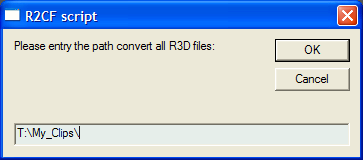
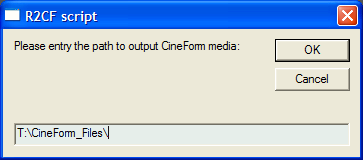
Now you can double-click on the script you need, and a simple GUI opens to request where your source is and where to put your outputs. Hope this helps.

SourceR3D.png
OutputAVI.png


No, this is not the GUI we are planning, that will be an HDLink integration, but it makes conversions pretty easy for everyone.

Also made the Ctrl-C cancel much cleaner.
 
Absolutely stoked about this new GUI. I was just starting to look into scripting this afternoon, and this does exactly what I need.
 
Back
Top