


Brett Harrison
Well-known member
Hi All,
I haven’t seen this camera comparison before:
Take the linear HDR information from each camera and place it in a common colour space so that each camera can be evaluated independent of any ‘introduced’ differences after debayer.
This is a test for RedUsers so I am reaching out to source advice before we do the test next week.
Here's my basic thinking and then the workflow:
The essence of each camera is the data that comes from the debayer in linear form.
We take pains to control the physical environment when doing camera tests, but when it comes to post, it’s often not as controlled as modern workflows allow.
The cameras to be compared are the Carbon Fibre Weapon (with STD OLPF) and the Alexa XT.
Each manufacturer's Log curve differs slightly as does each Rec709-compliant curve:
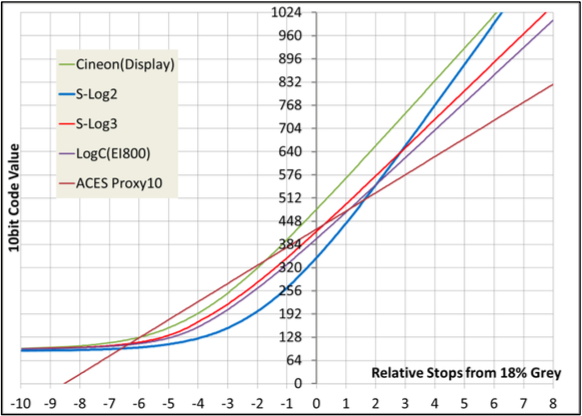
Note that REDLogFilm has the same curve as the Cineon standard.

We'll be using precision transforms on the SGO Mistika finishing system www.sgo.es (equivalent or better than the generalised colour space of Baselight, demonstrated here https://vimeo.com/68305142).
Mistika is in use at houses like Fotokem and Deluxe for compositing, editing, stereo 3D and colour.
It includes mathematics that allows the user to accurately transform to/from proprietary colour spaces and curves like DragonColor2, ACES primaries, Alexa Wide Gamut, LogC, S-Log, REDLogFilm etc.
Here's the description of this functionality:
"...this effect uses the official mathematical equations as defined per each standard. It is not based on 3DLUTS but in pure mathematical algorithms for direct conversion from one space to the other. This provides the best accuracy and also the capability to invert conversions..."
Starting with debayers in 16bit-HDR ACES primaries with gamma curve 1.0 (linear) and arriving at 4 outputs per scene:

RED DATA -> RED TRANSFORMS
RED DATA -> ARRI TRANSFORMS
ARRI DATA -> RED TRANSFORMS
ARRI DATA -> ARRI TRANSFORMS
The ARRI debayer is from SDK V5.0.
The ACES debayer doesn't imply a full ACES workflow; it's just an agreed-upon standard built into both SDKs. Everything past that point is Mistika colour science terminating with RED and ARRI LUTs.
Though it’s redundant to transform to ACES before going to a native log colour space, I’m doing it to establish a unified workflow and eliminate any presumed difference. I’ll also provide a comparison with a native workflow to demonstrate equivalence.
All images will be offset to render middle grey at the same luminance and we can then examine where the highlight and shadow detail falls under identical scene, colour space and curve conditions.
The scene will include a daylight source, a strong key-to-fill ratio on the face of the model, a GretagMacbeth-compliant chart and some common objects.
Let me know what you think and if I could improve on the method.
Cheers
Brett
I haven’t seen this camera comparison before:
Take the linear HDR information from each camera and place it in a common colour space so that each camera can be evaluated independent of any ‘introduced’ differences after debayer.
This is a test for RedUsers so I am reaching out to source advice before we do the test next week.
Here's my basic thinking and then the workflow:
The essence of each camera is the data that comes from the debayer in linear form.
We take pains to control the physical environment when doing camera tests, but when it comes to post, it’s often not as controlled as modern workflows allow.
The cameras to be compared are the Carbon Fibre Weapon (with STD OLPF) and the Alexa XT.
Each manufacturer's Log curve differs slightly as does each Rec709-compliant curve:
Note that REDLogFilm has the same curve as the Cineon standard.
We'll be using precision transforms on the SGO Mistika finishing system www.sgo.es (equivalent or better than the generalised colour space of Baselight, demonstrated here https://vimeo.com/68305142).
Mistika is in use at houses like Fotokem and Deluxe for compositing, editing, stereo 3D and colour.
It includes mathematics that allows the user to accurately transform to/from proprietary colour spaces and curves like DragonColor2, ACES primaries, Alexa Wide Gamut, LogC, S-Log, REDLogFilm etc.
Here's the description of this functionality:
"...this effect uses the official mathematical equations as defined per each standard. It is not based on 3DLUTS but in pure mathematical algorithms for direct conversion from one space to the other. This provides the best accuracy and also the capability to invert conversions..."
Starting with debayers in 16bit-HDR ACES primaries with gamma curve 1.0 (linear) and arriving at 4 outputs per scene:
RED DATA -> RED TRANSFORMS
RED DATA -> ARRI TRANSFORMS
ARRI DATA -> RED TRANSFORMS
ARRI DATA -> ARRI TRANSFORMS
The ACES debayer doesn't imply a full ACES workflow; it's just an agreed-upon standard built into both SDKs. Everything past that point is Mistika colour science terminating with RED and ARRI LUTs.
Though it’s redundant to transform to ACES before going to a native log colour space, I’m doing it to establish a unified workflow and eliminate any presumed difference. I’ll also provide a comparison with a native workflow to demonstrate equivalence.
All images will be offset to render middle grey at the same luminance and we can then examine where the highlight and shadow detail falls under identical scene, colour space and curve conditions.
The scene will include a daylight source, a strong key-to-fill ratio on the face of the model, a GretagMacbeth-compliant chart and some common objects.
Let me know what you think and if I could improve on the method.
Cheers
Brett


