Welcome to our community

Be a part of something great, join today!

  • Hey all, just changed over the backend after 15 years I figured time to give it a bit of an update, its probably gonna be a bit weird for most of you and i am sure there is a few bugs to work out but it should kinda work the same as before... hopefully :)

Can't seem to Render RED Files out of Color 1.5

Chris Armstrong

Well-known member
Joined
Dec 30, 2006
Messages
124
Reaction score
0
Points
0
Website
www.elysianpictures.com
I can't seem to render out RED files from Color 1.5. All I get is either completely black frames, or garbled frames.

The files look fine on the monitor (both LCD and external), grade fine, but won't render out.

Doesn't matter if it is Quicktime (or the codec), or DPX.

I've installed the new RED FCS Installer. I've deleted and reinstalled the FCS 3 suite twice now. I've tried every variation of resolution, and quality setting that I can.

I've tried importing both the source R3D and using a wrapped file send from FCP.

Non-RED files seem to render out fine as long as they aren't mixed in a timeline that has RED files in it. (Then the non RED files have the same issues).


Any thoughts, areas to check, or anyone experiencing similar issues?
 
Update:

So I re-installed Color 1 and it exports R3D files just fine (using the new FCS 3 Installer), but as soon as I go back to Color 1.5 it won't export R3D files.

They play just fine, grade fine, look fine on the LCD and the External (via Kona) but they won't render to disk at all.

Color 1.5 will render out non-red files just fine.


Anybody have any suggestions/idea?
 
It sounds like you need to install the latest QuickTime codec.
 
Already have. About a half dozen times.

I've installed the Final Cut Studio Installer v20.00 & I've installed the 2.8 version of the Quicktime codec as well.

Like I said earlier. Color shows the footage properly, you can grade it, and play it back, but when I render it, the files it makes are all black or corrupted.
 
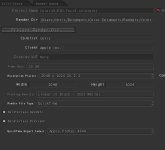
Can you snapshot your prject settings tab in color? I want to see your output settings. Have you tried different output formats?
 
Attached are pics of the project settings (though I've tried all kinds of variations in size and output codec and type (Quicktime and DPX).

Also attached is a pick of the quicktime output (when it isn't all black).
 

Attachments

  • Color-ScreenCap1.jpg
    Color-ScreenCap1.jpg
    60.2 KB · Views: 0
  • Color-ScreenCap2.jpg
    Color-ScreenCap2.jpg
    36.7 KB · Views: 0
What resolution was this footage shot in, and did you do any reframing in Geometry?
 
Also do you have full resolution renders turned on?
 
I've tried full resolution, half and quarter with no luck.

Files render out of REDCine and REDAlert just fine. As do both proxies and wrapped media out of FCP.

The problem seams to be isolated to RED files in Color 1.5.

Guess the next step is to boot into my test partition that has the base OS and only FCS without the other software and hardware drivers installed and see if there is any difference.

I'm assuming I'm the only one with this problem at the moment?
 
So I installed FCS 3 and the new RED FCS installer on a new partition with only the OS.

Now Color renders everything fine, just like it should...

...so that means somewhere I've got a piece of software or plugin that is interfering with Color/RED output.

Anybody have any ideas on how I might go about figuring out which software is causing the problems?
 
Video Plugs

Video Plugs

Just to make sure, i would take out any WMV, Divx, Perian or any video codec installs.
Perian has caused me some render problems in the past.
One click and it's uninstalled.
 
Last edited:
Back
Top