Welcome to our community

Be a part of something great, join today!

  • Hey all, just changed over the backend after 15 years I figured time to give it a bit of an update, its probably gonna be a bit weird for most of you and i am sure there is a few bugs to work out but it should kinda work the same as before... hopefully :)

Can the RedTouch 5.0" LCD Monitor ROTATE 360 degrees ??

George D.

Well-known member
Joined
Oct 22, 2008
Messages
980
Reaction score
0
Points
0
Location
N. California, USA
Can the RedTouch 5" LCD Monitor used on most Scarlets, rotate "around" 360 degrees?

I realize it can tilt up and down, but can it rotate so that you can see it an "any" camera angle?

In other words, if I want to do a shot where the lens is facing "at" me, can the monitor also face me so I can see the image?

Thanks.

.
 
Yes.
 
short answer: no AND yes actually...
it can't be rotated 360 freely - but it can be rotated 180 to face towards the shooting direction, that's no problem.

for "real" flexibility you can always add a noga arm or magic arm tho :)
 
short answer: no AND yes actually...
it can't be rotated 360 freely - but it can be rotated 180 to face towards the shooting direction, that's no problem.

for "real" flexibility you can always add a noga arm or magic arm tho :)

Thanks Peter,

I use a noga articulating arm for our Red EVF on our Red-One, but how can you mount the RedTouch Monitor with a wide bottom bracket that takes two screws, onto an arm with only one 1/4" screw ?

Please explain.

Thanks again.

.
 
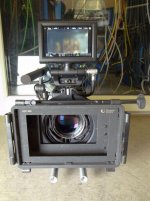
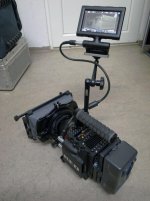
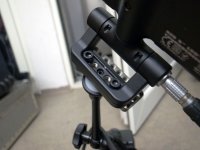
this is how I do it...
it can be put in all 4 directions (plus up/down to a certain degree), it just can't go "around in circles", but all the directions are here.
 

Attachments

  • R0015347.jpg
    R0015347.jpg
    88.8 KB · Views: 0
I use a noga articulating arm for our Red EVF on our Red-One, but how can you mount the RedTouch Monitor with a wide bottom bracket that takes two screws, onto an arm with only one 1/4" screw ?

Please explain.
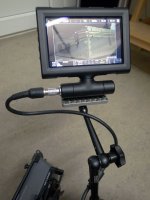
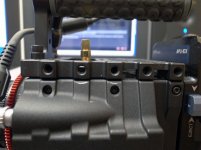
I'm just "abusing" a WC Easy Top Link Cover for that :)
I'm pretty sure there are much cheaper solutions as this part costs 60 Dollar but it's pretty nice if you ask me (just some other shim or plate with a few holes plus screws should also totally work and do the job)... As a (self-proclaimed) DIT I always mess around with the stuff I get in my hands - I don't care about crossing stuff from different brands as long as it turns out to be useful so I came up with this "solution" somehow :)

All you need is the WC "Easy Top Link Cover" -> direct linking to the WC-store is not allowed it seems but you'll find it on wooden*camera.com (WITHOUT the * of corse! -> somehow RED is censoring the word "Wooden_Camera" here in the forum - please don't ask me why, must be some "bad relationship" stuff, idk :D) in the RED -> CAMERA SUPPORT Section on page 2... if you want you can add some plastic shim (or rubber or anything else) for avoiding scratches at the monitor bottom, plus 2 fitting screws and you're ready to go...
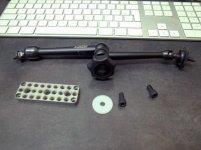
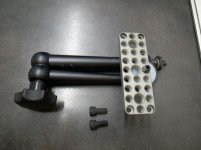
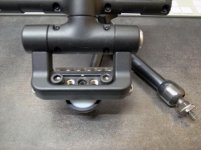
Just watch and learn;
 

Attachments

  • R0015517.jpg
    R0015517.jpg
    75.7 KB · Views: 0
  • R0015518.jpg
    R0015518.jpg
    75.6 KB · Views: 0
  • R0015519.jpg
    R0015519.jpg
    75.8 KB · Views: 0
  • R0015520.jpg
    R0015520.jpg
    71.4 KB · Views: 0
  • R0015521.jpg
    R0015521.jpg
    90.1 KB · Views: 0
Last edited:
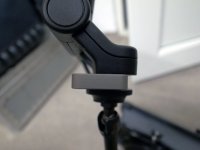
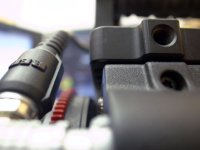
ok, the 3rd picture was not too good - I did two more so you get a better idea...
it's a solution with using three threads and it's tight enough to be "safe" as long as you tighten the noga arm well enough.
 

Attachments

  • R0015523.jpg
    R0015523.jpg
    55.1 KB · Views: 0
  • R0015524.jpg
    R0015524.jpg
    76.7 KB · Views: 0
ok, the 3rd picture was not too good - I did two more so you get a better idea...
it's a solution with using three threads and it's tight enough to be "safe" as long as you tighten the noga arm well enough.

Thank you very, very much Peter. You have been very kind and helpful.

But, at this time, we are going to pass on the monitor all together. Since we cannot use that monitor at the same time we use the Red EVF, we are going to use a 3rd party monitor, which I already have, and connect it to the SDI input. The monitor is just for framing anyway, so the EVF will be for focus and camera data. The Side Handle will be for changing menu settings, etc.

Will the plate that you are showing me from Wooden Camera, mount directly onto the top of the Scarlet Brain without hanging over the edges or any other problems? If so, it could make a good top plate.

Thanks again,

George

.
 
no problem. This exact plate will not "hang over" on the left, right and back side - however it will on the front side -> but just like 2 mm; it won't cause any problem with any lens-mount or other stuff. I've made another two pictures for you so you'll see what I mean. There are at least 5 different brands/models of these top-plates floating around and they all differ a little bit so it's best to just check out the pictures and specs provided... but usually the size fits pretty exact and you don't have more then like 3 to 5 mm "hanging over" - nothing that will cause problems. If you're using like special rigs (dive-housings, remote-heads,...) you should always make sure to check out the compatibility tho - I can not give you any "fitting-all-recipe" here!

just to make sure; did you read my suggestion/concern at the other thread about sticking to NO touchLCD at all?
 

Attachments

  • R0015525.jpg
    R0015525.jpg
    67.2 KB · Views: 0
  • R0015526.jpg
    R0015526.jpg
    68.8 KB · Views: 0
no problem. This exact plate will not "hang over" on the left, right and back side - however it will on the front side -> but just like 2 mm; it won't cause any problem with any lens-mount or other stuff. I've made another two pictures for you so you'll see what I mean. There are at least 5 different brands/models of these top-plates floating around and they all differ a little bit so it's best to just check out the pictures and specs provided... but usually the size fits pretty exact and you don't have more then like 3 to 5 mm "hanging over" - nothing that will cause problems. If you're using like special rigs (dive-housings, remote-heads,...) you should always make sure to check out the compatibility tho - I can not give you any "fitting-all-recipe" here!

just to make sure; did you read my suggestion/concern at the other thread about sticking to NO touchLCD at all?

Thanks again, and yes I did, but it is actually academic at this time. We just cannot afford a +1 Module. It's as simple as that. We'll just have to make do.

.
 
if you make me a list on what exactly you have already to adopt from your RED ONE and what you're planning to buy I'd be happy to put in my thoughts & suggestions... what is you main use? More like tripod-work or also run & gun?
 
if you make me a list on what exactly you have already to adopt from your RED ONE and what you're planning to buy I'd be happy to put in my thoughts & suggestions... what is you main use? More like tripod-work or also run & gun?

Thanks anyway Peter, but the package is already put together and bought. We are using some things, like a Cinema Oxide Bottom Plate Adapter so we can use our Red-One Bottom Plate with the 19mm rods, etc., the Allstar A-Mount, and other items we need.

We do wildlife, almost exclusively.

I think I can handle it from here, thanks. I've been shooting for over 40 years, so I think I can manage, but I am always open to help, and I do appreciate the thoughts, ideas, and feedback you've given me today.

Have a good one.

George

.
 
We managed to rotate one 720 degrees.

But it had to go back to red for a fairly expensive repair. ;)

Do not try it at home!
 
wow… just curious; did it get loose after a "crack" or were you still using it until the cables get twisted around too much? I won't ever try that as 180 is good enough for me and as it's only a logical thing to break it the way you did… but it's always interesting to know such stuff :D
 
The great thing about this thread, is I initially tried turning the LCD myself, and at some point at some setup left the LCD turned backwards. As I have been wanting to buy a longer cable for my shoulder-rig setup for some time, I noticed yesterday that when the LCD is turned 180 degrees, the cable is inserted on the right side of the monitor, thus giving me a few extra inches for my setup and thus saving me $220. So thank you George for creating this thread.
 
Back
Top