Welcome to our community

Be a part of something great, join today!

  • Hey all, just changed over the backend after 15 years I figured time to give it a bit of an update, its probably gonna be a bit weird for most of you and i am sure there is a few bugs to work out but it should kinda work the same as before... hopefully :)

camera to camera sync?

Andrae Palmer

Well-known member
Joined
Sep 1, 2007
Messages
2,480
Reaction score
1
Points
38
Age
52
Location
Fort Lauderdale, FL
Website
www.facetmedia.com
Is it possible to do a camera to camera shutter sync with the Epic? Deanan did mention it a few times on the board (in 3D section) but I'm not sure how it's done.


Epic can sync from camera to camera without external sync.
This is especially useful for offspeed, moco, etc.

However, having a genlock sync input helps phase lock
timecode to frame time while also locking monitor outputs
to genlock (good for SIP, etc).

So you can run without external sync depending on
what your requirements are.

http://www.reduser.net/forum/showth...element-technica-neutron-scarlet-3d-rig/page3
 
My Scarlets sync pretty well with just the gig-e cable. Let me rephrase that: the start time for each frame is very close to each other, but there will be a couple of frames extra at the head of the shot on one of the cameras. This can be corrected for by sliding the camera in a time line.
 
I was referring to shutter syncing instead of timecode syncing. But... do have the gig-e cable... how do you configure it for timecode syncing?
 
I've been curious about this as well, especially after some of Deanan's replies...but the more I've looked into it, it still seems that you need an external device to get tri-level sync from (gen10) especially if there's SDI monitoring involved.
Potentially I think there's a feature in there somewhere that just hasn't been enabled yet...
Was gonna talk to support about this specifically once i got my bodies in...
 
I'm wondering it it's possible with the RS232 to RS232 cable found here: http://www.red.com/store/cables/product/rs232-to-rs232-cable

In the manual it says this:

CTRL (RS232 CONTROL)
A 4-pin LEMO connector supports RS232 remote control for stereoscopic camera image capture, and third party metadata ingest applications.
The shutter Sync Output signal acts as an immediate response hardware tally of a scan. This is useful for 3D or motion control applications where a slave camera or lighting device needs to be synchronized to a master camera.
Alternatively, this output pin may be used as a GPO (General Purpose Output) tally, whose function is programmed in the USER KEYS menu. Default is Record Tally.
 
I've sent a few questions to tech support myself... will update the thread on any responses.
 
Got an answer from John Restivo at RED that what Deanan posted does not apply to the EPIC. We will will need timecode and gunlock generators... no way around it.
 
So it does apply to Scarlet ? I tested with gig-e, and it's pretty damned close, after correcting the 1 or 2 frame slip.
Easy test: start the two cams, draw fast circles with a laser pointer on a wall. The laser marks on the frames will tell tale the timing clearly.
 
I was referring to shutter syncing. How did you export the timecode using the gig-e cable?
 
Got an answer from John Restivo at RED that what Deanan posted does not apply to the EPIC. We will will need timecode and gunlock generators... no way around it.

interesting... if it doesn't apply to Epic, what DOES it apply to. Can't do it with Red One that's for sure... Doesn't make sense to have it on Sc. and not Epic. Confused about that one.
I spoke to support as well, he said that cable pertains to features that haven't been activated yet. Cable would be pointless to have until that happens. He said the GigE and cam-control cable are the ones to have.
So, no way to shutter sync yet BUT... I'd bet that feature is coming one day...
 
interesting... if it doesn't apply to Epic, what DOES it apply to. Can't do it with Red One that's for sure... Doesn't make sense to have it on Sc. and not Epic. Confused about that one.
I spoke to support as well, he said that cable pertains to features that haven't been activated yet. Cable would be pointless to have until that happens. He said the GigE and cam-control cable are the ones to have.
So, no way to shutter sync yet BUT... I'd bet that feature is coming one day...

Shutter syncing does not work on a Scarlet either. Looks like Les was talking about timecode syncing and not shutter syncing.
 
Here's one way...

Here's one way...

I was referring to shutter syncing instead of timecode syncing. But... do have the gig-e cable... how do you configure it for timecode syncing?

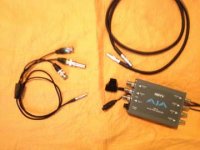
1) Purchase a $100 3BNC-T0-00 for each camera to be synched:
http://www.red.com/store/cables/product/3bnc-to-00-lemo-sync-cable

2) External Tri-Level Synch Box required - this example uses the AJA GEN 10 available online for <$350. Make certain to purchase the AJA GEN 10 power supply chord that fits an independent power source. DO NOT use a D-tap to power the GEN 10 from the same battery that is powering the camera. Low voltage results in failure.

(Note: the Deneke SB-T at $1,000 provides timecode and tri-level synch in one GEN 10 size box.)

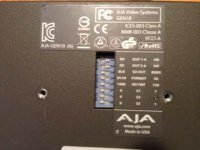
3) Set the GEN 10 dip switches - slick that they print the switch functions right on the case in a readable print.

(Suggestion - select ON for VIDEO outputs 4 & 5 on the dip switch menu. Provides cleaner cable out wrangling for 2 cameras.)

4) Power the AJA from an independent power source.

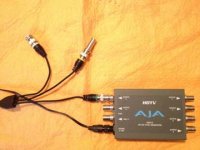
5) Connect the GREEN BNC end of the 3BNC-TO-OO cable onto the GEN 10 VIDEO OUT 1-5 as selected in set up.

( 3BNC-TO-OO cable: GREEN BNC is synch, YELLOW BNC is for timecode and WHITE BNC is Not Applicable to this set up).

6) Carefully align and connect the LEMO 00 end of the 3BNC-TO-00 cable into the LEMO synch input of the EPIC.

7) Select EXT GENLOCK and EXT JAM SYNCH in your camera settings. May require rebooting the cameras when more than 3 camera are on the same GEN 10. No further steps required in camera.

8) Provide Jam synch to all cameras with the YELLOW BNC end of the 3BNC-TO-00 cable.

(Recently tested Sound Devices 4400T from Coffey Sound and used it as the time code master clock for jam synching EPICs. Worked well. Requires BNC barrel connector and BNC to LEMO from Coffey).

The Master/Slave GIG-E cable from RED is used to slave camera controls.
http://www.red.com/store/cables/product/lemo-to-lemo-cat5e-ethernet-straight-cable-4
For example, when the cable is connected and Master/Slave mode is properly set, one REDMOTE will activate RECORD for both cameras. Now that is my definition of slick...
 

Attachments

  • cablesGen10.jpg
    cablesGen10.jpg
    34.3 KB · Views: 0
  • Gen10_rear.jpg
    Gen10_rear.jpg
    31.6 KB · Views: 0
  • set_up.jpg
    set_up.jpg
    34.1 KB · Views: 0
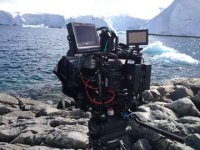
  • InSitu.jpg
    InSitu.jpg
    50 KB · Views: 0
  • InputsE.jpg
    InputsE.jpg
    39.1 KB · Views: 0
Ken, Thank you for the detail instructions of setting up the camera with the AJA Gen 10.

With just the gen-e cable and the camera... is it possible to share timecode from one EPIC-X to another?
 
Hi Andrae and Ken,

It seem to me that both of you are, I would say, experts in this subject. I would very much appreciate it if you share with me your knowledge in the communication subject between RED-MX and EPIC-X. Thanking you both in anticipation.
 
Thank you very much for your replay, but can you go a little further.... (where you connect the cables - any settings ????) The final aim is to shoot with both cameras the same time having the same time code for editing synchronization. Thanks again.
 
Nicos,

Detail instructions are in the RED EPIC & RED One operation guide on how to timecode sync each camera... it wouldn't make sense for me to rewrite all of those instructions on here and even more it would take a whole lot of my time. These instructions for the EPIC start on Page 161. Page 130 & 141 on the RED One manual. "Jam Sync" is a good search term to use in both manuals for diagrams on how to verify a successful sync. The manual has a diagram of where to connect the cables. Just a reminder that each camera uses two different timecode cables and of course you will need a device that can generate timecode.

https://www.red.com/support/all/downloads
 
Andrae,

Thank you very much for your help. I will read all relevant instructions within the manuals. Sorry but I didn't know. Thanks again.
 
Back
Top