Welcome to our community

Be a part of something great, join today!

  • Hey all, just changed over the backend after 15 years I figured time to give it a bit of an update, its probably gonna be a bit weird for most of you and i am sure there is a few bugs to work out but it should kinda work the same as before... hopefully :)

Build 101 plus Windows...

I don't mean to be That Guy, and I know you probably have some internal timeline or issue prioritization system that you're working off of, but there are three show-stoppers that prevent RedCine-X from being useful to us in real workflows right now, and they'd probably be a lot easier than some of the other stuff you're working on. If RedCine-X just had clip relinking (when R3D files move), some keyboard shortcuts for conveniently jumping between clips, and the ability to render clips on a timeline out to separate files, it would immediately be our tool of choice.

It's really frustrating to not be able to use FLUT, RedColor, RedGamma, etc. in real workflows because of the lack of a couple of comparatively trivial features.
 
I don't mean to be That Guy, and I know you probably have some internal timeline or issue prioritization system that you're working off of, but there are three show-stoppers that prevent RedCine-X from being useful to us in real workflows right now, and they'd probably be a lot easier than some of the other stuff you're working on. If RedCine-X just had clip relinking (when R3D files move), some keyboard shortcuts for conveniently jumping between clips, and the ability to render clips on a timeline out to separate files, it would immediately be our tool of choice.

It's really frustrating to not be able to use FLUT™, RedColor, RedGamma, etc. in real workflows because of the lack of a couple of comparatively trivial features.

The boys are working as fast as they can...

Jim
 
I don't mean to be That Guy, and I know you probably have some internal timeline or issue prioritization system that you're working off of, but there are three show-stoppers that prevent RedCine-X from being useful to us in real workflows right now, and they'd probably be a lot easier than some of the other stuff you're working on. If RedCine-X just had clip relinking (when R3D files move), some keyboard shortcuts for conveniently jumping between clips, and the ability to render clips on a timeline out to separate files, it would immediately be our tool of choice.

It's really frustrating to not be able to use FLUT™, RedColor, RedGamma, etc. in real workflows because of the lack of a couple of comparatively trivial features.

All of those are things we're working on currently or high up on our todo list (which keeps growing every day).

Jumping between clips on the timeline can be done with the next in/out point button for now. ( looks like >>| )
 
I exported with success 4K 2:1 QT files with Animation codec. The Sheer codec (8 bits and 10 bits) outputs an empty QT file though, even if the export seems to run nicely (the % progress seems to go fine).

Sometimes some codecs don't accept the pixel types we send to their codec. Sheer could be on of these cases. Maybe Andreas can take a look at it.
 
Since RedCine-X supports the Rocket, why is there still a RocketCine-X?

is there an advantage to using RocketCine-X?

Have you tried REDCINE-X when a RR card installed ? The GUI still hangs for long spells (as of build 100) > seems to be caused when parameters are changed.

Latest RocketCine-X (with FLUT™, REDgamma & REDcolour) just works ;-) ... even if without Lift:Gamma:Gain control (see http://reduser.net/forum/showpost.php?p=547933&postcount=9)
 
Have you tried REDCINE-X when a RR card installed ? The GUI still hangs for long spells (as of build 100) > seems to be caused when parameters are changed.

Latest RocketCine-X (with FLUT™™, REDgamma & REDcolour) just works ;-) ... even if without Lift:Gamma:Gain control (see http://reduser.net/forum/showpost.php?p=547933&postcount=9)

If you're seeing the GUI hang it's not common but we'd like to get your system profile and the redcinex files so we can figure out why.

d
 
Have you tried REDCINE-X when a RR card installed ? The GUI still hangs for long spells (as of build 100) > seems to be caused when parameters are changed.

Latest RocketCine-X (with FLUT™™™, REDgamma & REDcolour) just works ;-) ... even if without Lift:Gamma:Gain control (see http://reduser.net/forum/showpost.php?p=547933&postcount=9)

It does not hang for me, works great and supports the Wave control surface which is an awesome combo.

I'll try RocketCine-X today. But can anyone from Red tell me why we need both apps now that RedCine-X supports the Rocket, I thought RocketCine-X was now dead and merged into RedCine-X.

BTW Red Team- Thanks, these apps are sweet, really liking the combo of RedCine-X and the Tangent Wave!!!
 
It's really frustrating to not be able to use FLUT™, RedColor, RedGamma, etc. in real workflows because of the lack of a couple of comparatively trivial features.

Isn't the product still in open beta and our participation and involvement is a courtesy from red at this point? Or was the 101 considered a release version?

If it still is in beta, we can't have it both ways, although at red, the line between beta and release often gets blurred. (Which I like)
 
It does not hang for me, works great and supports the Wave control surface which is an awesome combo.

I'll try RocketCine-X today. But can anyone from Red tell me why we need both apps now that RedCine-X supports the Rocket, I thought RocketCine-X was now dead and merged into RedCine-X.

BTW Red Team- Thanks, these apps are sweet, really liking the combo of RedCine-X and the Tangent Wave!!!

Well I'm not from Red, but as a customer, I can tell you my opinion. RocketCine-X is a stable app and works pretty much exactly as it should and the new update with FLUT™ and the updated color science was very much appreciated on our end. RedCine-X is coming along nicely, but it is still very much in Beta. Yes I love the Wave integration and I've been using the app as well. However, when my time is tight and I really just need to to get images processed, I've been falling back on RocketCine-X because as of now, I can get things done and have working files in my bins much quicker with RocketCine then I can with RedCine-X. From a customer standpoint, if you've spent money on the hardware (RedRocket) that hardware needs to come with solid products to be able to effectively use it. In my mind, RocketCine is a purchased app. Where as RedCine-X is free. At some point RedCine-X will be out of Beta and maybe at that time, Red will decide to discontinue development of RocketCine. But until that time comes, I'm not only glad that Red has continued to update RocketCine, but I also think it's in their best interest. Like most of us, I look forward to the day when RedCine-X comes into it's own, and I know the team is bustin' their asses to move towards that goal, but it takes time and patience and until then, RocketCine fits the bill. Just my $0.02.
 
The Save Project/Save Project As is still not working for the windows version and the Save Layout option let's you type a filename and press SAVE but it doesn't save anything.

All the other stuff are progressing well!
 
I have been working with some clips I shot yesterday and today and in a couple if i scrub the clip there is one frame where all the settings are different like a flash. None of the actual numbers in the settings change but for one frame the image looks like its reverted to the metadata and the white balance and color are all off. but then after the frame back to normal so when the clip is plying back it looks like there is a flash any one get that problem.
Deanan, I've seen this too, on my PC.

My specs:

Windows 7 Ultimate x64
Intel Core i7 on ASUS P6T6 motherboard, 12GB RAM
Nvidia GTX285 video card with 1GB RAM

HTH

Paul
 
If you're seeing the GUI hang it's not common but we'd like to get your system profile and the redcinex files so we can figure out why.

d

Absolutely agree ... let me know where the 'log' files are for REDCINE-X (or whatever you need me to send on) and I'll happily email.
Will send system profile with it ... (please advise who I send this all to).

Thanks ...
 
Shout Out! This Beta Process = awesome...

Shout Out! This Beta Process = awesome...

I've done more than my fair share of Beta testing over the past 20 years, but the past weeks with RedCine-X have been pretty unbelievable. New RedCine-X downloads are part of my daily regimen now...
I shoot with the latest build, come home, find out about and download the NEW latest build, test and re-process 4-5 shots, render out, wake up and repeat. Its like Dailies, but with Software! So a big thanks for all the hard work, and the transparency... Really appreciated!
-CK
 
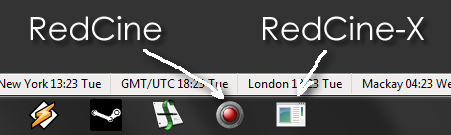
Just one small request for the Windows version - can you compile the executable with the new Redcine-X icon so we can make shortcuts to it that don't look like the generic notepad icon:

redcine-x-icon.jpg


Thanks for all the hard work!

Cheers from Tokyo,

Paul
 
On a MacPro I'm not hearing any sound on playback in Redcine-x or from an exported QuickTime file. The Quicktime file generated by Redcine-x does contain an audio track, just nothing in there.

The Redcine-x timeline indicates that there is sound in these clips. I've tried selecting each of the 4 audio channels under "Preferred Playback Channels" but no luck.

Is audio enabled and I'm just missing something or is this coming in a future build?

Thanks!
Mike
 
So Deanan, could you please see with Andreas for the Sheer codec ? He can contact me directly if he needs more info. It would be great for me to be able to use it, I have too many r3d files !

I don't have a contact with him. It's probably best if one of his customers contacts him first.

I'll try RocketCine-X today. But can anyone from Red tell me why we need both apps now that RedCine-X supports the Rocket, I thought RocketCine-X was now dead and merged into RedCine-X.

We'll continue to do bug fixes until current rocketcineX users feel comfortable transitioning over to redcinex.

Windows 7 Ultimate x64
Intel Core i7 on ASUS P6T6 motherboard, 12GB RAM
Nvidia GTX285 video card with 1GB RAM
Paul

With or without Rocket?

On a MacPro I'm not hearing any sound on playback in Redcine-x or from an exported QuickTime file. The Quicktime file generated by Redcine-x does contain an audio track, just nothing in there.

Can you please email me the log file for that export and details such
as how many audio channels on each clip?
 
Snapshot Settings

Snapshot Settings

Small request for later consideration.

Another SnapShot Setting OPTION - 'Email Version'

On a recent job I was required to urgently email 33 shots in one email, so I was wondering if it would be an idea, to include a SnapShot Setting 'Email Version' OPTION, producing Email Size Quality e.g. say 1280x640 and 640x 320 under 1 MB, as a quick Email option. (Sometimes high quality is not required, speed is more the issue)
 
Back
Top